Here is some operating skills and FAQs of
Yanhua Mini ACDP BMW FEM/BDC
Q1: What should I do first when I meet a FEM/BDC vehicle?
A: Firstly, to identify FEM/BDC via OBD. Operating as following:
Connect the ACDP to the vehicle OBD port, and connect the device. Then open the APP to click the “BMW ”
programming---“FEM/BDC”--- “OBD detect FEM/BDC”.
When it occurs:Whether the FEM/BDC supports preprocess operations: support
Whether the FEM/BDC has been processed: unprocessed
Please disassemble the FEM/BDC module from vehicle, and connect the FEM/BDC with ACDP device on the desktop platform , and operate following the “Help document”.
When it occurs:Whether the FEM/BDC supports preprocess operations: support
Whether the FEM/BDC has been processed: processed
It indicates that the FEM/BDC module has been initial programming processed before, so no need to do initial programming process. Now you can do key programming or mileage resetting.
When it occurs:Whether the FEM/BDC supports preprocess operations: unsupported
Whether the FEM/BDC has been processed: unprocessed
It indicates that ACDP does not support programming of this FEM/BDC version. It requires BMW engineer software to read version information, downgrade or upgrade to ACDP-supported versions, and then connect FEM/BDC with ACDP devices on the desktop platform for operation.
Q2: How to determine the module is FEM or BDC ?
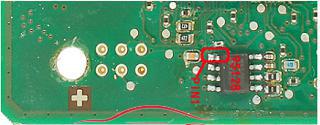
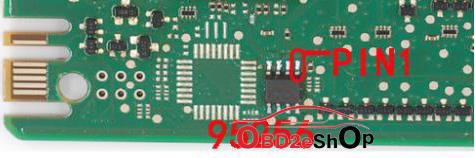
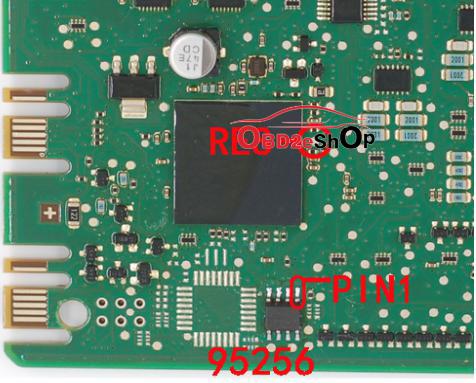
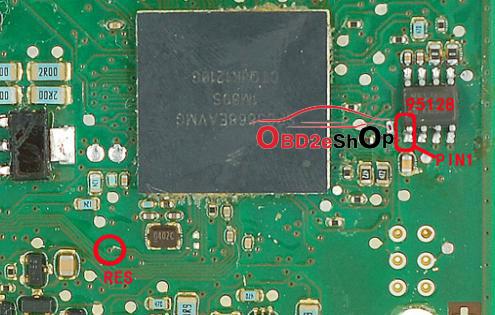
A:To judge by the memory chip model. 95128 or 95256.
95128 is FEM
95256 is BDC


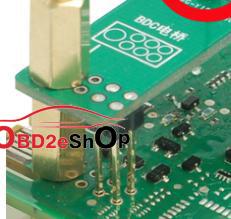
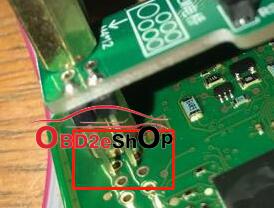
Q3: The 4 fixed pins of FEM/BDC bridge are not inserted into the PCB hole?


A3: The 4 fixed pins of FEM/BDC bridge are oriented in the direction of the bridge and have no actual electrical performance. The functions are not affected by this. Only the RES of FEM/BDC has electrical performance.


Source:
http://www.obd2eshop.com/wholesale/yanhua-mini-acdp-plus-full-package-5-adapters.html