Friday, June 17, 2022

How does Yanhua ACDP do VW & Audi mileage correction?

Can Yanhua Mini ACDP supports to do VW/Audi gearbox mileage correction? The answer is yes. Only to have A605 License, by working with ACDP Module 13 or Module 21 to easily realize. Supports VW/Audi DQ200(0AM/0CM), DQ250(02E/0D9), DL382(0CK), VL381(0AW) mileage adjustment.

How to correct VW/Audi gearbox mileage?

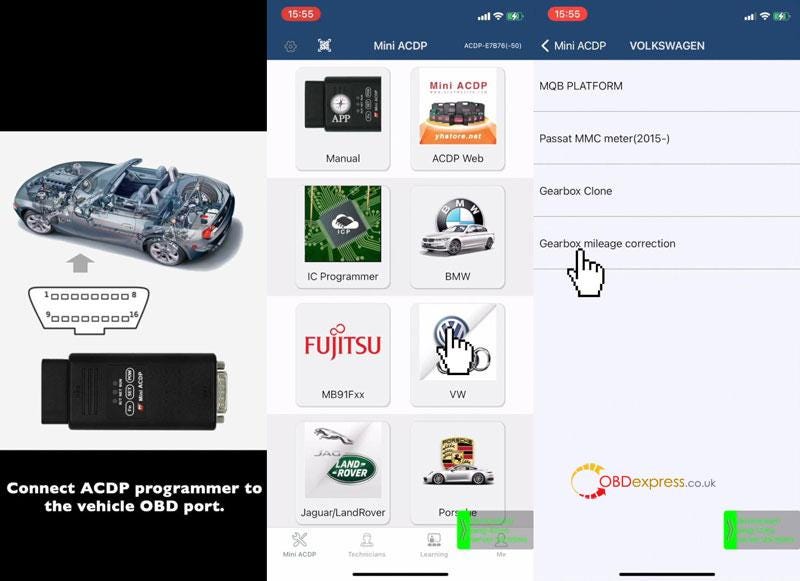
Connect ACDP programmer to vehicle OBD port.

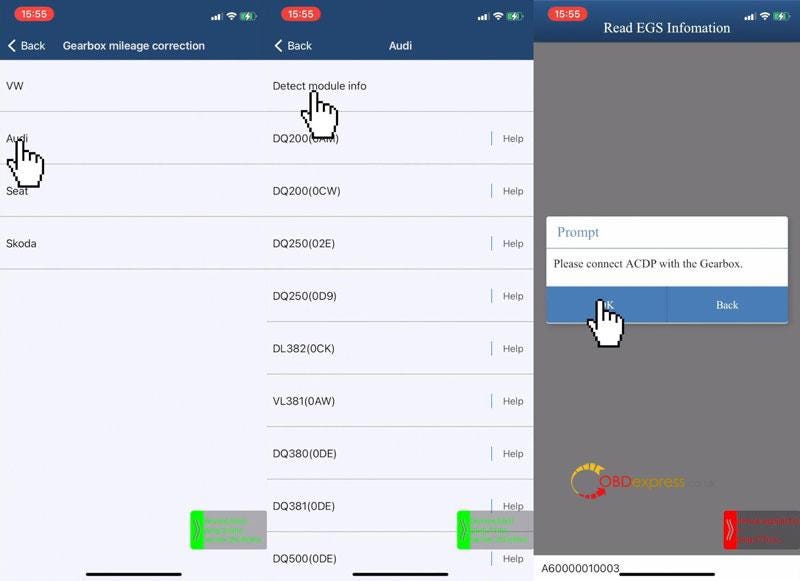
Mini ACDP>> VW >> Gearbox mileage correction >> Audi >> Detect module info

Connect ACDP with gearbox, click "OK".

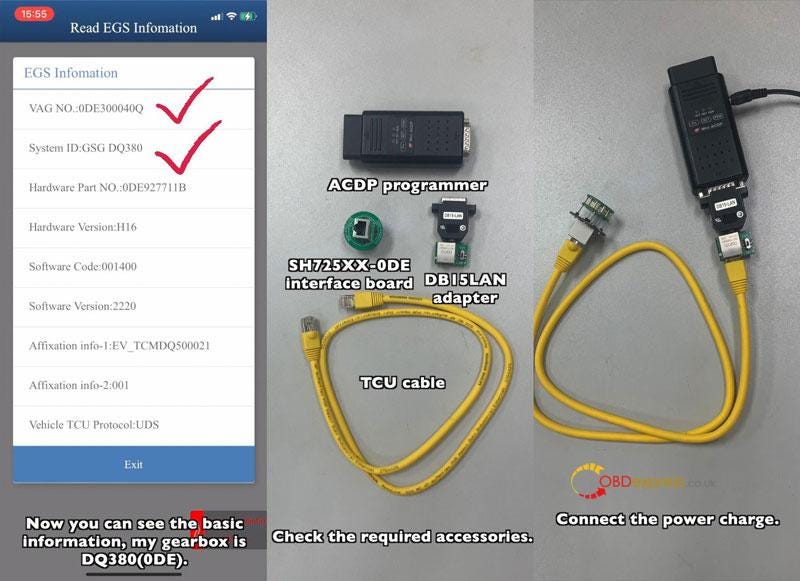
Check gearbox info, it's DQ380(0DE).

Required Tools:

ACDP Programmer

SH725XX-0DE interface board

DB15LAN adapter

TCU cable
  • Connect the interface board.
  • Pull DB15LAN adapter's button to the CAN-R side.
  • Connect the power charge & vehicle gearbox.
    1. Yanhua Mini ACDP Correct VW Audi 0DE Gearbox Mileage

      Yanhua Mini ACDP Correct VW Audi 0DE Gearbox Mileage

      Yanhua Mini ACDP Correct VW Audi 0DE Gearbox Mileage

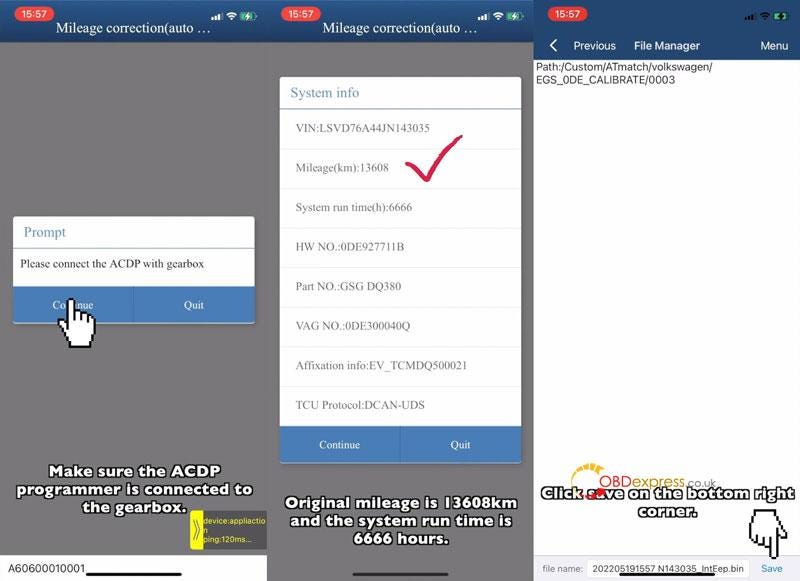
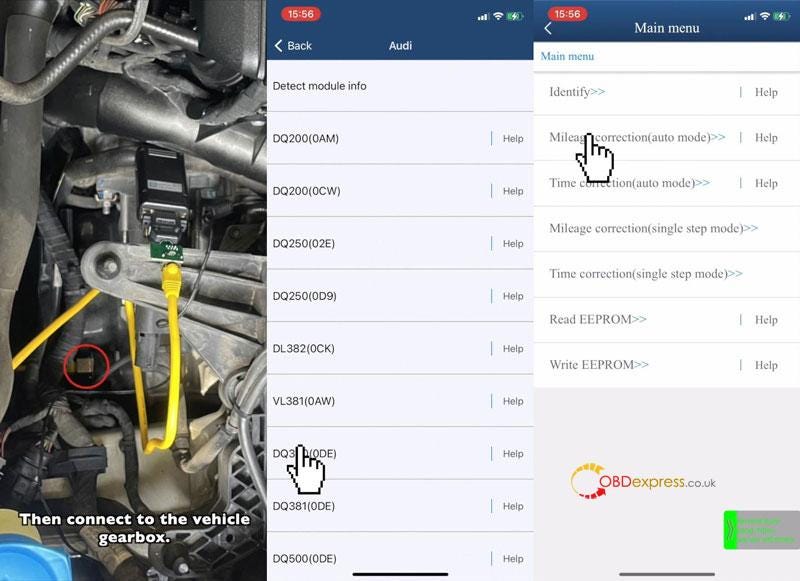
      DQ380(0DE) >> Mileage correction(auto mode) >> Continue

      Check system info, original mileage:13608km

      Click "Continue".

      Save EEPROM data.

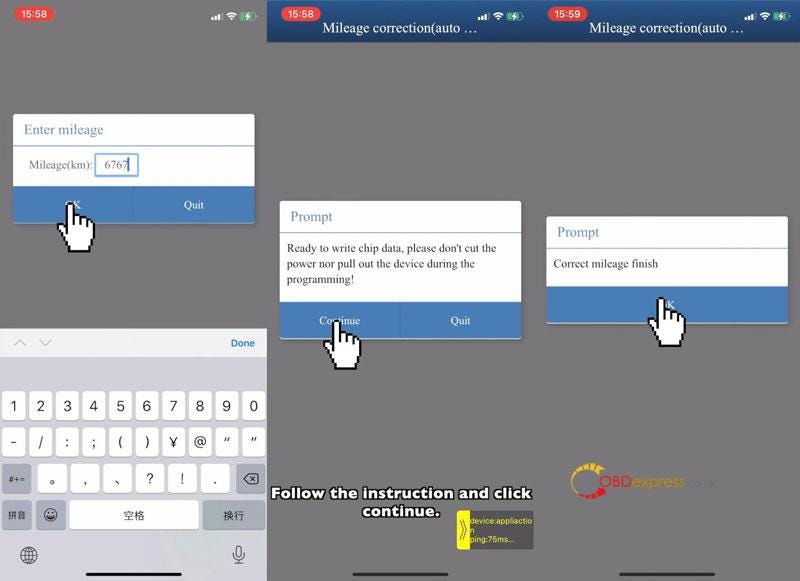
      Enter new mileage: 6767km

      Click "OK".

      Ready to write chip data, please don't cut the power nor pull out the device during the programming!

      Click "Continue".

      Correct mileage finish.
      Yanhua Mini ACDP Correct VW Audi 0DE Gearbox Mileage

      Yanhua Mini ACDP Correct VW Audi 0DE Gearbox Mileage

      Yanhua Mini ACDP Correct VW Audi 0DE Gearbox Mileage

      How to correct system run time?

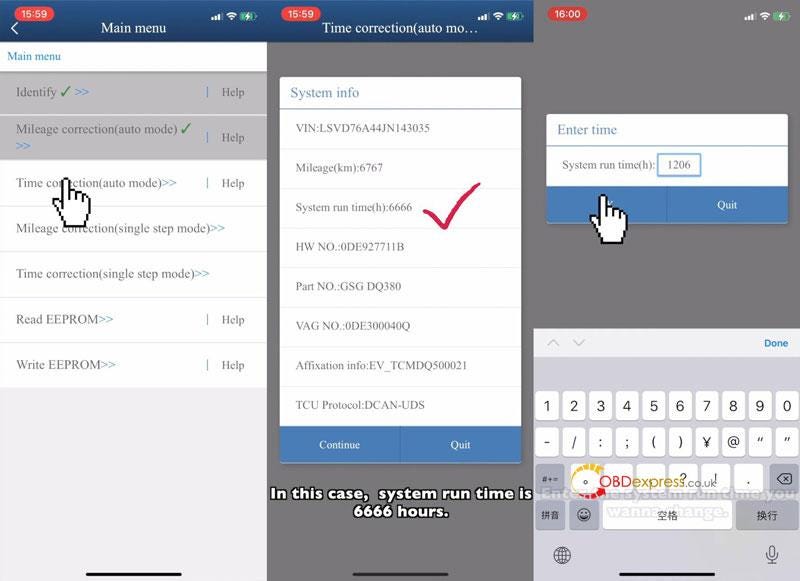
      Time correction(auto mode) >> Continue

      Check system info, system run time: 6666 hours.

      Click "Continue".

      Save EEPROM data.

      Enter new run time: 1206hours

      OK >> Continue

      Correct time finish.
      Yanhua Mini ACDP Correct VW Audi 0DE Gearbox Mileage

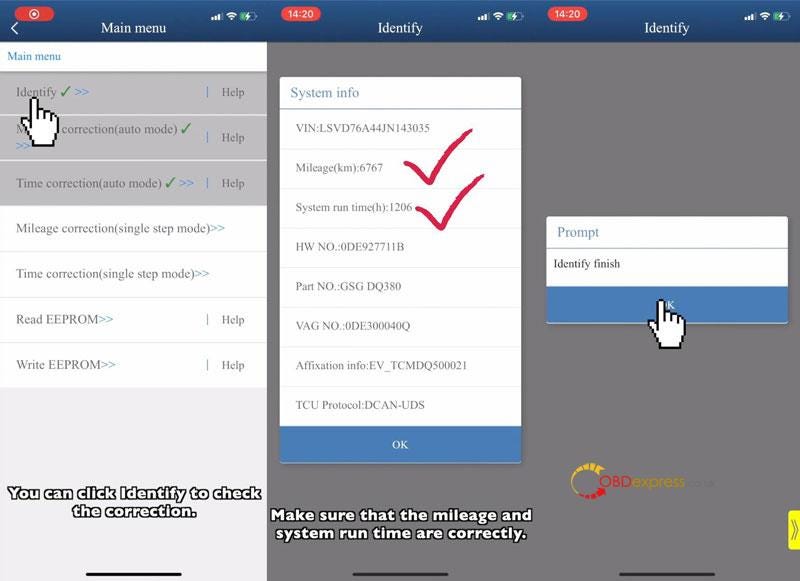
      Check the correction info.

      Identify >> Continue

      System info have been changed:

      Mileage: 6767km, system run time: 1206hours.

      Done.
      Yanhua Mini ACDP Correct VW Audi 0DE Gearbox Mileage

      This is how to do VW/Audi gearbox odometer correction with Yanhua ACDP.

      www.obdexpress.co.uk

      Monday, June 13, 2022

      Can Yanhua tools support 35128 chip?

       Hello everyone, I used Yanhua module 4 to erase the 35128 chip. Will red dots appear when erasing the chip data under normal circumstances?

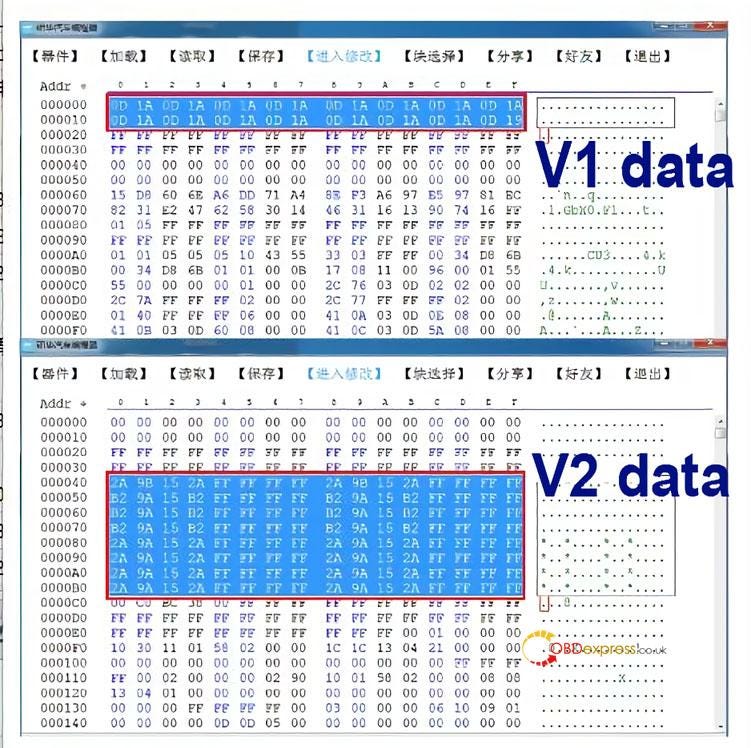
      Yanhua engineer replies: 35128 chip has two kinds of data (V1 and V2)

      Precautions for Yanhua ACDP erasing 35128 chip data

      V2 can directly wipe data without red dots.

      V1 cannot directly erase data, and the analog chip needs to be replaced. Users can use Yanhua 35XX programmer + Simulator to read and modify data with Yanhua Mini ACDP or Digimaster 3.

      Thanks for the reply from the engineer, one more question: I put can file wrong, it jumped back mileage. Then i try make again, but cannot read or write. Can the simulator only change the mileage once?

      Yanhua engineer replied:

      The simulator can modify the mileage many times, but chip soldering is not an easy task. If the chip is soldered many times, the chip is easy to break.

      It is recommended that you check whether there is a problem with the soldering of the chip. If there is no problem, you should consider whether the chip is damaged.

      Technical support: obdexpress.co.uk

      Thursday, May 12, 2022

      How to export data of Yanhua Mini ACDP from IOS?

       This is a guide to explain how to export IOS system Yanhua Mini ACDP data and bind device to PC software.

      How to export ACDP data in IOS system?

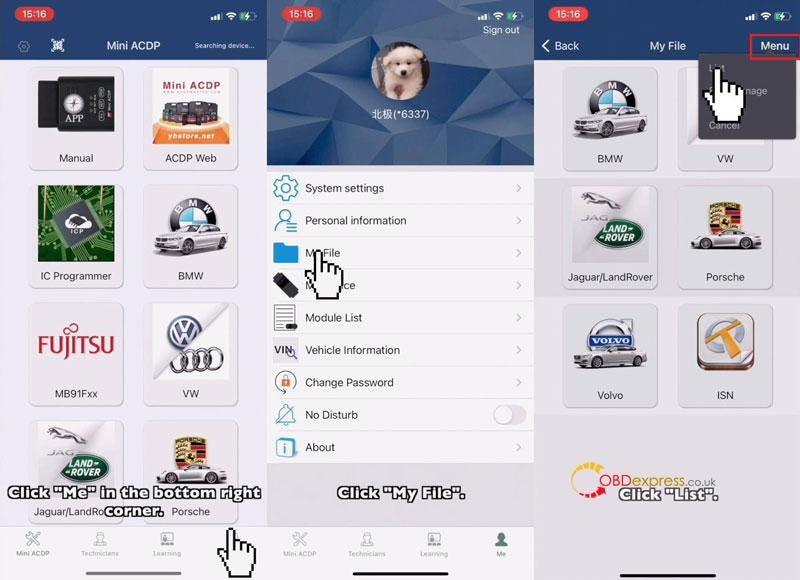
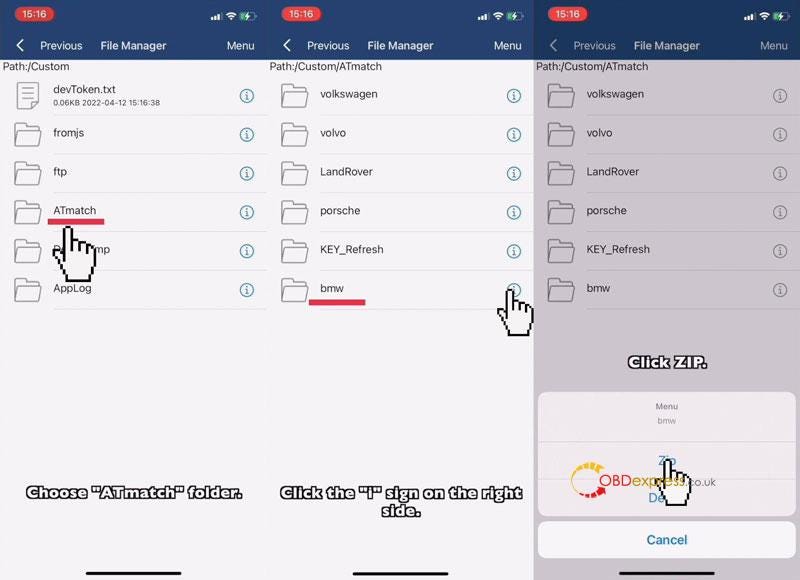
      Mini ACDP >> Me >> My file >> Menu >> List >> ATmatch

      Note: folders need to be compressed before exporting.

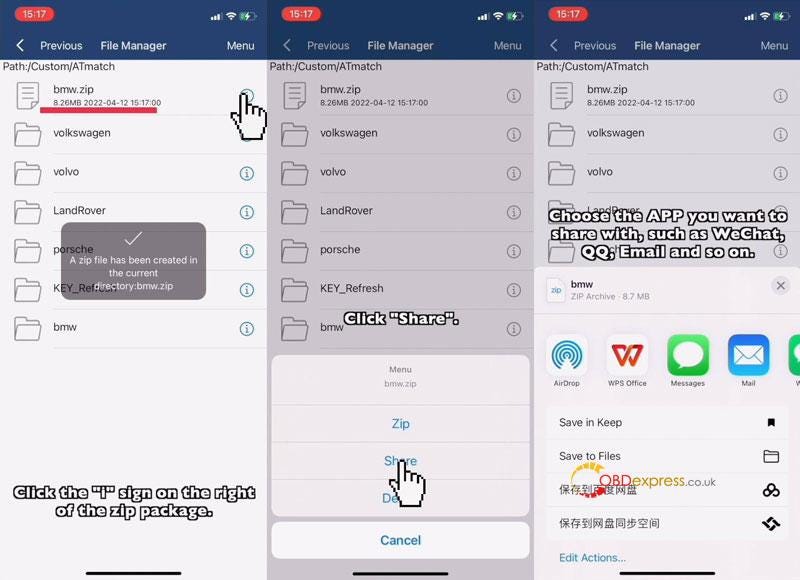
      Select a data file, click "i">> Zip >> Click zip file "i">> Share

      Select the APP you want to share with, such as WhatsApp, Email and so on.

      Now you can export data to anywhere as wanted.

      Yanhua Mini ACDP IOS System Data Export & PC Bind

      Yanhua Mini ACDP IOS System Data Export & PC Bind

      Yanhua Mini ACDP IOS System Data Export & PC Bind

      How to bind Mini ACDP to PC software?

      iPhone Setting:

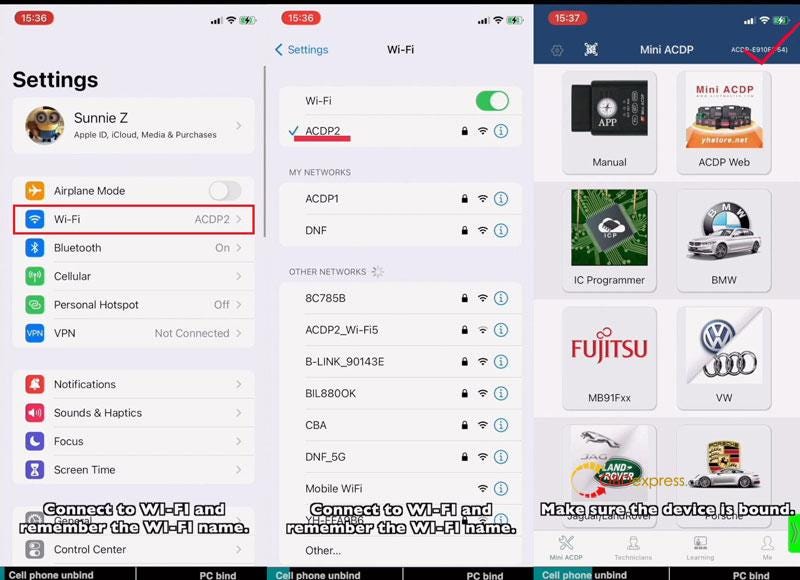
      Settings >> Wi-Fi

      *Connect to Wi-Fi and remember its name.

      APP Setting

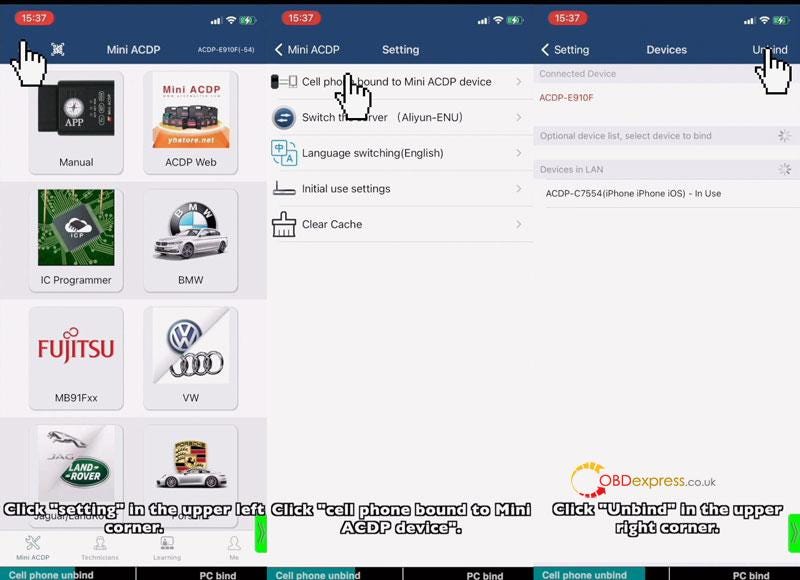
      Step1. Cell Phone Unbind

      Mini ACDP >>Make sure the device is bound(check top right corner)

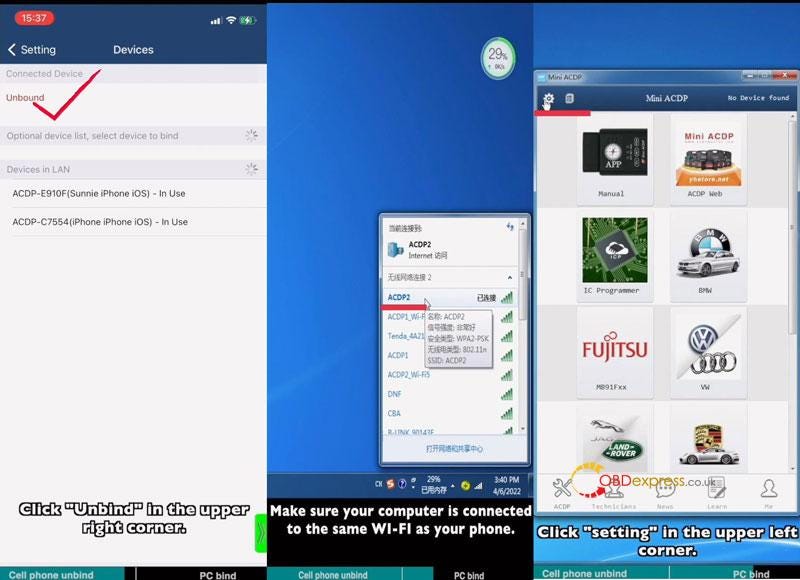
      Setting >> Cell phone bound to Mini ACDP device >> Unbind

      Step2. PC Bind

      Note: make sure your computer is connected to the same Wi-Fi as your phone.

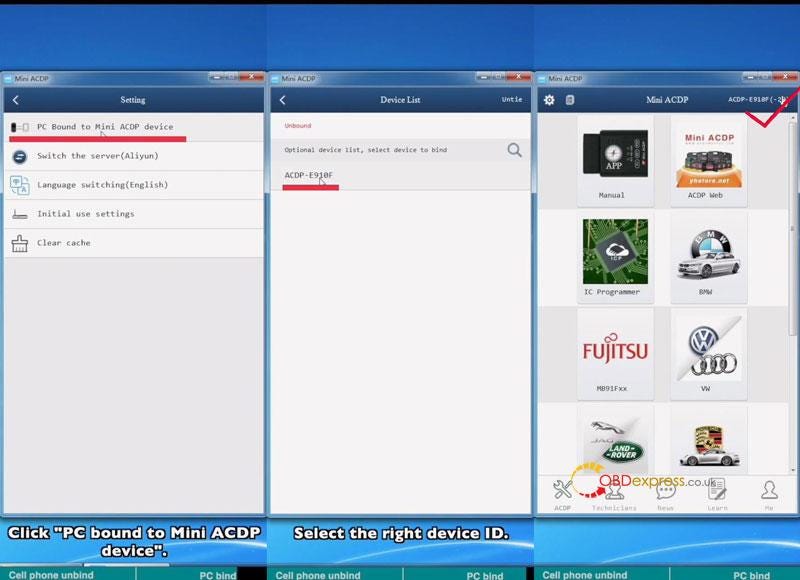
      Start ACDP PC software >> Setting >> PC bound to Mini ACDP device >> Select ACDP ID

      Go back to home page, once device ID was displaying on the top right corner, which means binding success.

      Yanhua Mini ACDP IOS System Data Export & PC Bind

      Yanhua Mini ACDP IOS System Data Export & PC Bind

      Yanhua Mini ACDP IOS System Data Export & PC Bind

      Yanhua Mini ACDP IOS System Data Export & PC Bind

      Read also

      How to connect Yanhua Mini ACDP to IOS iPhone Hotspot?

      Thursday, April 21, 2022

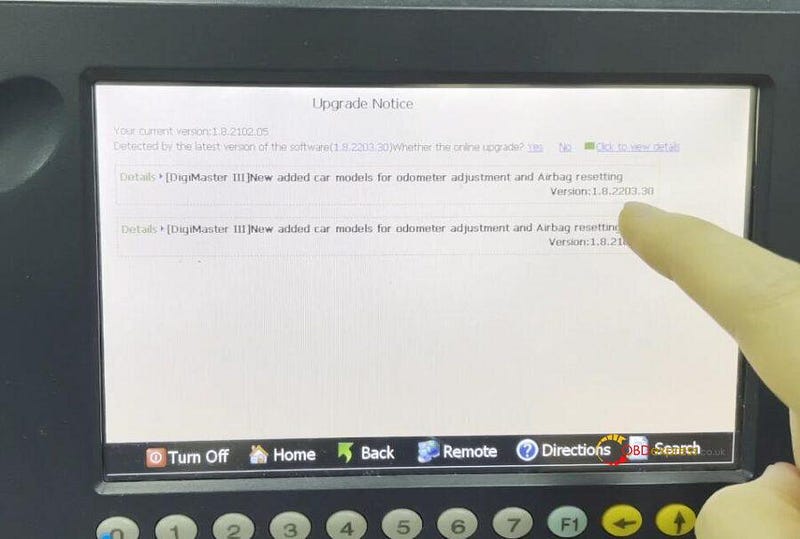
      New DigiMaster 3 software upgrade to support more car types (April 2022)

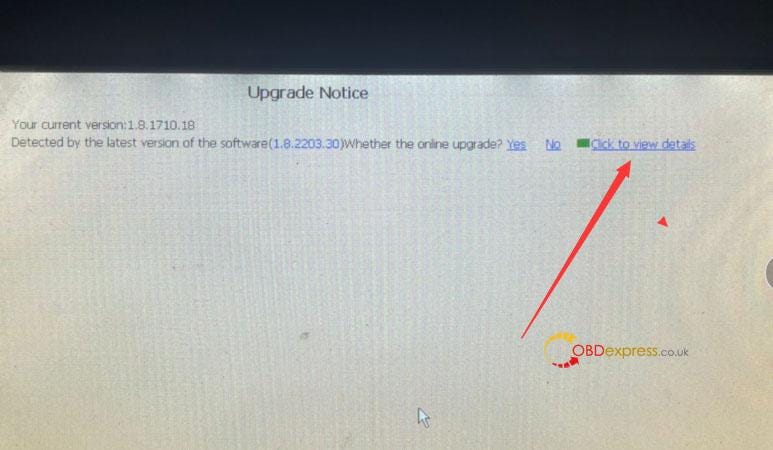
       In April 2022, Yanhua officially released the new DigiMaster 3 patch V1.8.2203.30. It has been a long time since the last update, this update patch is mainly to upgrade the airbag function and the instrument function.

      DigiMaster3 update V1.8.2203.30 in April 2022

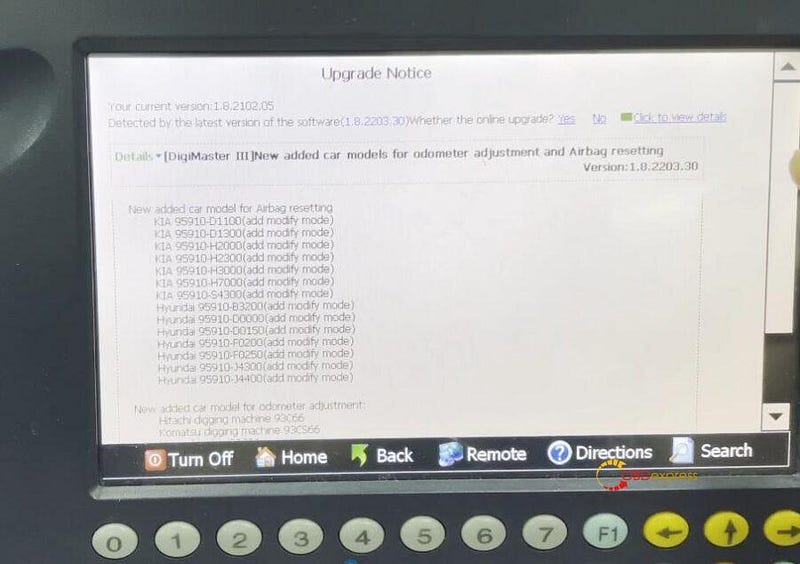
      Upgrade airbag function:
      Kia 95910-D1100 (add modification mode)
      Kia 95910-D1300 (add modification mode)
      Kia 95910-H2000 (add modified model)
      Kia 95910-H2300 (add modified model)
      Kia 95910-H3000 (add modified model)
      Kia 95910-H7000 (add modified model)
      Kia 95910-S4300 (add modification mode)
      Hyundai 95910-B3200 (add modification mode)
      Hyundai 95910-D0000 (add modification mode)
      Hyundai 95910-D0150 (add modification mode)
      Hyundai 95910-F0200 (add modification mode)
      Hyundai 95910-F0250 (add modification mode)
      Hyundai 95910-J4300 (add modification mode)
      Hyundai 95910-J4400 (add modification mode)

      DigiMaster3 update V1.8.2203.30 in April 2022

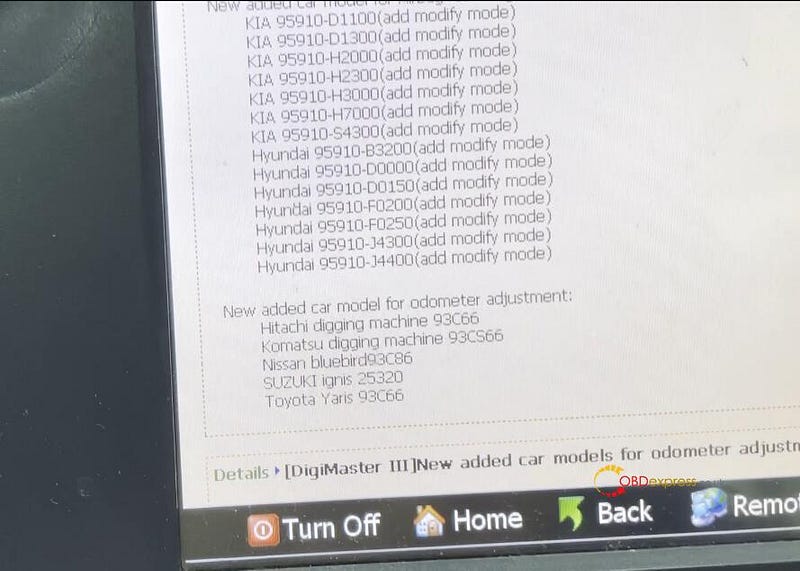
      New added car model for odometer adjustment:
      Hitachi digging machine 93C66
      Komatsu digging machine 93CS66
      Nissan bluebird 93C86
      SUZUKI ignis 25320
      Toyota Yaris 93C66

      DigiMaster3 update V1.8.2203.30 in April 2022

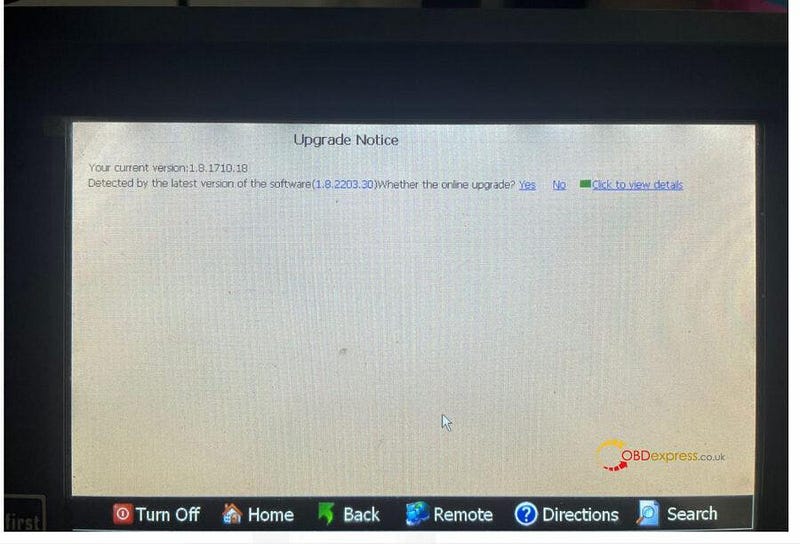
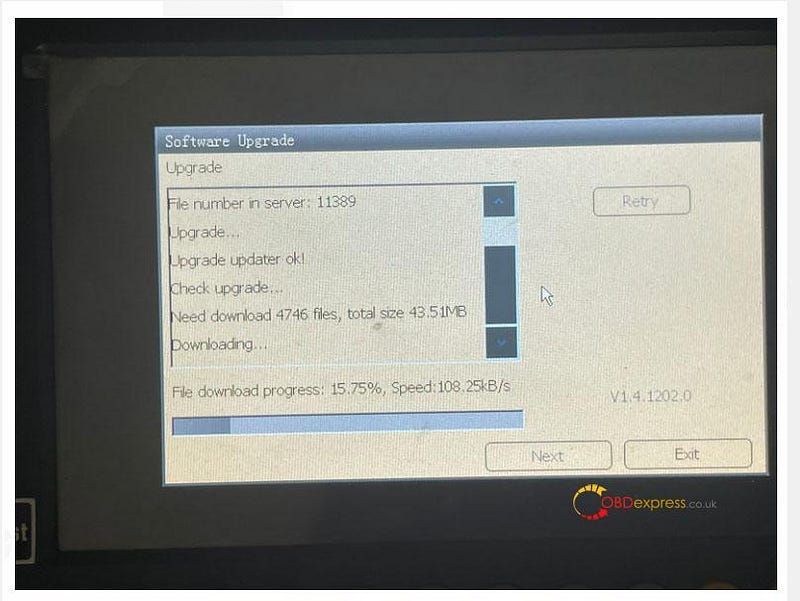
      The upgrade method is also very simple, you can update it online after connecting to the Internet.

      DigiMaster3 update V1.8.2203.30 in April 2022

      DigiMaster3 update V1.8.2203.30 in April 2022

      DigiMaster3 update V1.8.2203.30 in April 2022


      Monday, April 18, 2022

      Is Yanhua digimaster 3 suitable for Toyota Vios mileage correction?

       Customer’s question:

      I need to correct odometer on my toyota vios. Which tool is recommended to use?

      Obdexpress.co.uk engineer replied:

      Yanhua digimaster 3 is a very good mileage programmer for Japanese cars, especially Toyota, some supports till year 2020/2021. All EEPROM job.

      It comes with high performance hardware platform which takes high-speed CPLD and the ARM11 processor as the core technology. Works with various types of adapter, supporting odometer correction, Audio decoding, airbag resetting, engine ECU resetting, IMMO, key programming for Benz & BMW etc. Moreover, it can be updated online lifetime for free.

      Yanhua digimaster 3 for Toyota Vios mileage correction

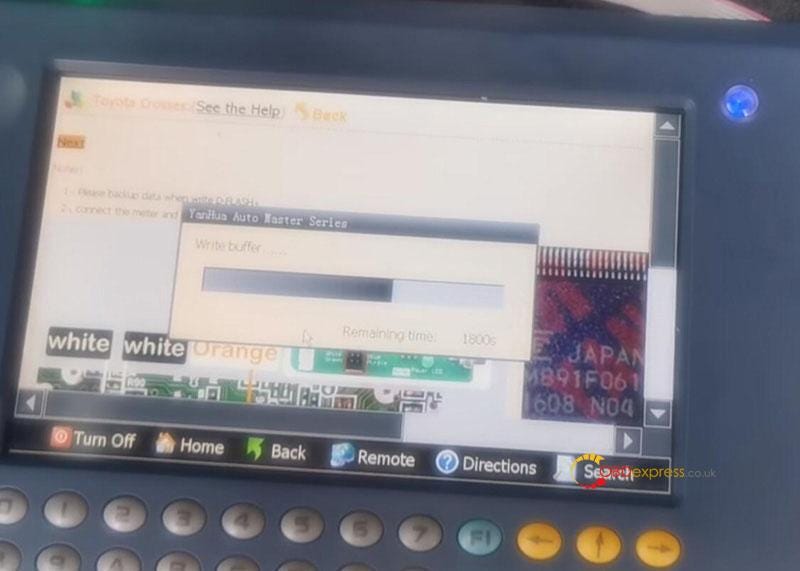
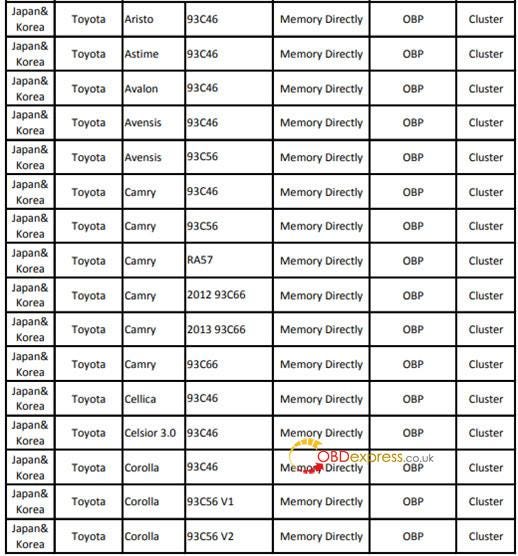
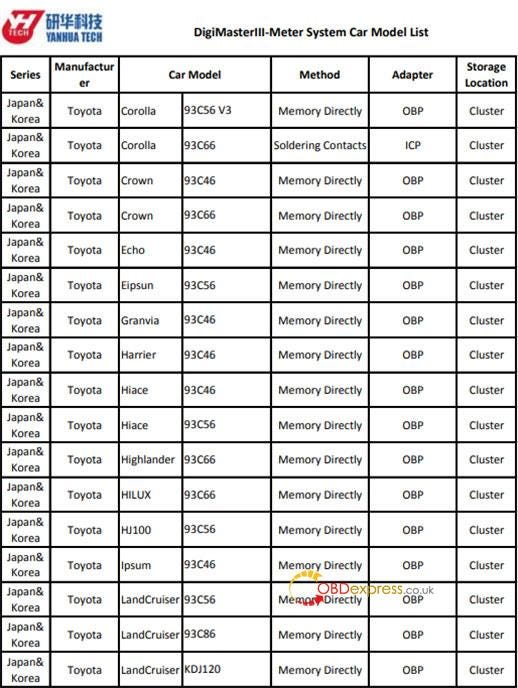
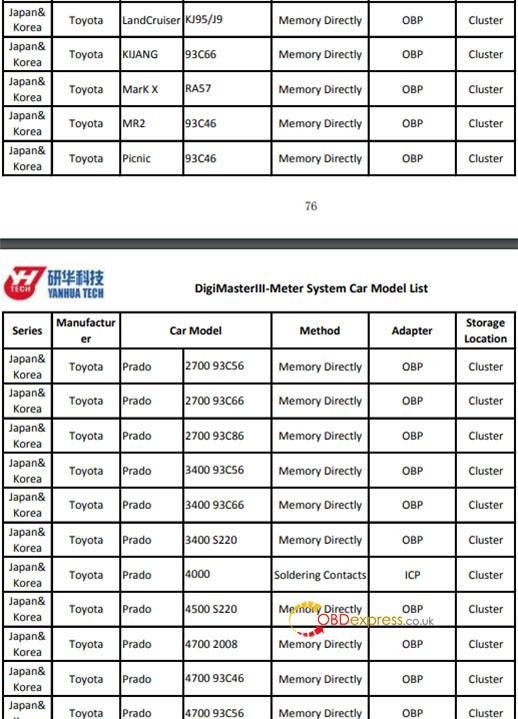
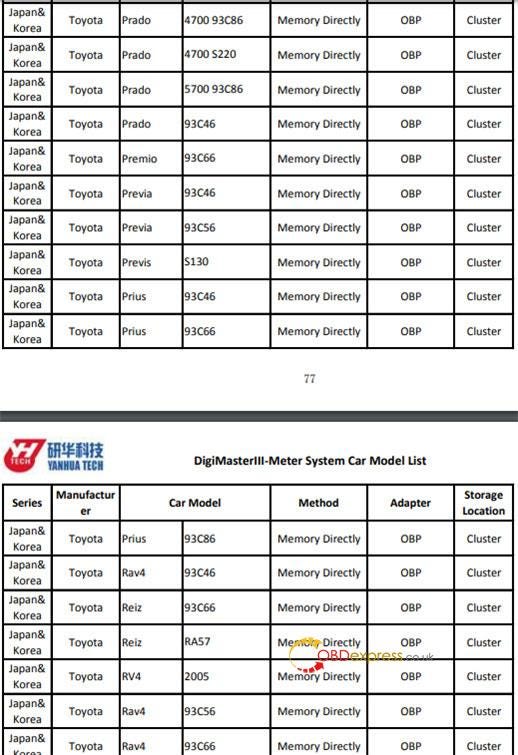
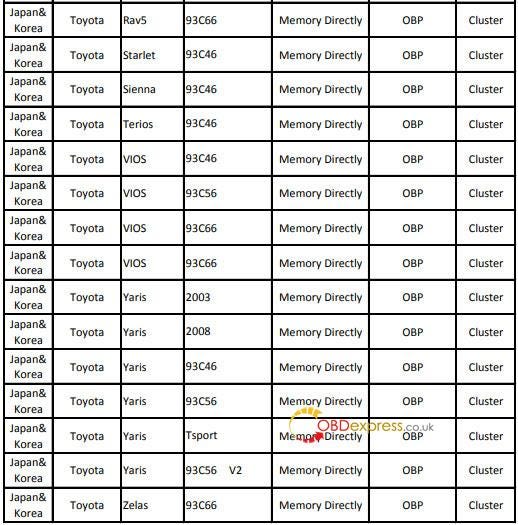
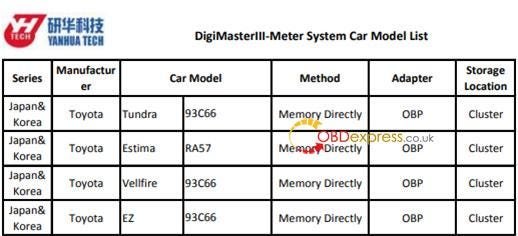
      Digimaster 3 Toyota VIOS (Japan& Korea) odometer correction car models including 93C46, 93C56, 93C66 by memory directly with OBP adapter in cluster storage location.

      Guides to correct mileage on Toyota VIOS:

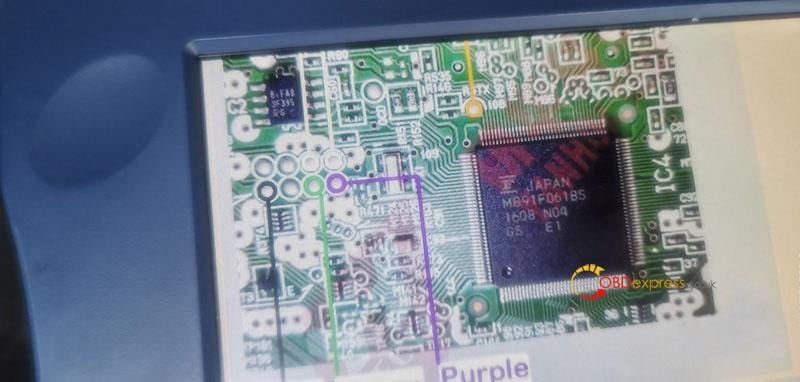
      e.g.Toyota Vios MB91F061BS instrument dashboard eeprom 93c46

      By ICP adapter

      1.Connect the meter and digimaster III

      The wiring diagram can be found in digimaster 3.

      Select Toyota>> Vios

      Then you can see the related wiring diagram

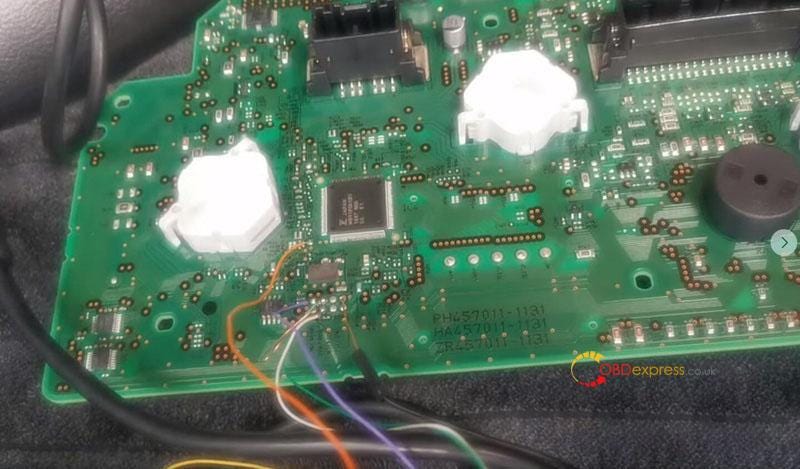
      Connect the meter and the CPU socket of digimaster iii ICP adapter correctly

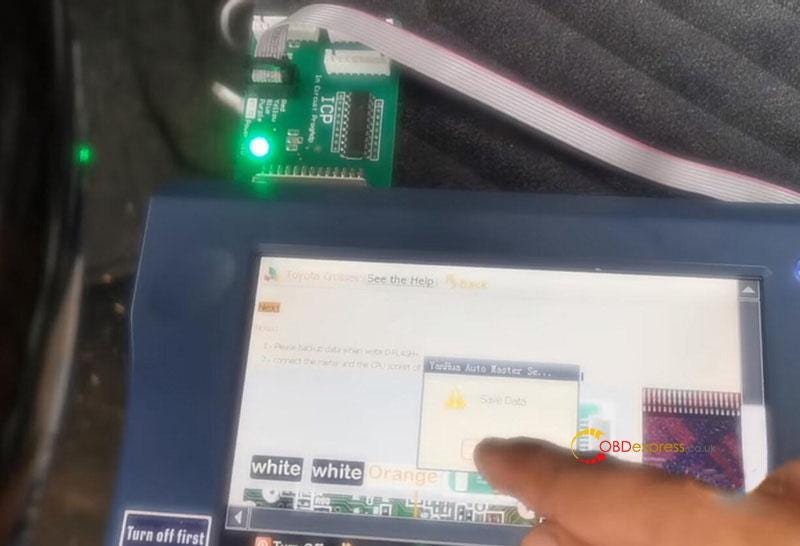
      2.Backup data

      Backup data when writing DFLASH

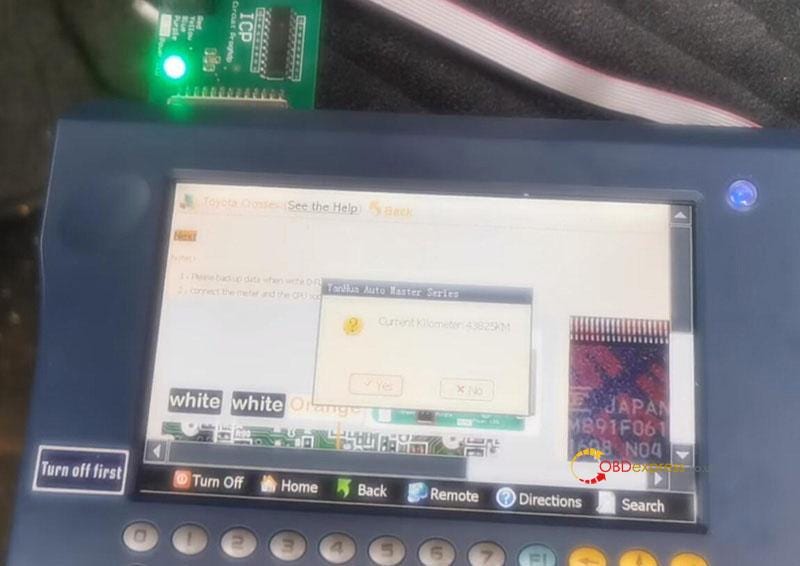
      3.Read current kilometer

      Read the current kilometer by D3 and confirm it is correct

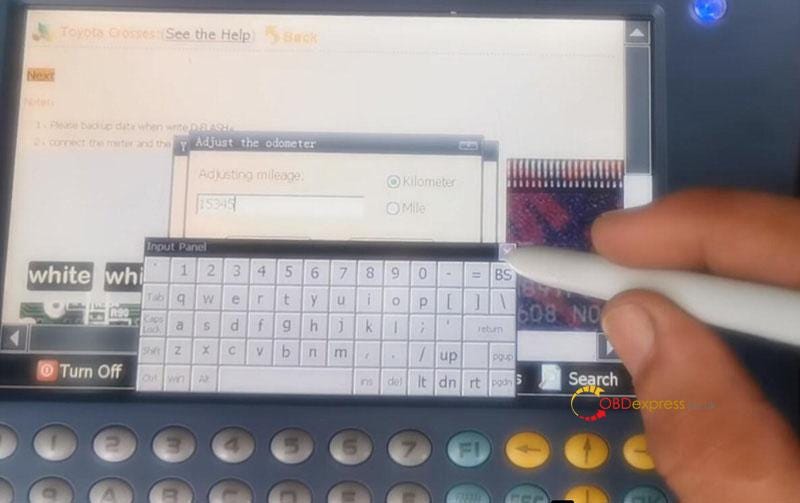
      4.Change mileage

      Manually enter the mileage you desired

      Writing data until completed.

      Check the new mileage after correction.

      Yanhua digimaster 3 for Toyota Vios mileage correction

      Yanhua digimaster 3 for Toyota Vios mileage correction
      Yanhua digimaster 3 for Toyota Vios mileage correction
      Yanhua digimaster 3 for Toyota Vios mileage correction
      Yanhua digimaster 3 for Toyota Vios mileage correction
      Yanhua digimaster 3 for Toyota Vios mileage correction

      Besides TOYOTA VIOS, Yanhua digimaster III also supports TOYOTA Aristo, Astime, Avalon, Avensis, Camry, Cellica, Celsior 3.0, corolla, Corolla, Crown, Echo, Elipsun, Granvia, Harrier, Hiace, Highlander, Hilux, Hj100, Ipsum, Landcruiser, Kijang, Mark X, Mr2, Picnic, Prado, Premio, Previa, Previs, Prius, Rav4, Reiz, Rav5, Starlet, Sienna, Terios, Yaris, Zelas, Tundra, Estima, Vellfire, EZ.

      Yanhua digimaster 3 for Toyota Vios mileage correction

      Yanhua digimaster 3 for Toyota Vios mileage correction
      Yanhua digimaster 3 for Toyota Vios mileage correction
      Yanhua digimaster 3 for Toyota Vios mileage correction
      Yanhua digimaster 3 for Toyota Vios mileage correction
      Yanhua digimaster 3 for Toyota Vios mileage correction

      Search the specific model, click Yanhua Digimaster 3 odometer correction car list.

      Wednesday, April 13, 2022

      Yanhua Mini ACDP Connect to iPhone Using Hotspot

       This is a guide to setup Yanhua Mini ACDP hotspot connection on IOS iPhone. Introduced 2 methods: scanning & non-scanning modes. Need to pay attention to confirm if there's a "scan" mark on device backside.

      Read also:

      How to connect Yanhua Mini ACDP to Android Phone Hotspot?

      How Yanhua Mini ACDP connect to WIFI on IOS Android phone?

      ACDP connect via IOS Hotspot Scanning

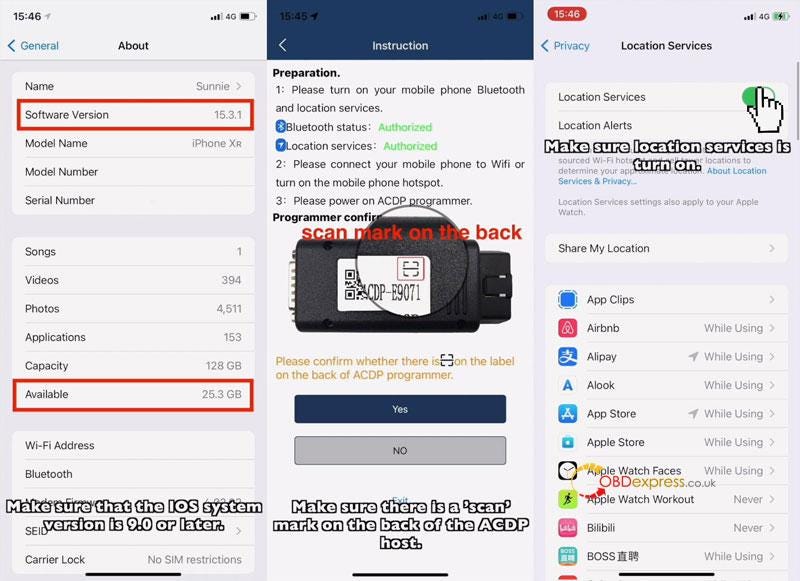
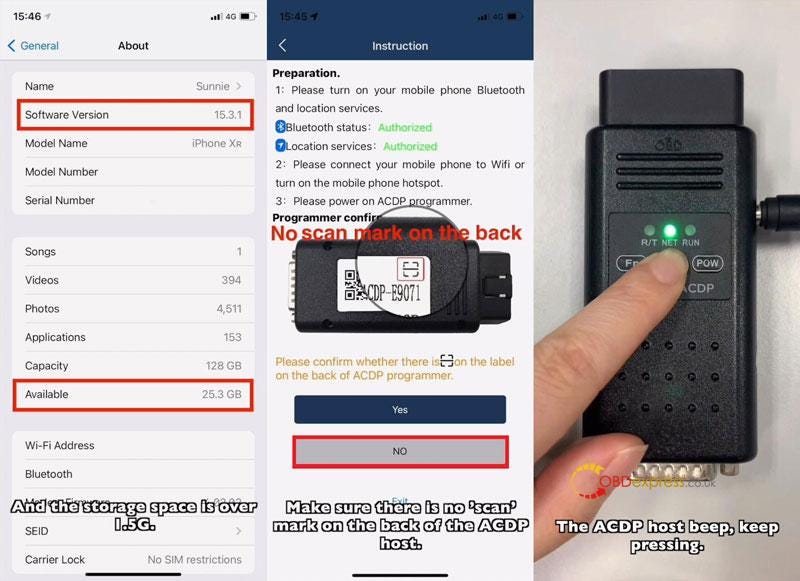
      Note: This is for users who have a "scan" mark on the back of ACDP device.

      Make sure IOS system version is 9.0 or later, storage space is over 1.5G.

      Phone Settings

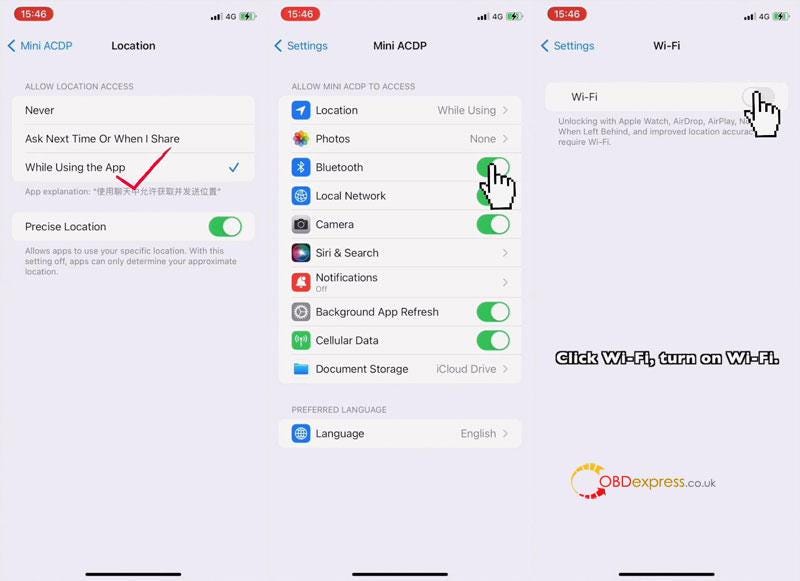
    2. Settings >> Privacy >> Location Services >> Turn on location services button
    3. Settings >>Mini ACDP>> Location >> Make sure location is on "While Using".
    4. Settings >> Mini ACDP >> Turn on Bluetooth button
    5. Settings >> Wi-Fi >> Turn on Wi-Fi button
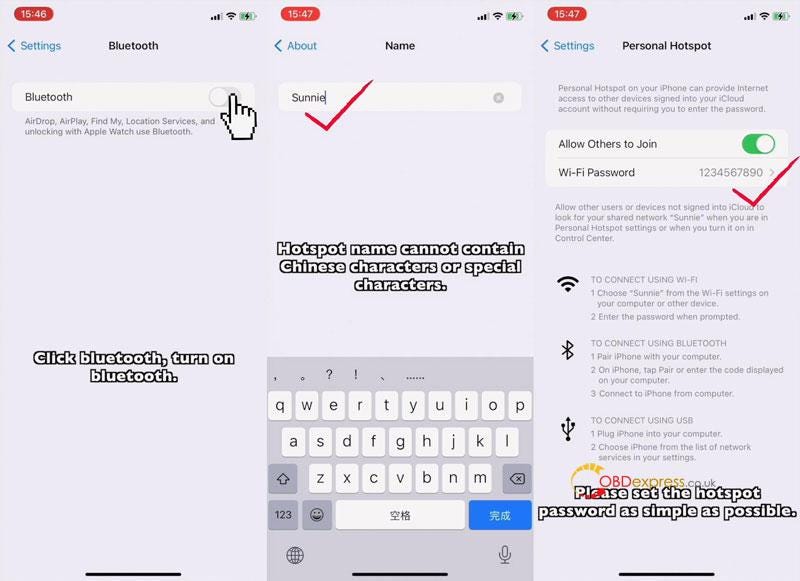
    6. Settings >> Bluetooth >> Turn on Bluetooth button
    7. Settings >> General >> About >> Name >> Hotspot name cannot contain Chinese characters or special characters.
    8. Settings >> Personal Hotspot >> Turn on Allow others to join button, set hotspot password as simple as possible.
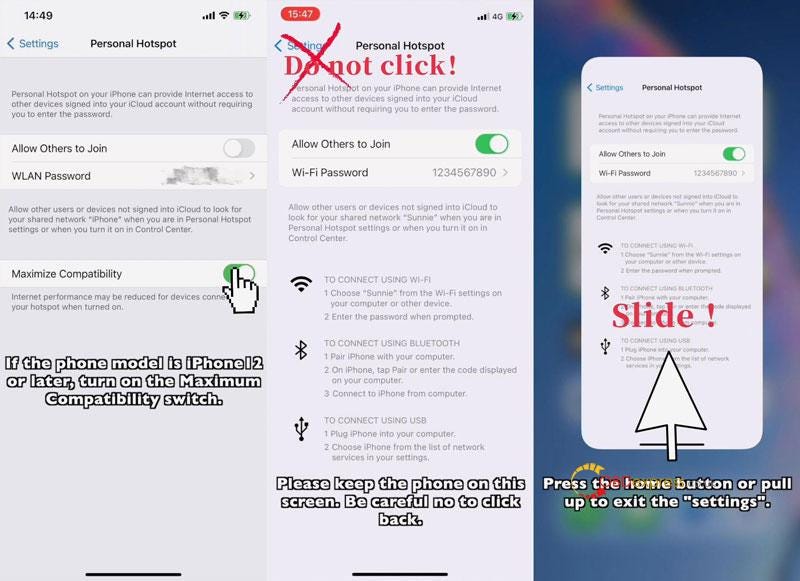
      1. * for iPhone 12 or later, turn on Maximize Compatibility button.

        Keep iPhone on Personal Hotspot screen. Be careful no to click back.

        Press Home button or pull up to exit.

        Yanhua Mini ACDP Connect to iPhone Using Hotspot

        Yanhua Mini ACDP Connect to iPhone Using Hotspot

        Yanhua Mini ACDP Connect to iPhone Using Hotspot

        Yanhua Mini ACDP Connect to iPhone Using Hotspot

        Mini ACDP APP Settings

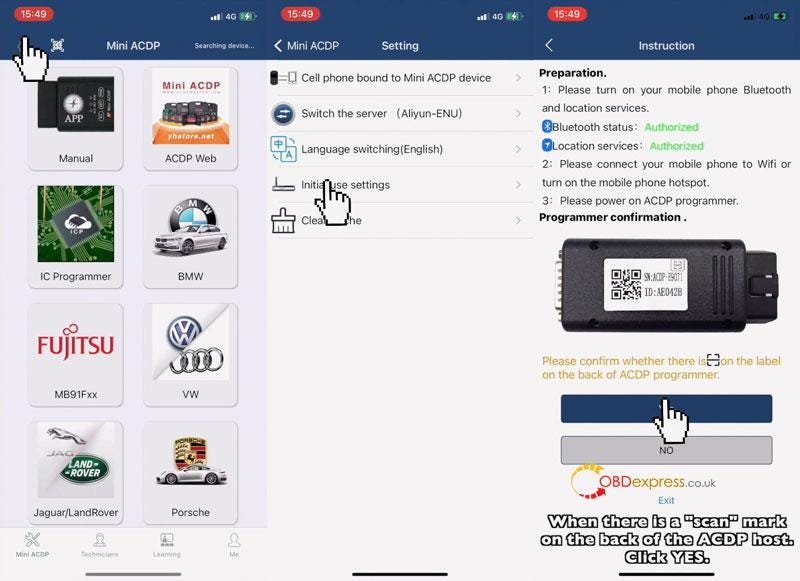
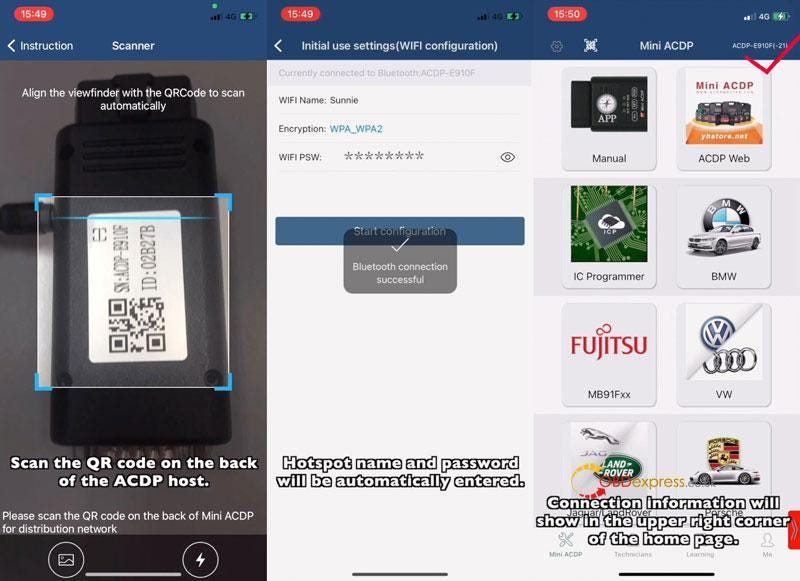
        Mini ACDP >> Settings >> Initial use settings

        Make sure Bluetooth & Location are both authorized.

        Yes >> Scan the QR code on ACDP backside >> Hotspot name & password will be automatically entered >> Start configuration

        Once connection is successful, ACDP will jump to main screen automatically.

        You can see the info at upper right corner.

        Yanhua Mini ACDP Connect to iPhone Using Hotspot

        Yanhua Mini ACDP Connect to iPhone Using Hotspot

        ACDP connect via IOS Hotspot Non-scanning

        Note: This is for users who don't have a "scan" mark on the back of ACDP device.

        Make sure IOS system version is 9.0 or later, storage space is over 1.5G.

        Make sure iPhone settings are ALL SAME as above IOS Hotspot Scanning method.

        Mini ACDP APP Settings

        Mini ACDP >> Settings >> Initial use settings

        Make sure Bluetooth & Location are both authorized.

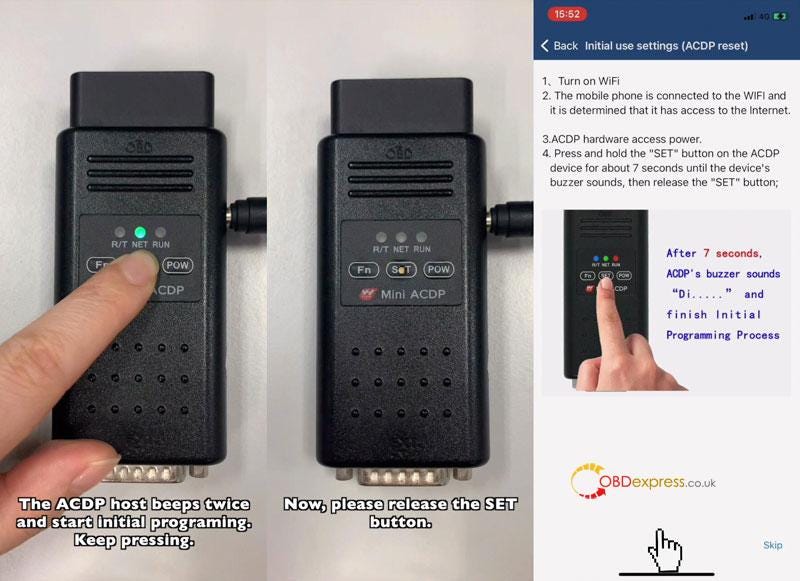
        No >> Follow the instructions to operate:

      2. Keep pressing SET button, ACDP will beep once, then beeps twice to start initial programming.
      3. Holding the button until hearing a long beep to finish initial programming.
      4. Release SET button.
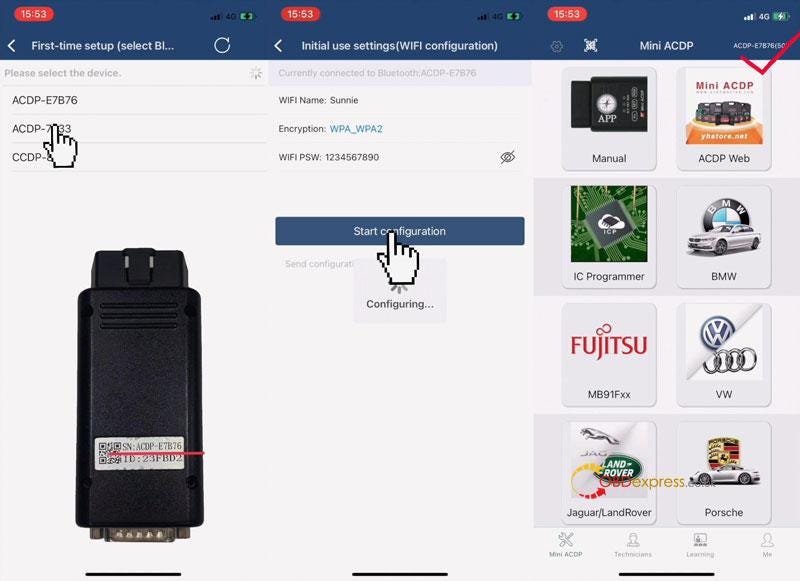
        1. Next >> Select ACDP SN >> Confirm Hotspot name & password are all correct >> Start configuration

          Once done, ACDP will jump to main screen automatically.

          You can see the info at upper right corner.

          Yanhua Mini ACDP Connect to iPhone Using Hotspot

          Yanhua Mini ACDP Connect to iPhone Using Hotspot

          Yanhua Mini ACDP Connect to iPhone Using Hotspot


          Monday, September 13, 2021

          2021 BMW Key Programming with Xhorse VVDI Key Tool Plus / Yanhua Mini ACDP

          How to know if the Xhorse VVDI Key Tool Plus or Yanhua Mini ACDP Master key programmer can support to program latest BMW 2020-2021?

          The answer is to check your BMW chassis. Both VVDI Key Tool Plus & Mini ACDP support to program keys for BMW with F chassis or E chassis. That’s to say apart from the G chassis, all other chassis are workable.

          (eg. Mini ACDP can program BMW Mini 2020.)

          You may have a check if your BMW model is in the form below.

          BMW Chassis, Year, IMMO System Reference Form

          BMW Series Chassis Year IMMO System
          BMW 1 SeriesE81(3 doors hatchback)2007-2011CAS3/CAS3+
          E82(Coupe)2007-2014CAS3/CAS3+
          E87(5 doors hatchback)2004-2011CAS2/CAS3/CAS3+
          E88(Convertble)2008-2015CAS3+
          F20(5 doors hatchback)2011-2018FEM
          F21(3 doors hatchback)2012-2018FEM
          F52(Sedan 4 doors)2016-BDC
          F40(5 doors hatchback)2018-FEM or BDC
          BMW 2 SeriesF22(Coupe)2014-FEM
          F23(Convertble)2014-FEM
          F44(Gran Coupe)2020-BDC
          F45(Active Tourer)2014-BDC
          F46(Gran Tourer)2015-BDC
          BMW 3 SeriesE211975-1982×
          E301982-1990×
          E361992-1999EWS1/EWS2
          E461998-2006EWS3
          E902005-2006CAS2
          E90(Sedan)2007-2012CAS3/CAS3+
          E91(travel edition)2007-2013CAS3/CAS3+
          E92(Coupe)2006-2010CAS3/CAS3+
          E93(Convertble)2007-2014CAS3/CAS3+
          F30(Sedan)2012-2018FEM
          F31(travel edition)2012-2018FEM
          F34(Gran Turismo)2013-2020FEM
          F352015-BDC
          G20(Sedan)2018-BDC
          G21(travel edition)2018- 
          BMW 4 SeriesF32( Coupe)2013-2020FEM
          F33(Convertble)2013-2020FEM
          F36(Gran Coupe)2014-FEM
          BMW 5 SeriesE281981-1987×
          E341988-1995EWS
          E391995-2003EWS1/EWS2/EWS3
          E60(Sedan)2002-2010CAS3/CAS3+
          E61(travel edition)2002-2010CAS3/CAS3+
          F07(Gran Turismo)2009-2016CAS4/CAS4+
          F10(standard axle wheelbase)2010-2016CAS4/CAS4+
          F11(travel edition)2011-2016CAS4/CAS4+
          F18(long axle wheelbase)2010-2016CAS4/CAS4+
          G30(standard axle wheelbase)2016-BDC
          G31(travel edition)2017-BDC
          G38(long axle wheelbase)2017-BDC
          BMW 6 SeriesE241976-1982×
          E63(Coupe)2002-2007CAS3/CAS3+
          E64(Convertble)2002-2007CAS3/CAS3+
          F06(Gran Coupe)2011-CAS4/CAS4+
          F12(Convertble)2012-2019CAS4/CAS4+
          F13(Coupe)2011-2018CAS4/CAS4+
          G32(Gran Turismo)2017-BDC
          BMW 7 SeriesE231977-1979×
          E321986-1994×
          E381994-2001EWS1/EWS2/EWS3
          E65(standard axle wheelbase)2001-2008CAS1
          E66(long axle wheelbase)2001-2008CAS2
          F01(standard axle wheelbase)2008-2015CAS4/CAS4+
          F02(long axle wheelbase)2008-2015CAS4/CAS4+
          F03(Protection)2009-2015CAS4/CAS4+
          F04(Hybrid)2010-2015CAS4/CAS4+
          G11(standard axle wheelbase)2016-BDC
          G12(long axle wheelbase)2016-BDC
          BMW 8 SeriesE311989-1999EWS
          G14(Convertble)2018-BDC
          G15(Coupe)2018-BDC
          G16(Gran Coupe)2018-BDC
          BMW X1E842009-2016CAS3/CAS3+
          F202012-FEM
          F482015-BDC
          F49(long axle wheelbase)2016-BDC
          BMW X2F392018-BDC
          BMW X3E832003-2010EWS4
          F252011-2018CAS4/CAS4+
          G012017-BDC
          G08(China)2018-BDC
          BMW X4F262014-2018CAS4/CAS4+
          G022018-BDC
          BMW X5E531999-2006EWS2/EWS3/EWS4
          E702006-2013CAS3/CAS3+
          F152013-2018BDC
          G052018-BDC
          BMW X6E712008-2015CAS3/CAS3+
          E72(Hybrid)2010-2015CAS3/CAS3+
          F162014-2019BDC
          G062019-BDC
          BMW X7G072019-BDC
          BMW M Power M2F872015-BDC
          BMW M Power M3E90(Sedan)2005-2012CAS3/CAS3+
          E92(Coupe)2006-2010CAS3/CAS3+
          E93(Convertble)2007-2010CAS3/CAS3+
          F80(Sedan)2014-2018FEM
          BMW M Power M4F82(Coupe)2014-FEM
          F83(Convertble)2014-FEM
          BMW M Power M5E602003-2009CAS2/CAS3/CAS3+
          F102010-2016CAS4/CAS4+
          F902018-BDC
          BMW M Power M6E63(Coupe)2005-2010CAS3/CAS3+
          E64(Convertble)2006-2010CAS3/CAS3+
          F06(Gran Coupe)2012-CAS4/CAS4+
          F12M(Convertble)2012-CAS4/CAS4+
          F13M(Coupe)2012-CAS4/CAS4+
          BMW M Power M8F91(Convertble)2020-BDC
          F92(Coupe)2020-BDC
          BMW M Power X3 MF972020-BDC
          BMW M Power X4 MF982020-BDC
          BMW M Power X5 ME702006-2013CAS3/CAS3+
          F852014-BDC
          F952020-BDC
          BMW M Power X6 ME712008-2015CAS3/CAS3+
          F862014-BDC
          BMW M Power X7 MF942019-BDC
          BMW i Electric Series i3i012013-BDC
          BMW i Electric Series i8i122014-2016BDC
          i15(Roadster)2016-BDC
          BMW Z Series Z3E361992-1999EWS2(99 edition)
          E37(convertible)1992-1999EWS2(99 edition)
          BMW Z Series Z4E85(Roadster)2002-2009EWS2
          E86(Coupe)2006-2009CAS2
          E89(Roadster)2009-2016CAS3/CAS3+
          G29(Soft top convertible)2019-BDC
          BMW Z Series Z8E52(Roadster)1999-2003EWS2/EWS3
          BMW MINIR50(Cooper)2000-2006EWS
          R52(Convertble)2002-2008EWS/CAS
          R53(CooperS)2000-2006EWS/CAS
          R54(Clubman)2015-BDC
          R55(Clubman)2007-2014CAS3/CAS3+
          R562005-2012CAS3/CAS3+
          R57(Convertble)2010-2015CAS3
          R57(Cabrio)2013-CAS3
          R58(Coupe/Roadster)2012-2019CAS3
          R60(Contry Man)2010-2017CAS3
          R61(Pace Man)2013-CAS3
          F54(Clubman)2013-2019BDC
          F552013-2019BDC
           F562013-2019BDC
           F60(Countryman)2015-2019BDC


          More questions feel free to contact us.

          http://blog.obd2shop.co.uk/xhorse-vvdi-key-tool-plus-yanhua-mini-acdp-program-bmw-2021/