Thursday, October 10, 2024

Wiring Diagrams for Adding Yanhua MB CAN Filter

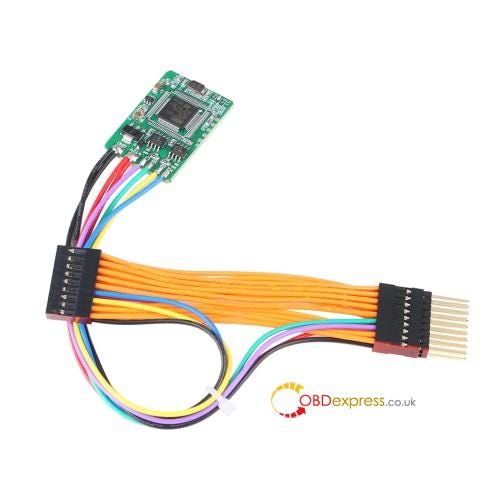
 Yanhua MB CAN Filter 18 in 1 can be added to Mercedes Benz/ BMW after odometer adjustment.

It’s universal for multiple car models, small and convenient, easy operate, with stable performance and reliability. How to add this filter to BMW cars? Check the wiring diagrams below.


Yanhua MB CAN Filter 18 in 1 Diagrams for BMW

Support BMW car models:

BMW 1 series F2X, 3 series F3X, BMW X5 etc., FEM mileage adjustment (no need to remove FEM, connect directly to instrument panel);

BMW 5 series F10, 7 series F01/02 etc., CAS4 Fxx chassis (F01, F02, F07, F18, F10, F20, F25, X3 etc., applicable for 9S12 XEP series 5M48H/1N35H).

Wiring illustration:


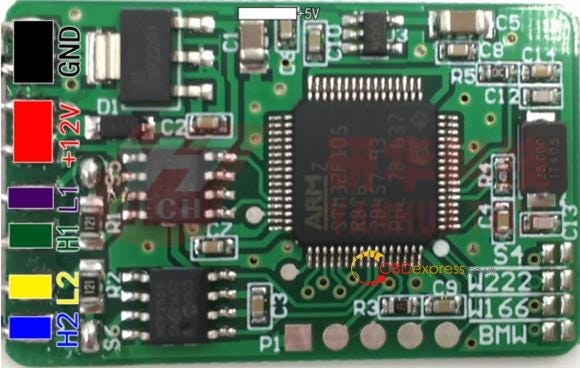
Yanhua MB CAN Filter 18 in 1 Diagrams for BMW

Black — — — — — GND

Red — — — — — +12V

White — — — — — +5V

Purple — — — — L1 (CAN_L1)

Green — — — — — H1 (CAN_H1)

Yellow — — — — — L2 (CAN_L2)

Blue — — — — — H2 (CAN_H1)

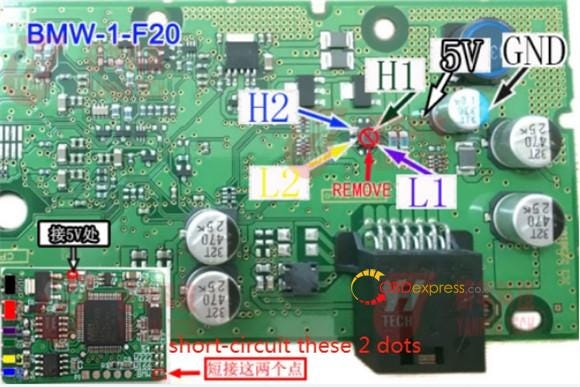
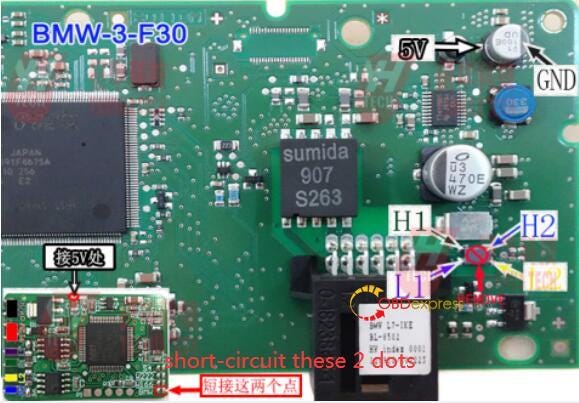
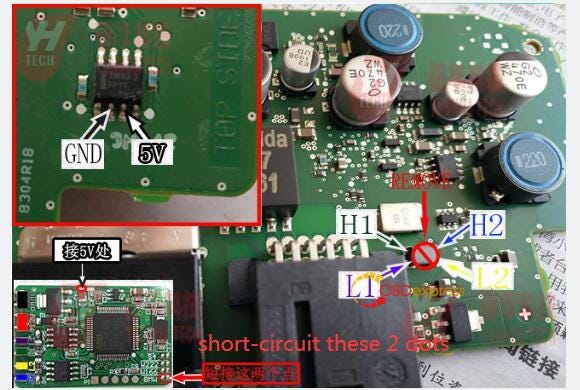
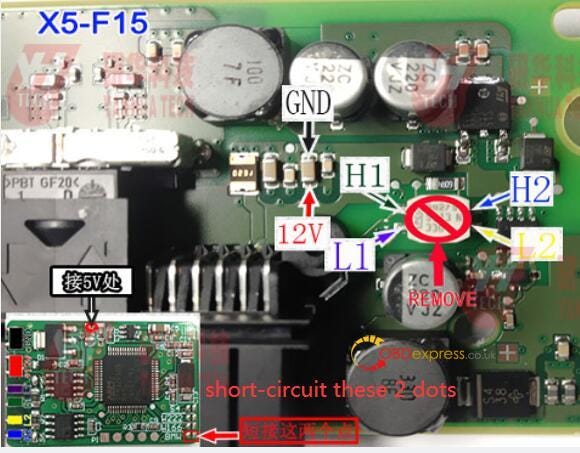
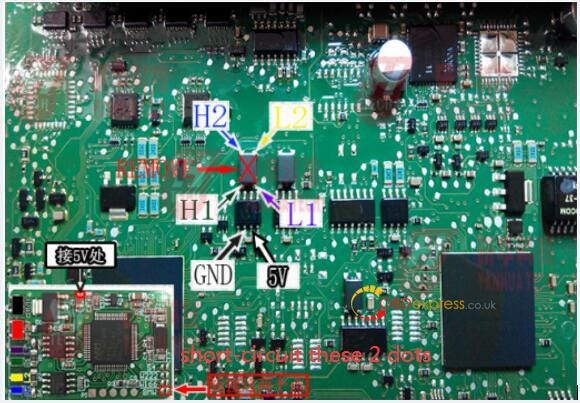
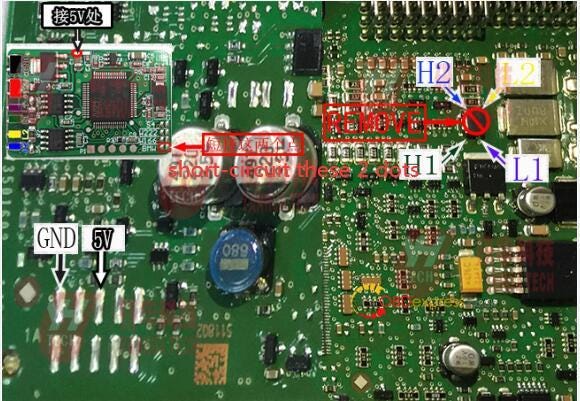
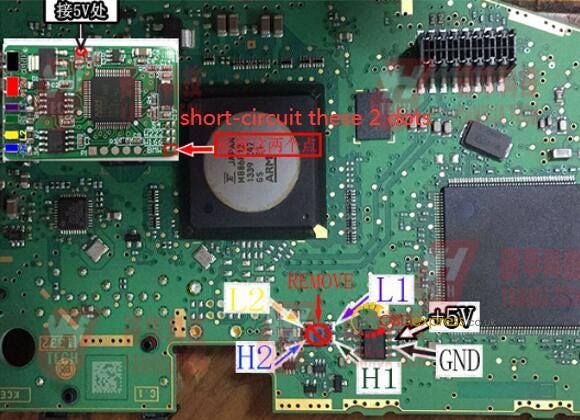
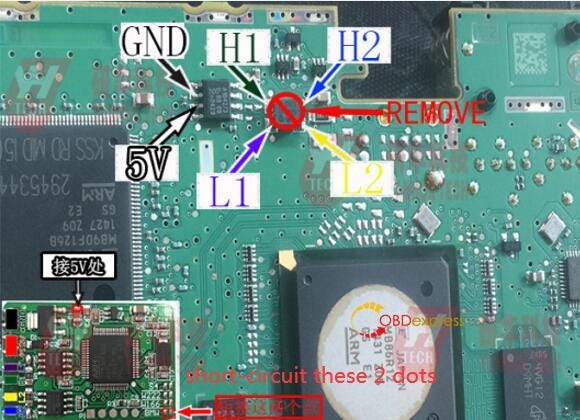
NOTICE! Please connect the 2 BMW dot together (short circuit) BEFORE connect to car!

BMW 1 series F20 instrument diagram:


Yanhua MB CAN Filter 18 in 1 Diagrams for BMW

BMW 3 series F30 instrument diagram:


Yanhua MB CAN Filter 18 in 1 Diagrams for BMW

BMW 3 GT series F30 instrument diagram:


Yanhua MB CAN Filter 18 in 1 Diagrams for BMW

BMW X5 F15 instrument diagram:


Yanhua MB CAN Filter 18 in 1 Diagrams for BMW

American Standard BMW X5 F15 instrument diagram:


Yanhua MB CAN Filter 18 in 1 Diagrams for BMW

BMW FEM diagram:


Yanhua MB CAN Filter 18 in 1 Diagrams for BMW

BMW CAS4 (1L15Y/5M48H/1N35H) diagram:


Yanhua MB CAN Filter 18 in 1 Diagrams for BMW

BMW X3 F25 instrument diagram:


Yanhua MB CAN Filter 18 in 1 Diagrams for BMW

Learn more:

http://blog.obdexpress.co.uk/2016/09/19/yanhua-mb-can-filter-18-in-1-user-manua/

Tuesday, September 3, 2024

Yanhua ACDP Module 34: VW MQB 3426+95128 Dashboard Mileage Adjustment

 How to change mileage on VW MQB dashboard with 3426+95128 chip model by Yanhua ACDP with Module 34? It’s easy to operate with the connection diagram in the Mini ACDP APP/software.

Check the detailed operation guide below.

1.Turn on the power switch on the car and light up the instrument panel

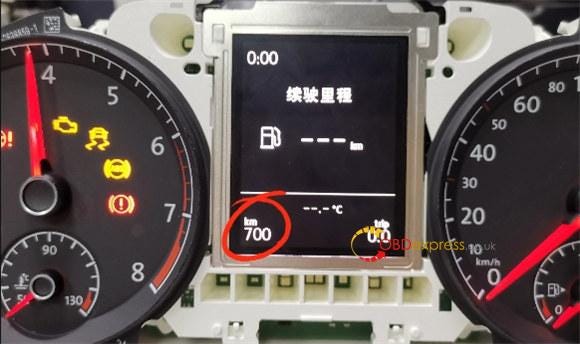
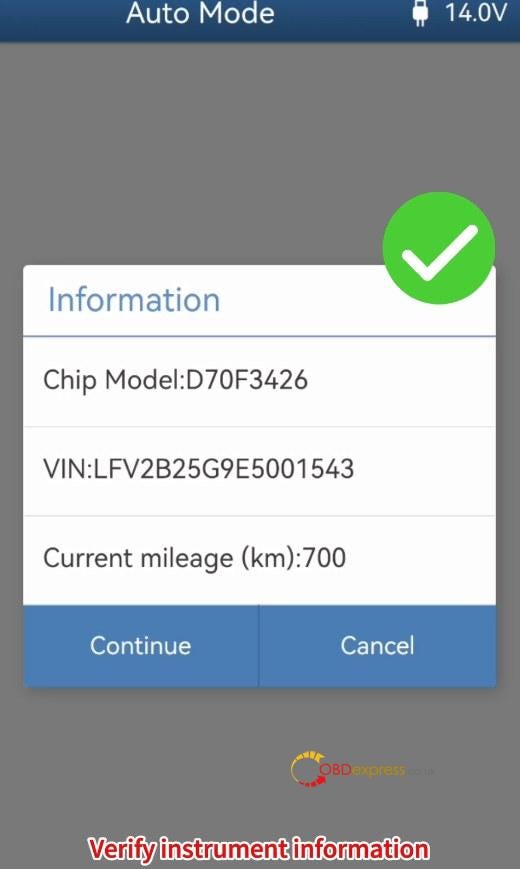
2.Record the current mileage (i.e. 700 km)


Yanhua ACDP with Module 34 Change VW MQB 3426+95128 Dashboard Mileage

3.Power on Yanhua ACDP2 and open Mini ACDP APP

4.Check the upper right corner to confirm the ACDP device has been bound

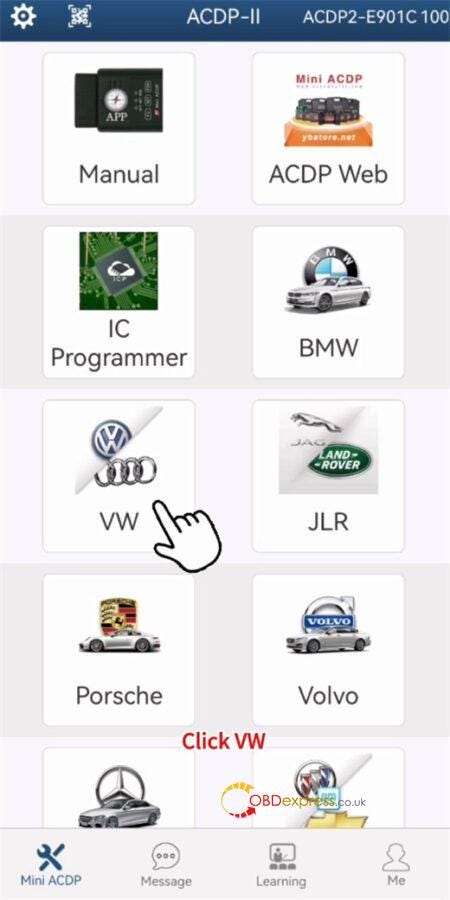
5.Click on "VW" on the main menu


Yanhua ACDP with Module 34 Change VW MQB 3426+95128 Dashboard Mileage

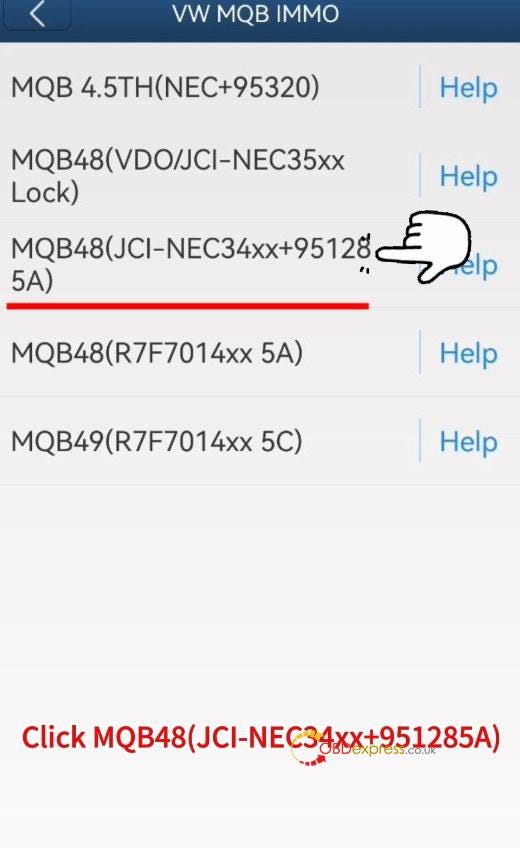
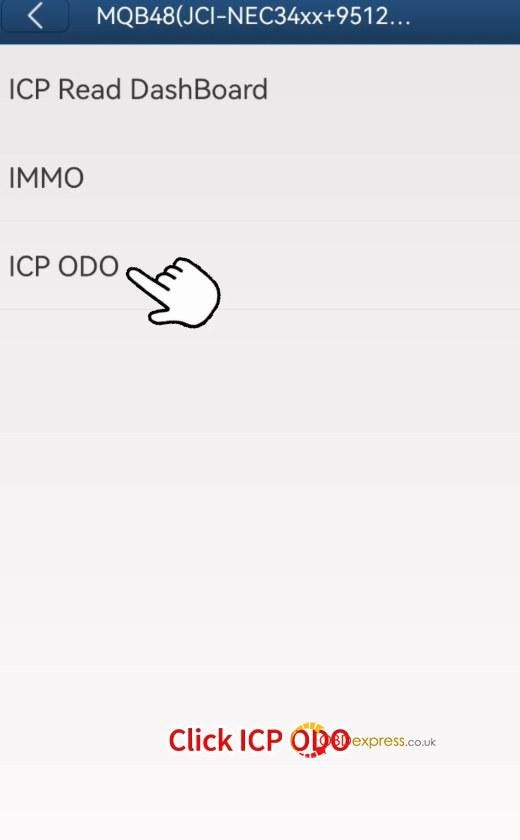
6.Select VW MQB IMMO>> MQB48 (VDO/JCI-NEC34xx +95128 5A)>> ICP ODO


Yanhua ACDP with Module 34 Change VW MQB 3426+95128 Dashboard Mileage

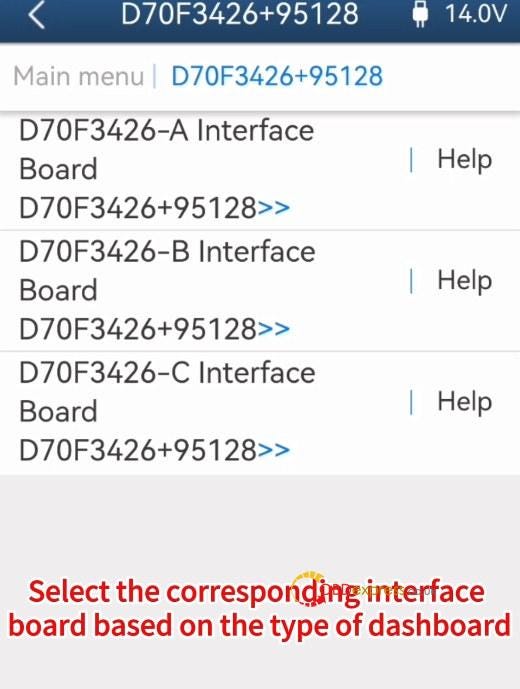
7.Select D70F3426+95128 and the corresponding interface board based on the type of dashboard

Here we select D70F3426-A Interface Board D70F3426+95128

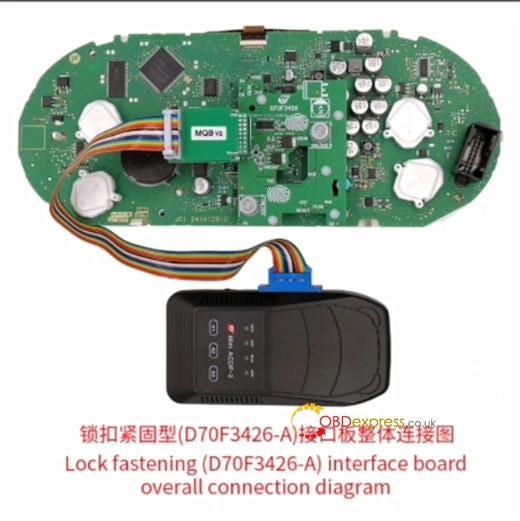
Click "Help" to check the connection diagram and connect Mini ACDP 2, MQB 3426+95128 chip dashboard and Yanhua Module 34 interface board correctly (click here to check the installation guide)


Yanhua ACDP with Module 34 Change VW MQB 3426+95128 Dashboard Mileage

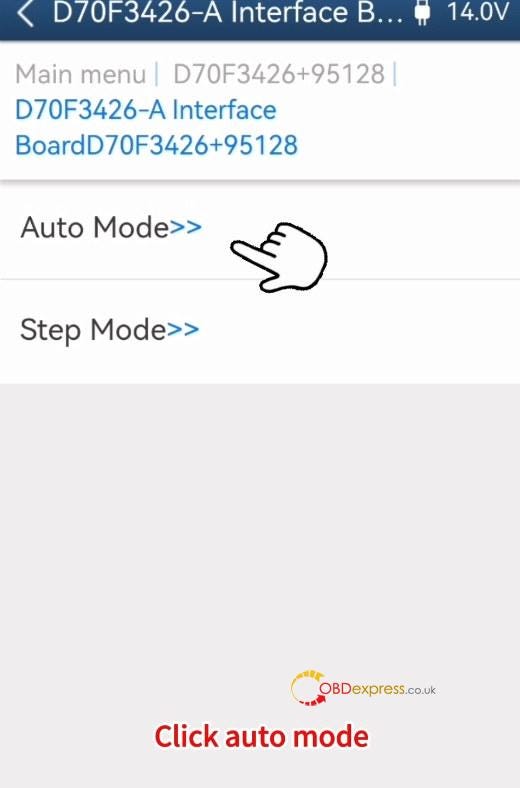
8.After connection, select "Auto Mode"


Yanhua ACDP with Module 34 Change VW MQB 3426+95128 Dashboard Mileage

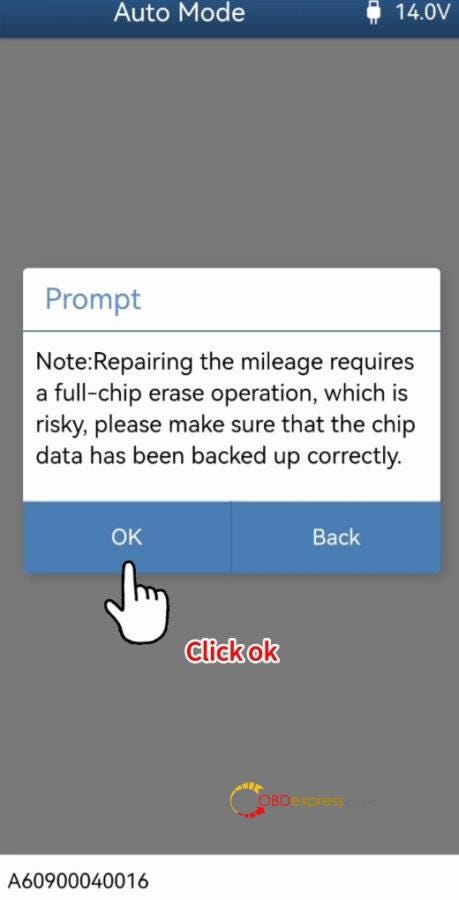
9.Confirm to repair the mileage


Yanhua ACDP with Module 34 Change VW MQB 3426+95128 Dashboard Mileage

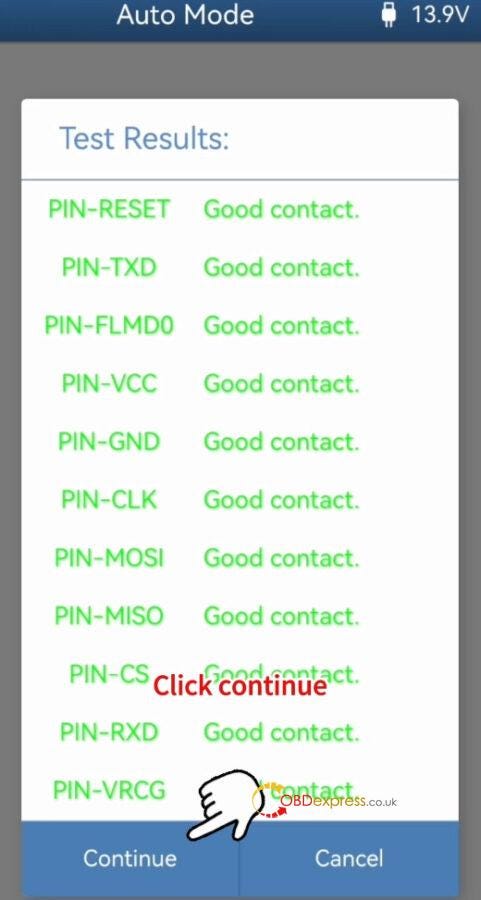
10.Detect Pins are good contact


Yanhua ACDP with Module 34 Change VW MQB 3426+95128 Dashboard Mileage

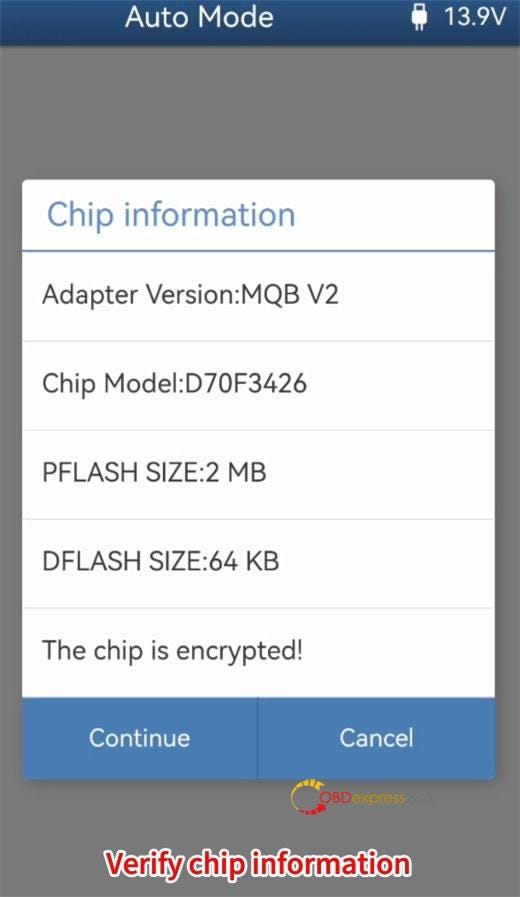
11.Verify the chip information


Yanhua ACDP with Module 34 Change VW MQB 3426+95128 Dashboard Mileage

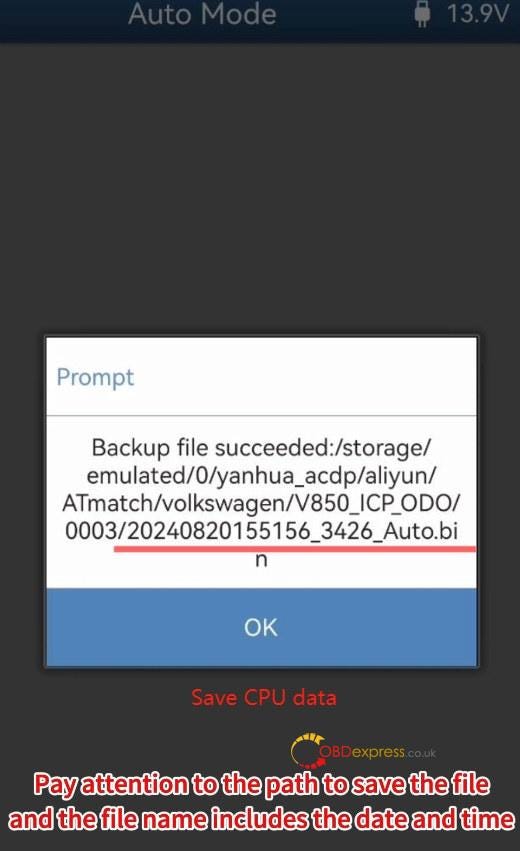
12.Read CPU data and save the data


Yanhua ACDP with Module 34 Change VW MQB 3426+95128 Dashboard Mileage

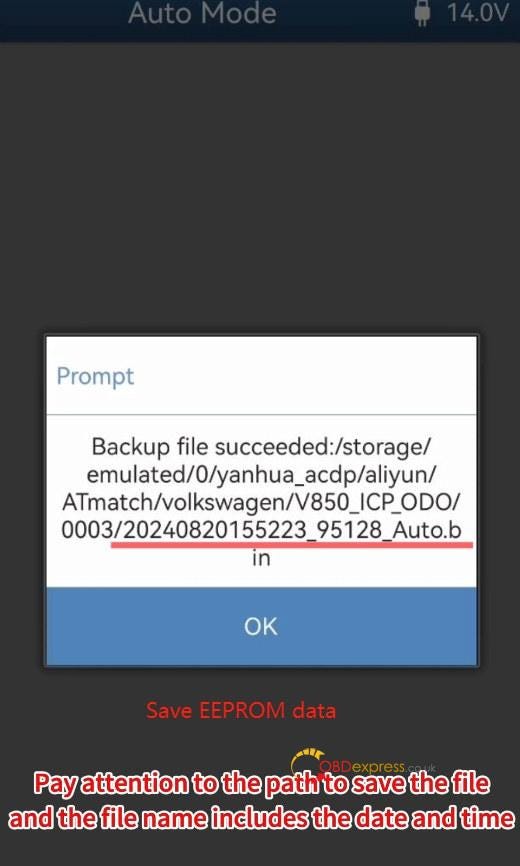
13.Read EEPROM data and save the data


Yanhua ACDP with Module 34 Change VW MQB 3426+95128 Dashboard Mileage

14.Verify the instrument information


Yanhua ACDP with Module 34 Change VW MQB 3426+95128 Dashboard Mileage

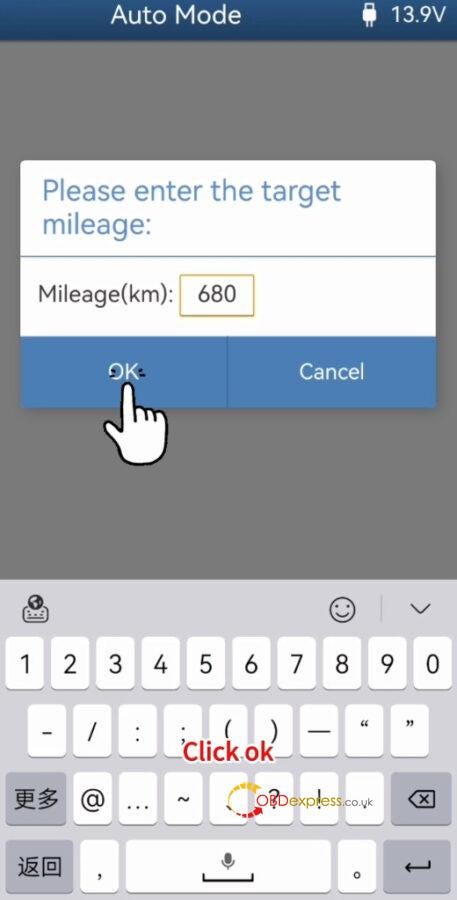
15.Input the target mileage (i.e. 680)


Yanhua ACDP with Module 34 Change VW MQB 3426+95128 Dashboard Mileage

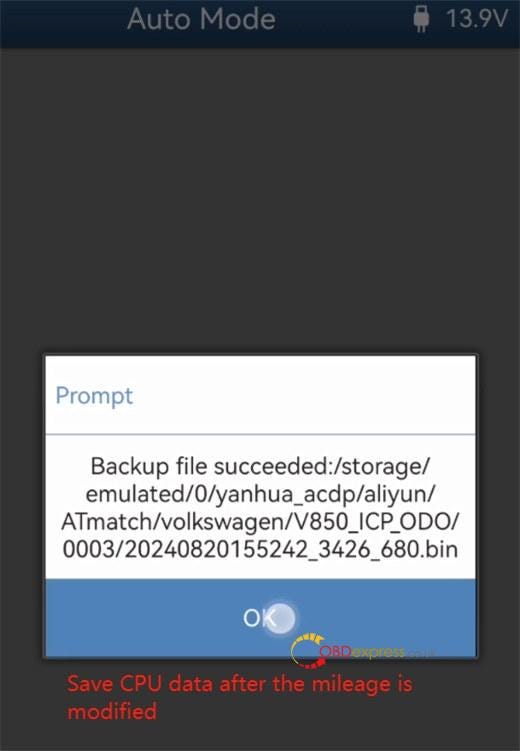
16.Save the CPU data after the mileage has been modified


Yanhua ACDP with Module 34 Change VW MQB 3426+95128 Dashboard Mileage

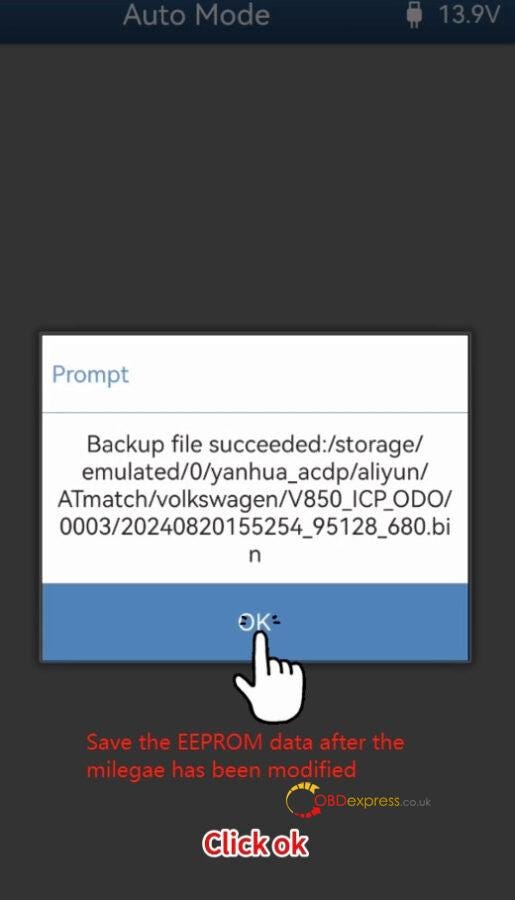
17.Save the EEPROM data after the mileage has been modified as well


Yanhua ACDP with Module 34 Change VW MQB 3426+95128 Dashboard Mileage

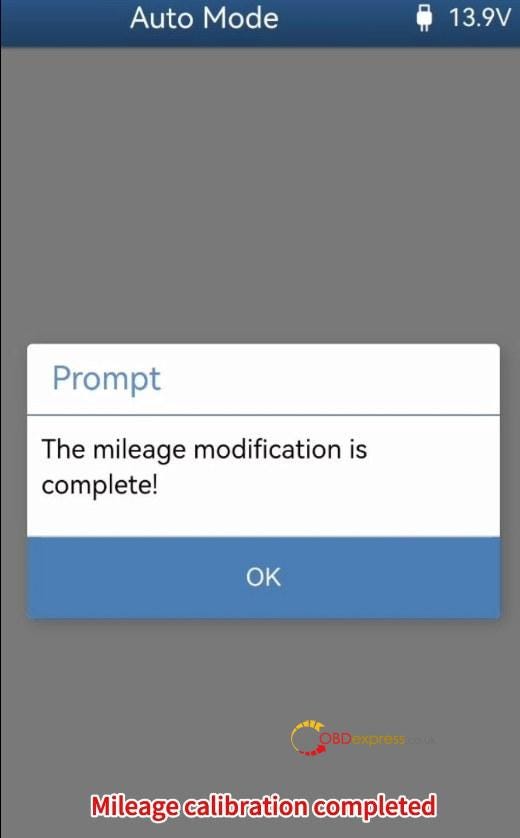
18.The mileage modification is complete


Yanhua ACDP with Module 34 Change VW MQB 3426+95128 Dashboard Mileage

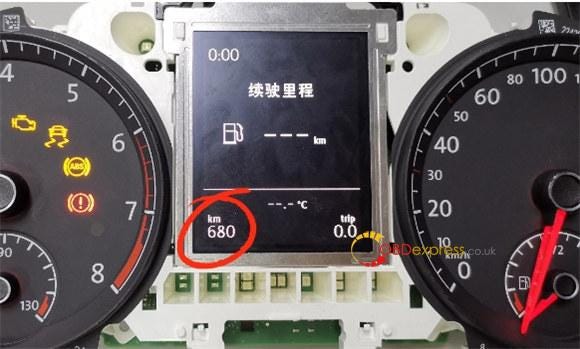
19.Install the instrument panel into the car and turn on the dashboard

Now the mileage on the dashboard is 680km, which is the same as modified.


Yanhua ACDP with Module 34 Change VW MQB 3426+95128 Dashboard Mileage

Video guide:

https://youtu.be/-JOEglIgSNs

Kindly notice:

To perform IMMO and mileage correction for the 4th generation instrument with D70F3423 +95320 chip model, D70F3426 +95128 chip model MQB 5A instrument, RH850 series R7F701401, R7F701402, R7F701407 chip model 5A instruments, and mileage correction for RH850 series R7F701401, R7F701402, R7F701404, R7F701406, R7F701407 chip model 5C instrument:

www.obdexpress.co.uk

Wednesday, July 24, 2024

Guide to Installing Yanhua ACDP Module 34 Interface Board

 Yanhua ACDP Module 34 interface board is suitable for D70F3423/3426, R7F71401/ 1402/ 1407, R7F71401/ 1402/ 1404/ 1406/ 1407 chips. Below we will introduce how to install these interface boards.

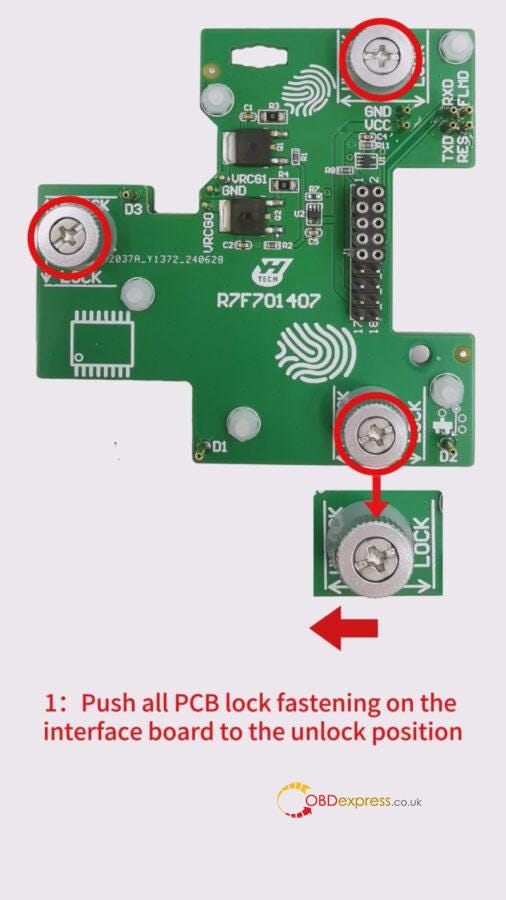
Yanhua Module 34: Lock fastening R7F701407 interface board Installation tutorial:
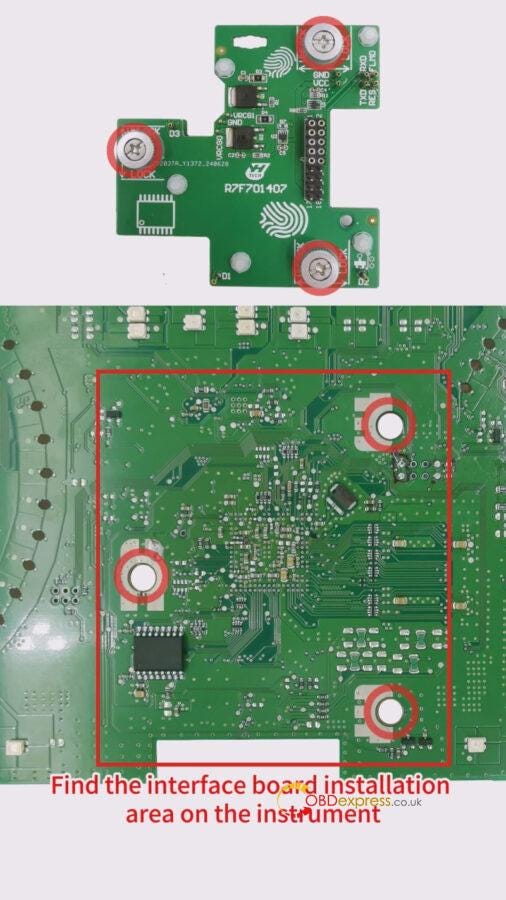
1: Push all PCB lock fastening on theinterface board to the unlock position. Find the interface board installation area on the instrument, according to the visual positioning mark on the interface board.

How to install the Yanhua ACDP Module 34 interface board

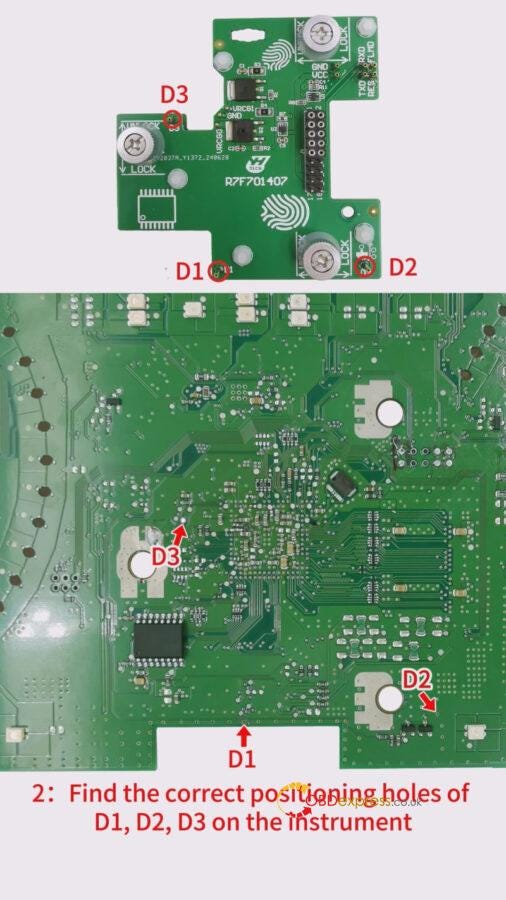
2: Find the correct positioning holes of D1, D2, D3 on the instrument.


How to install the Yanhua ACDP Module 34 interface board

3: Check that the D1 and D2 positioning pins are completely aligned with the D1 and D2 positioning holes of the instrument, and ensure that the PCB lock buckle is completely aligned.


How to install the Yanhua ACDP Module 34 interface board

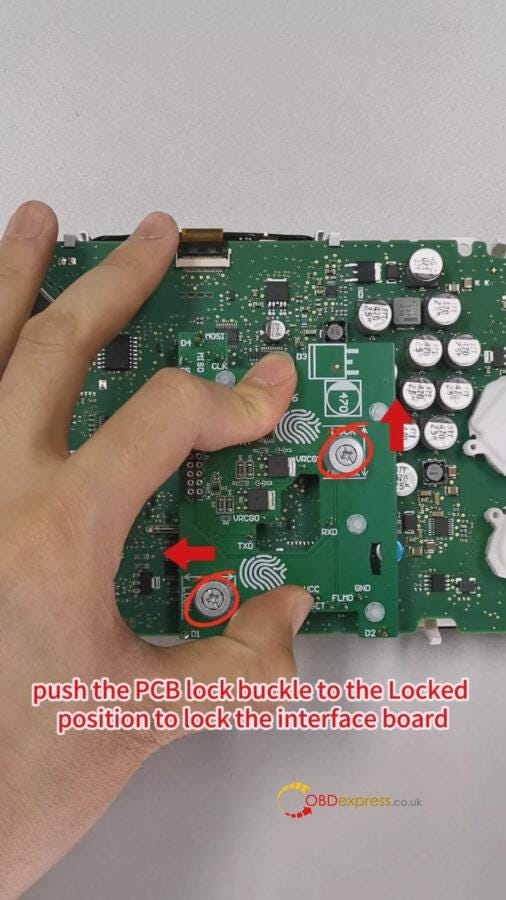
4: Finger down pressure interface board, push the PCB lock buckle to the Locked position to lock the interface board, installation is done.
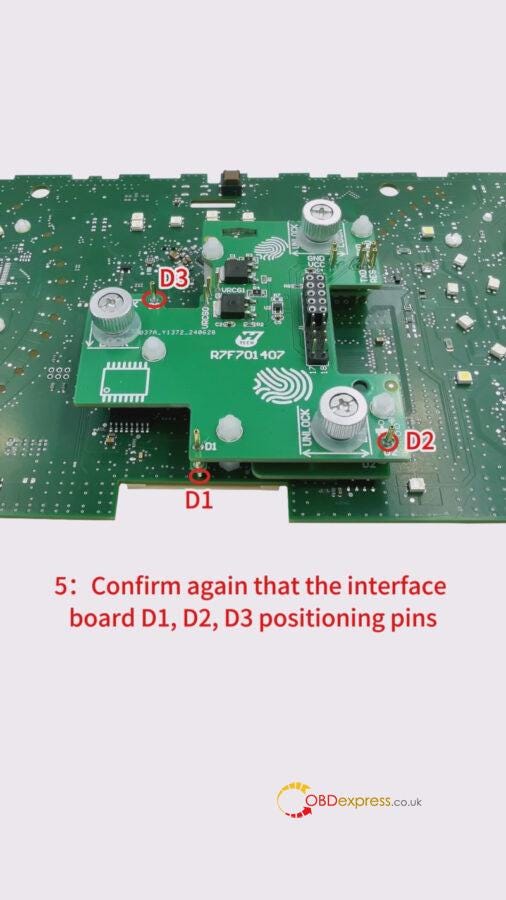
5: Confirm again that the interface board D1, D2, D3 positioning pins are completely aligned with the D1, D2, D3 positioning holes of the instrument


How to install the Yanhua ACDP Module 34 interface board

Reference video:
https://youtu.be/63linnCHTH0

Yanhua Module 34: Lock fastening (D70F3426)interface board Installation tutorial:
1: Push the lock fastening of the interface board to the unlock position. Find the interface board installation area on the instrument, according to the visual positioning mark on the interface board.

How to install the Yanhua ACDP Module 34 interface board

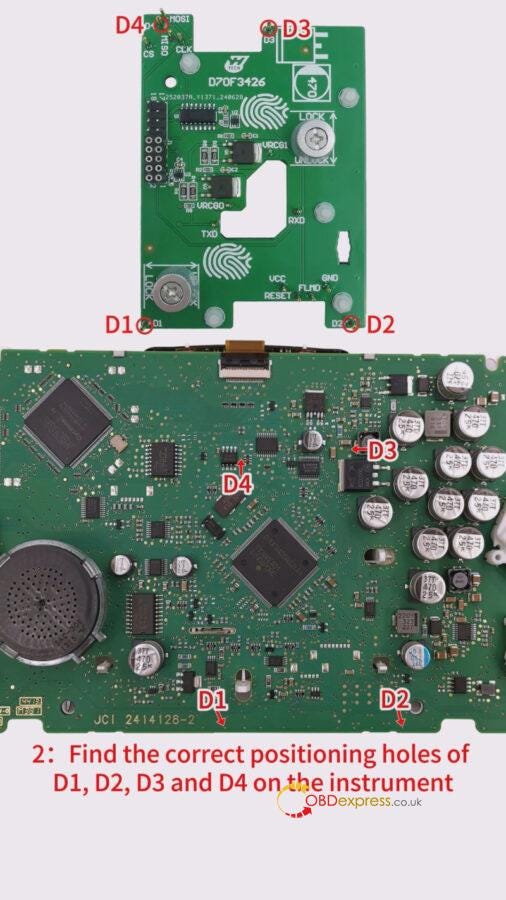
2: Find the correct positioning holes of D1, D2, D3 and D4 on the instrument


How to install the Yanhua ACDP Module 34 interface board

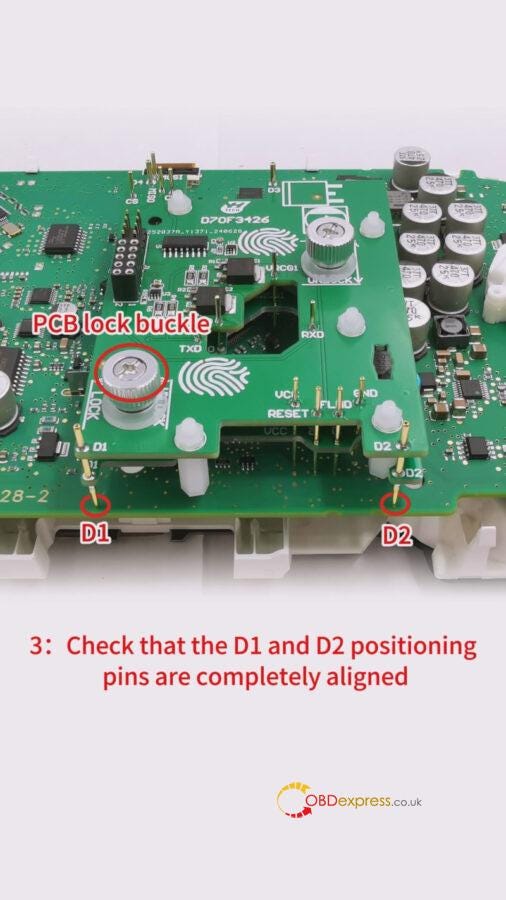
3: Check that the D1 and D2 position pins are completely aligned, with the D1 and D2 positioning holes of the instrument, and ensure that the PCB lock buckle is completely aligned.
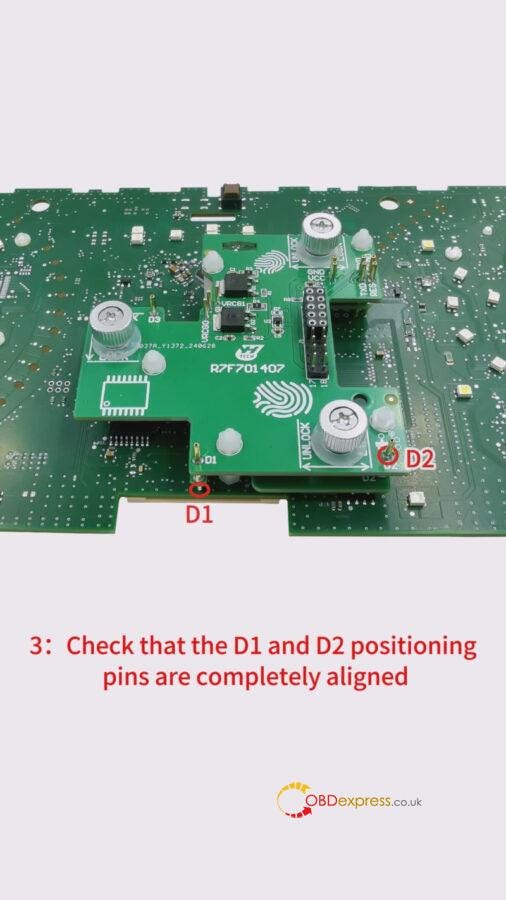

How to install the Yanhua ACDP Module 34 interface board

4: Finger down pressure interface board, push the PCB lock buckle to the Locked position to lock the interface board, installation is done.


How to install the Yanhua ACDP Module 34 interface board

5: Confirm again that the interface board D1, D2, D3, and D4 positioning pins are completely aligned with the D1, D2, D3 and D4 positioning holes of the instrument.


How to install the Yanhua ACDP Module 34 interface board

Reference video:
https://youtu.be/VEwrE88Bdaw

Yanhua Module 34: Thumb screw-fastened R7F701402 interface board Installation tutorial:
1:Find the interface board installation area on the instrument, according to the visual positioning mark on the interface board
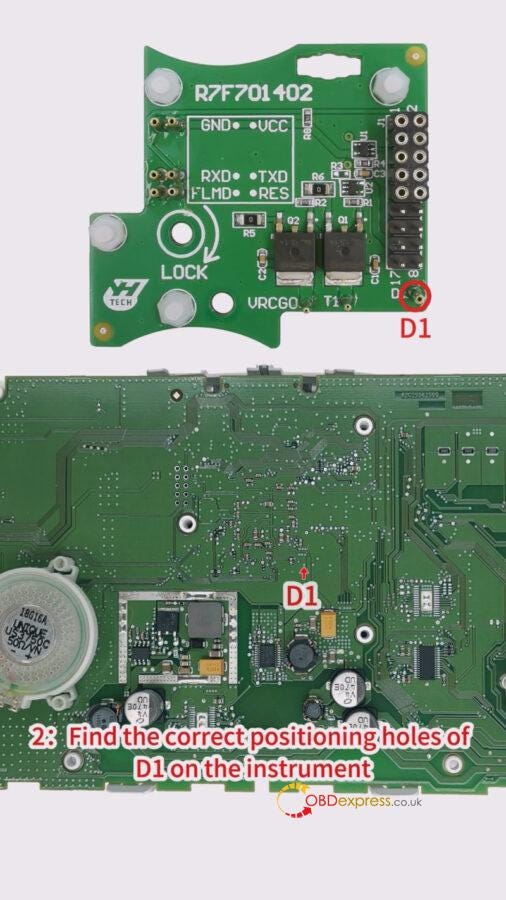
2: Find the correct positioning holes of D1 on the instrument


How to install the Yanhua ACDP Module 34 interface board

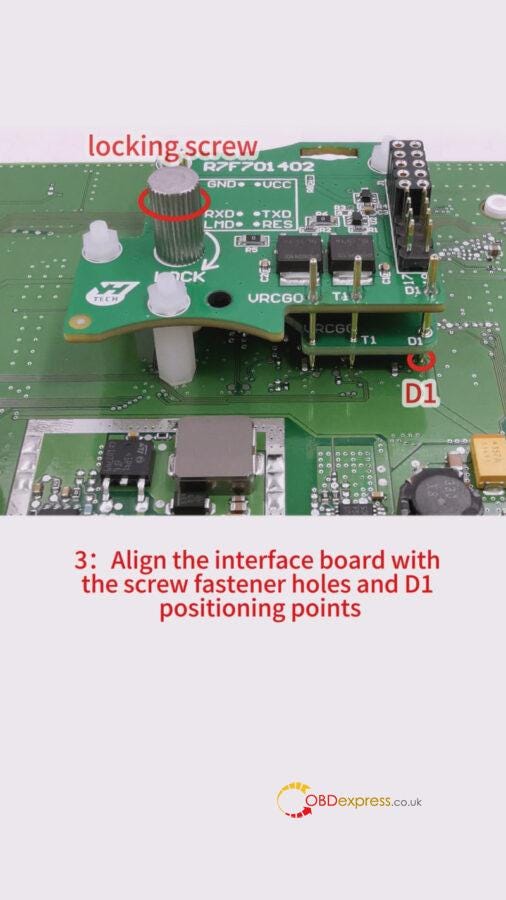
3: Align the interface board with the screw fastener holes and D1 positioning points


How to install the Yanhua ACDP Module 34 interface board

4: Press the interface board down with your left hand. Tighten the locking screw with your right hand.
The installation done
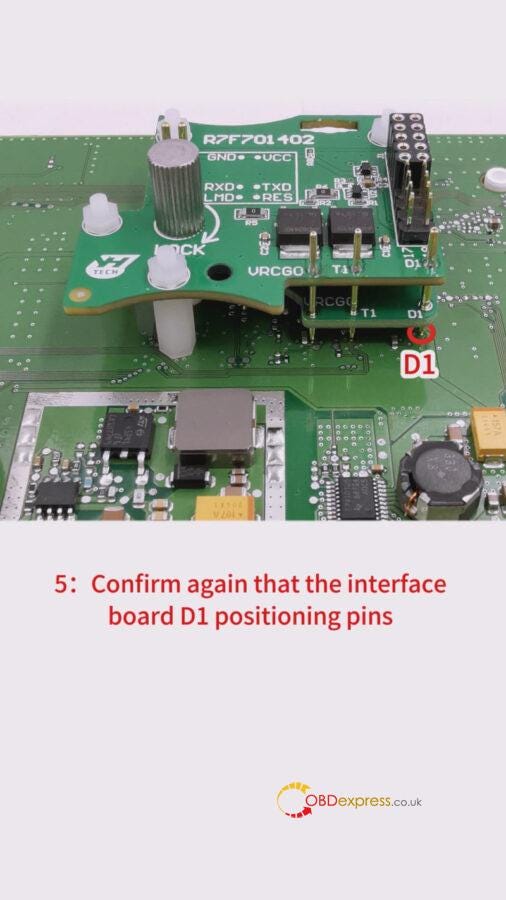
5: Confirm again that the interface board D1 positioning pins are completely aligned with the D1 positioning holes of the instrument


How to install the Yanhua ACDP Module 34 interface board

Reference video:
https://youtube.com/shorts/ZvHsKZP7qdY

How to Install Yanhua CEM Interface Board for Volvo 2023-2024 Models

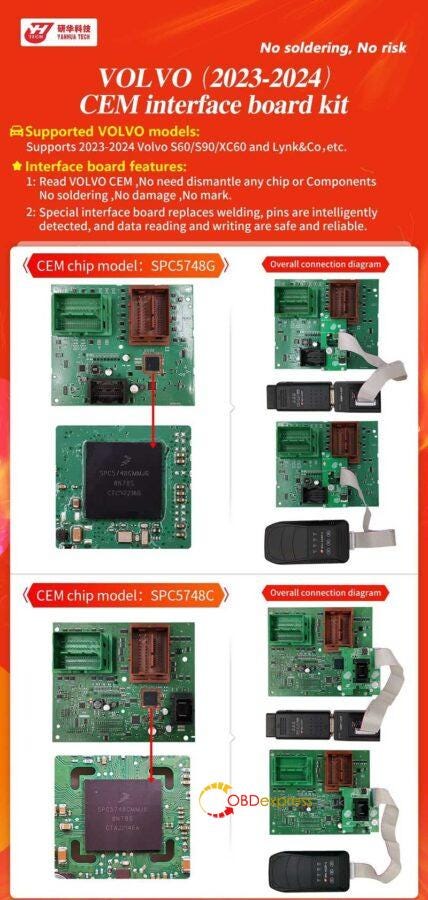
 YANHUA Volvo CEM Interface Board supports to read 2023–2024 Volvo S60/S90/XC60 and Lynk&Co without soldering. No need to dismantle any chip or components, no damage, no mark. Only need to activate the ACDP A303 License, then work with Yanhua Mini ACDP 2/ Mini ACDP-1 together.


How to Install Yanhua Volvo 2023–2024 CEM Interface Board

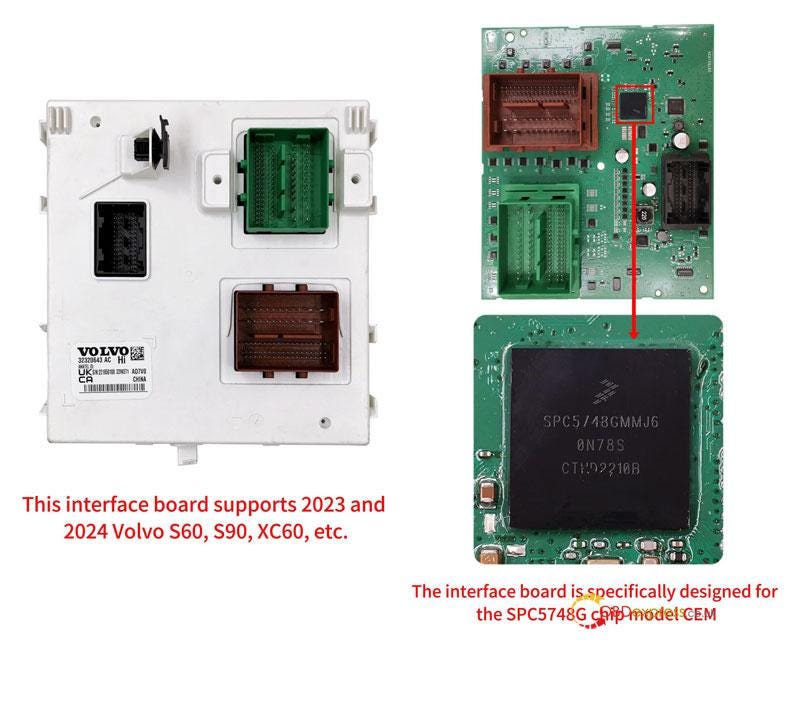
For 2023–2024 Volvo S60/S90/XC60 Installation

This interface board is specifically designed for the SPC5748G chip model CEM.


How to Install Yanhua Volvo 2023–2024 CEM Interface Board
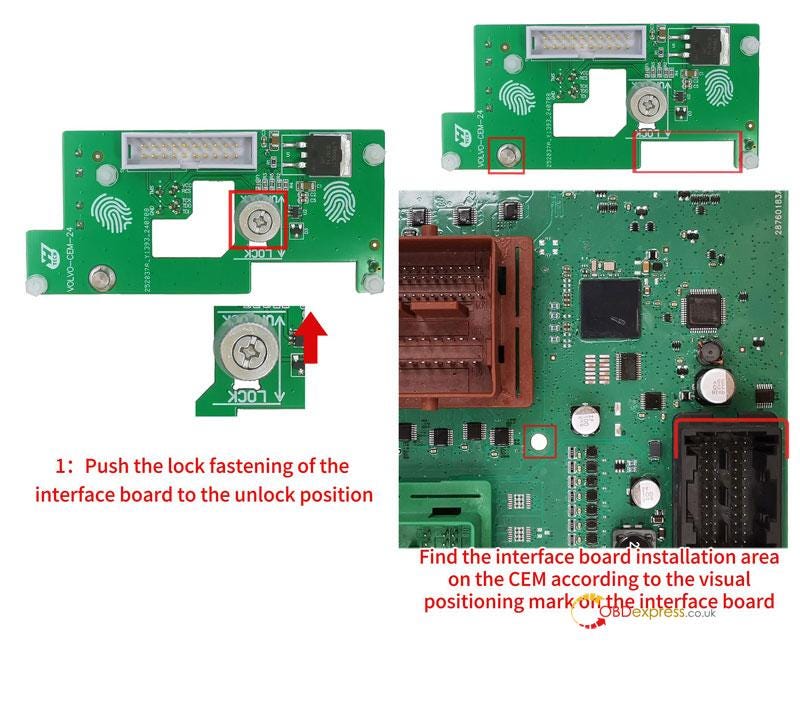
  1. Push the lock fastening to the unlock position. Find the installation area on CEM according to the visual positioning mark on the interface board.
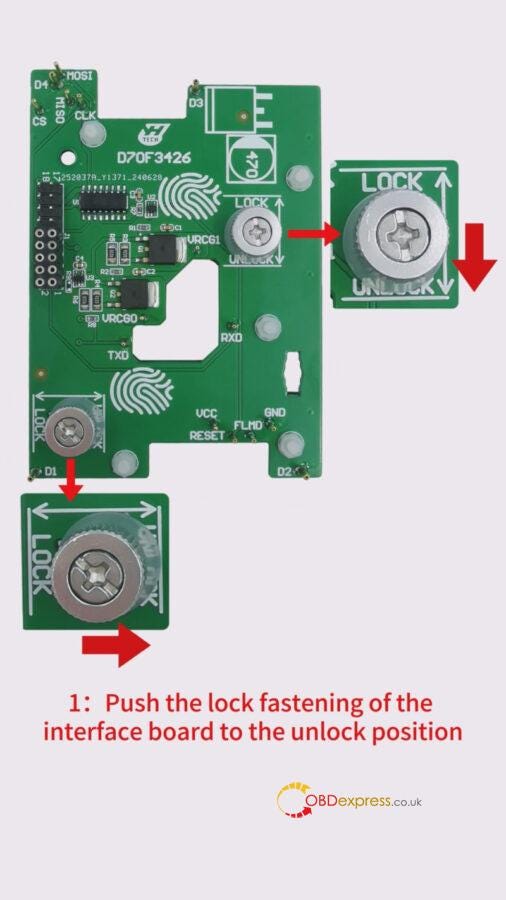
How to Install Yanhua Volvo 2023–2024 CEM Interface Board
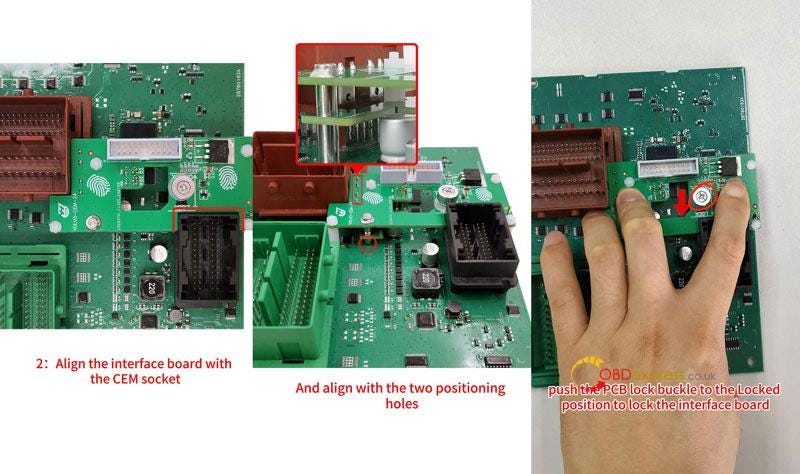
  1. Align the interface board with the CEM socket and the 2 positioning holes.
  2. Press the interface board downward with fingers, push the PCB lock buckle to lock the interface board.

How to Install Yanhua Volvo 2023–2024 CEM Interface Board

Completed.

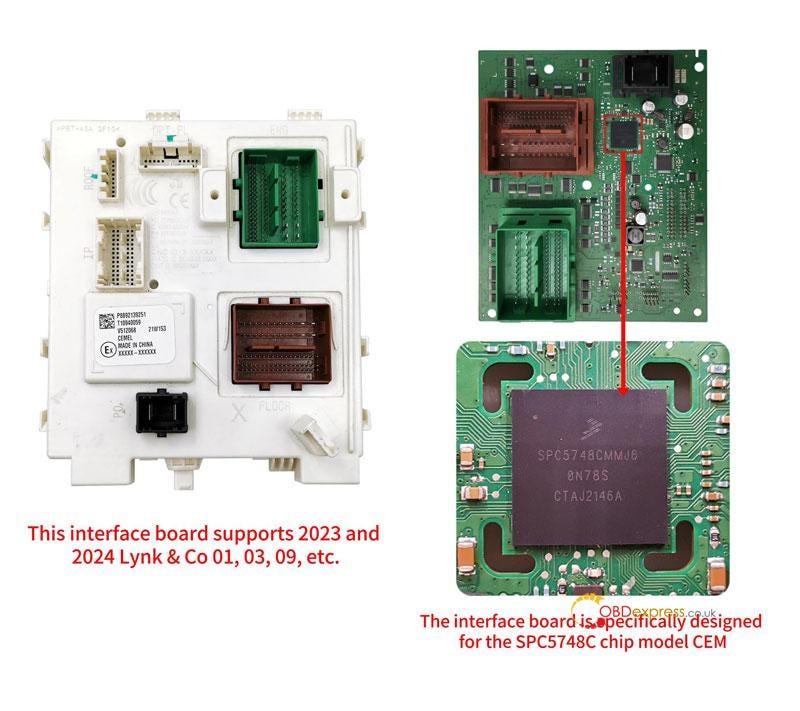
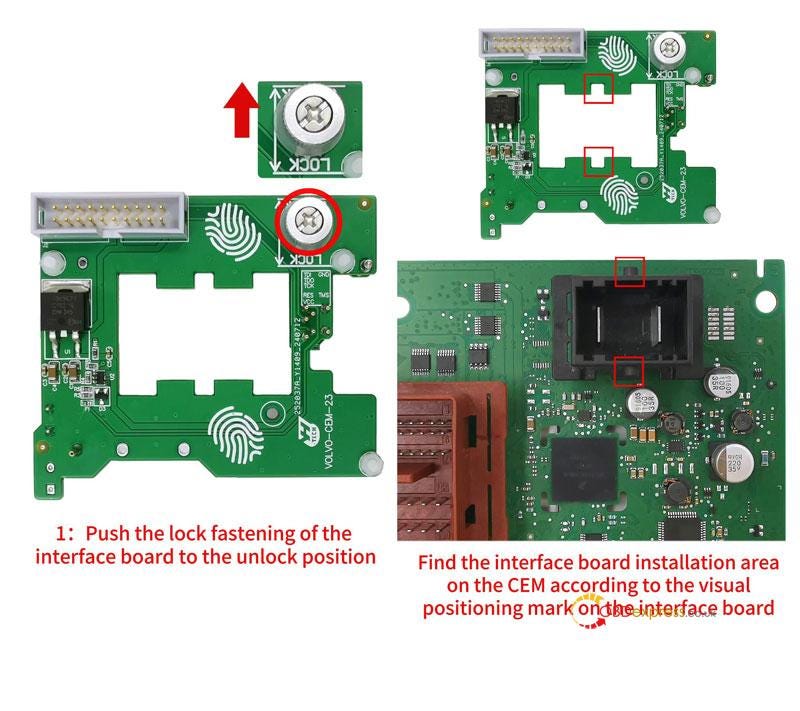
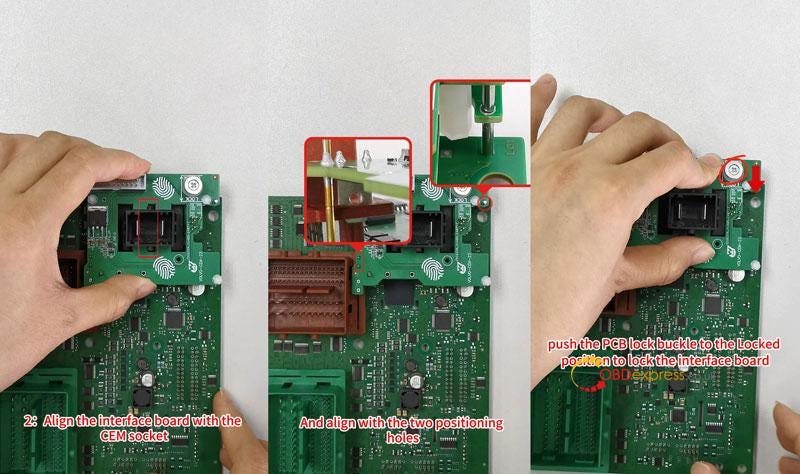
For 2023–2024 Volvo Lynk & Co 01/03/09 Installation

This interface board is specifically designed for the SPC5748C chip model CEM.


How to Install Yanhua Volvo 2023–2024 CEM Interface Board
  1. Push the lock fastening to the unlock position. Find the installation area on CEM according to the visual positioning mark on the interface board.
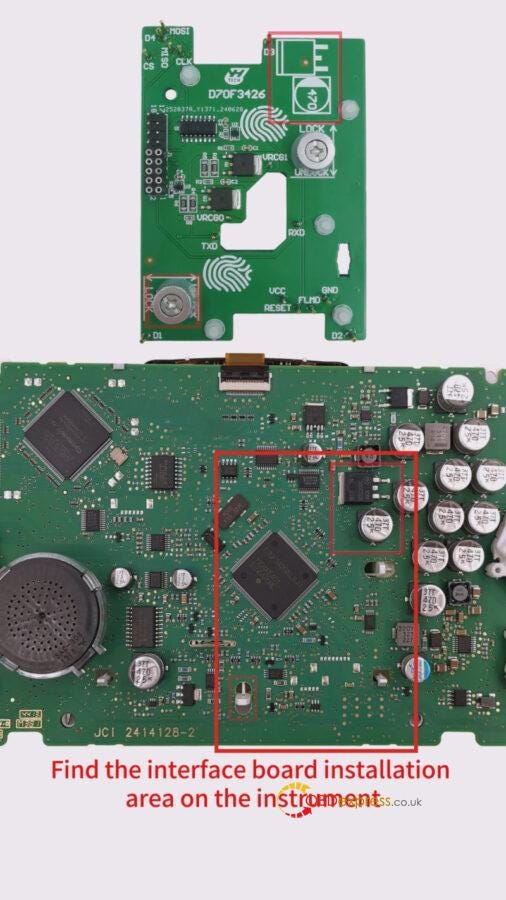
How to Install Yanhua Volvo 2023–2024 CEM Interface Board
  1. Align the interface board with the CEM socket and the 2 positioning holes.
  2. Press the interface board downward with fingers, push the PCB lock buckle to lock the interface board.

How to Install Yanhua Volvo 2023–2024 CEM Interface Board

Completed.

ACDP Volvo(2023-) CEM Interface Board has replaced welding to intelligently detect pins, which makes the data reading and writing are safe and reliable.

www.obdexpress.co.uk

Tuesday, May 21, 2024

Yanhua ACDP Module 33 MQB-82 Lock Fastening Installation

 This is a tutorial on how to use Yanhua Mini ACDP 2 + Module 33 to install MQB-82 lock fastening interface board.

Read also

Yanhua ACDP Module 33 MQB-80 Thumb Screw-Fastened Installation Tutorial

Installation Steps

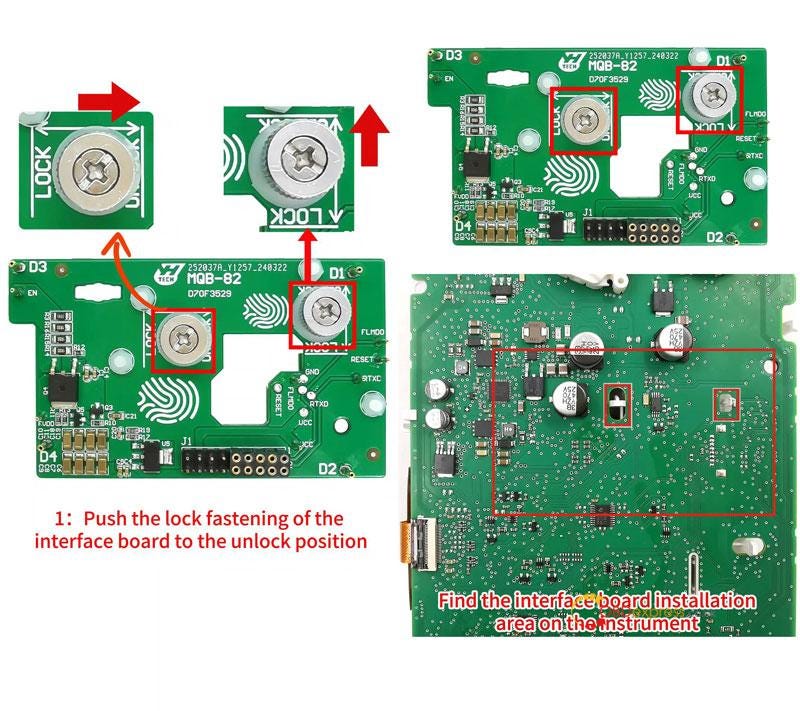
  1. Push the lock fastening of the interface board to the unlock position. Find the installation area according to the visual positioning mark.

Yanhua ACDP Module 33 MQB-82 Lock Fastening Installation Tutorial
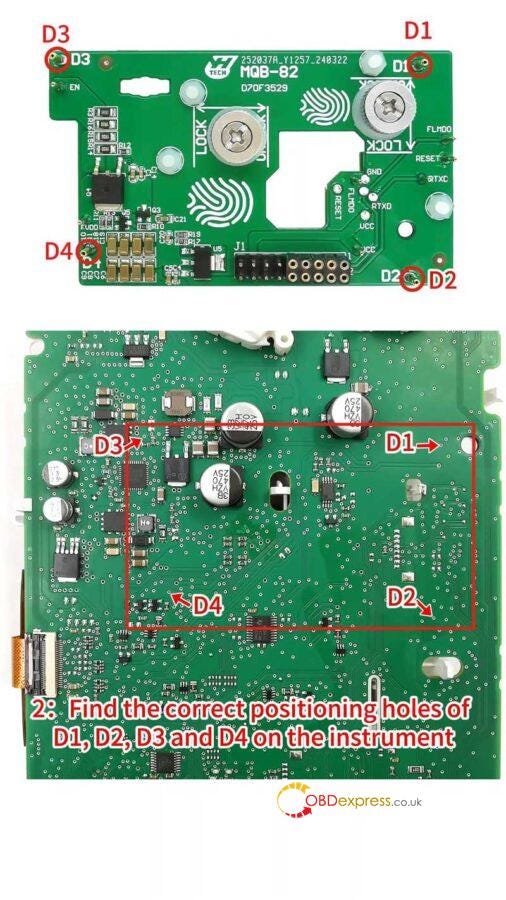
  1. Find the correct positioning holes of D1, D2, D3 and D4 on the instrument.

Yanhua ACDP Module 33 MQB-82 Lock Fastening Installation Tutorial
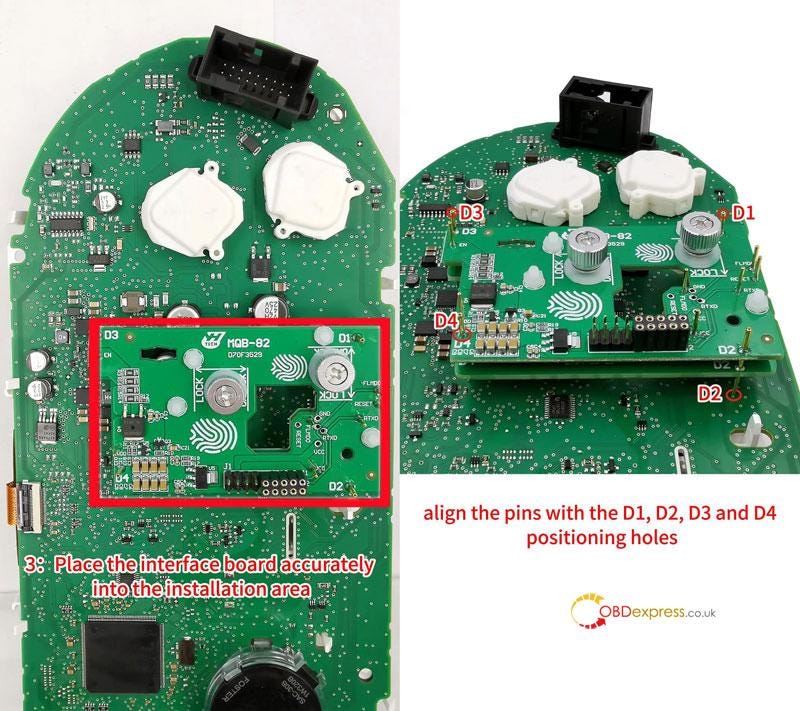
  1. Place the interface board accurately into the installation area, align the pins with the D1, D2, D3 and D4 positioning holes.

Yanhua ACDP Module 33 MQB-82 Lock Fastening Installation Tutorial
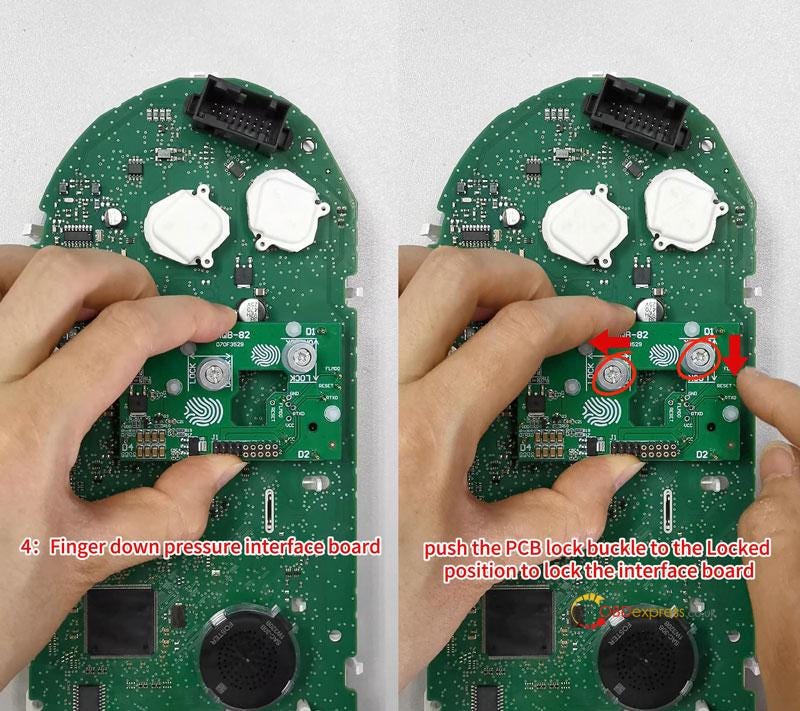
  1. Finger down pressure interface board, push the PCB lock buckle to the locked position to lock the interface board.

Yanhua ACDP Module 33 MQB-82 Lock Fastening Installation Tutorial
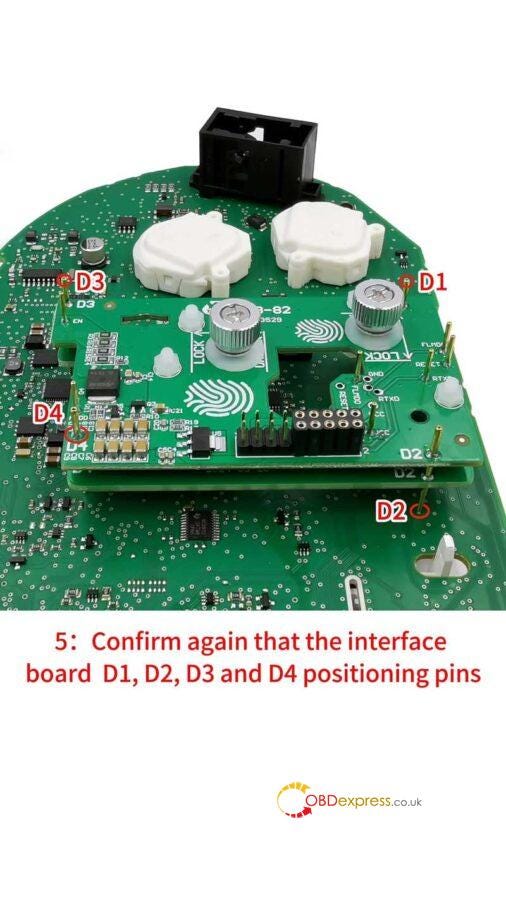
  1. Confirm again that the interface board are completely aligned with the D1, D2, D3 and D4 positioning holes of the instrument.
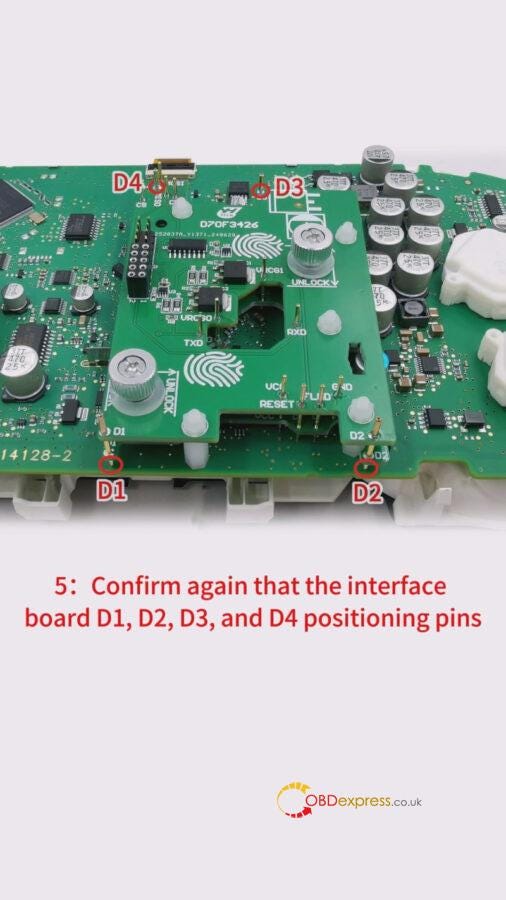
Yanhua ACDP Module 33 MQB-82 Lock Fastening Installation Tutorial

Completed.

www.obdexpress.co.uk

Sunday, January 14, 2024

Yanhua ACDP2 Troubleshoot: Overcoming Calculation Limitations

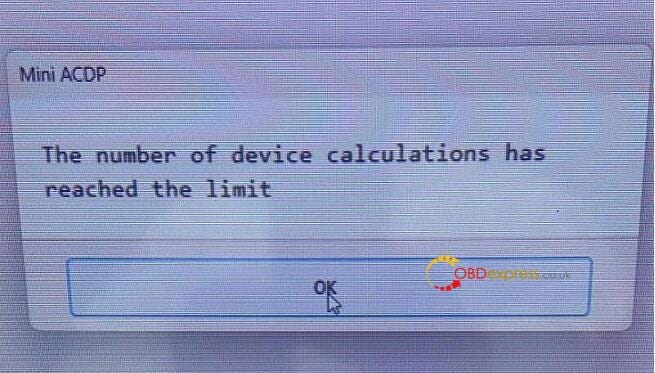
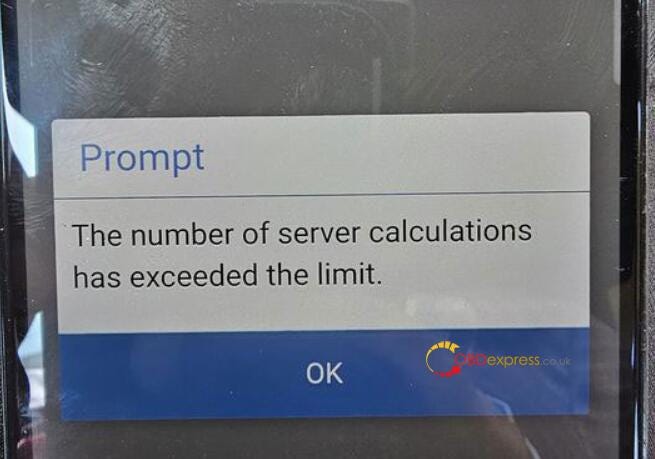
 Recently, some customers gave feedback that when they used Yanhua ACDP to clone or read ISN for BMW MSV80, MSD8x series DME modules, the system prompted "The number of device calculations has reached the limit" or "The number of server calculations has exceeded the limit" shown as follows.

How to Solve Yanhua ACDP1 ACDP2 Exceed the Calculation Limit

How to Solve Yanhua ACDP1 ACDP2 Exceed the Calculation Limit

For the above problem, obdexpress.co.uk engineer replied below.

It needs a special server calculation for the MSD8x MSV80 series DME modules.

After a couple times, it will shut down. Up to 5 times per day.

You can do it the next day.

If you are in a hurry to use it, you can send the ACDP serial number to Yanhua ACDP engineer to add 1–2 calculations.

Tech support:

  • Email: sales@OBDexpress.co.uk
  • Skype: obd2express.co.uk
  • WhatsApp Business:+44 7418609676
  • WhatsApp After-sales Service: +86 18750906257
  • WeChat(微信): 15705931767
  • Online Customer Service

Working Time: 9:00am — 18:00 pm (UTC+08:00), Monday to Friday.

https://www.obdexpress.co.uk/