Friday, June 9, 2023

Yanhua ACDP module corresponding function list: choose the appropriate model

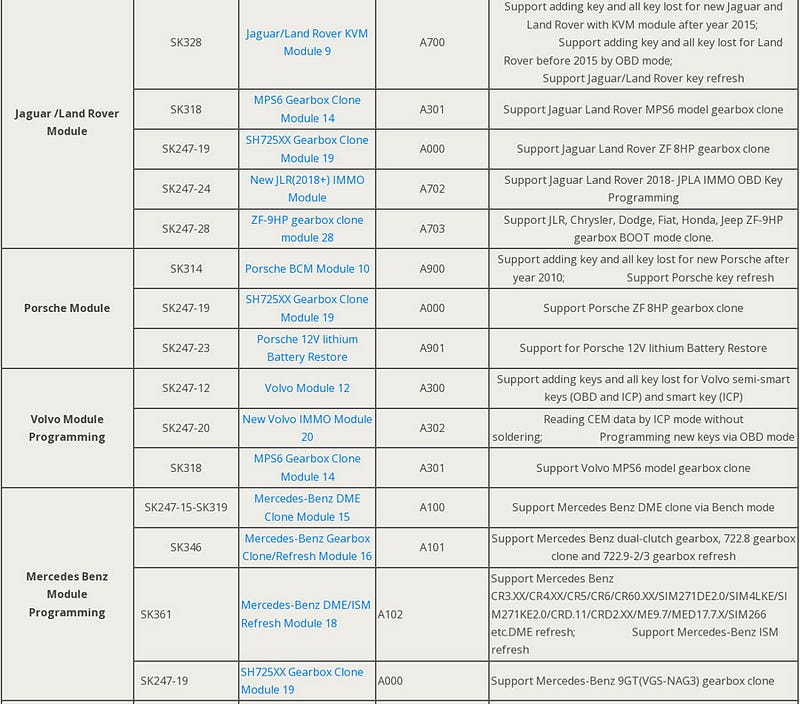
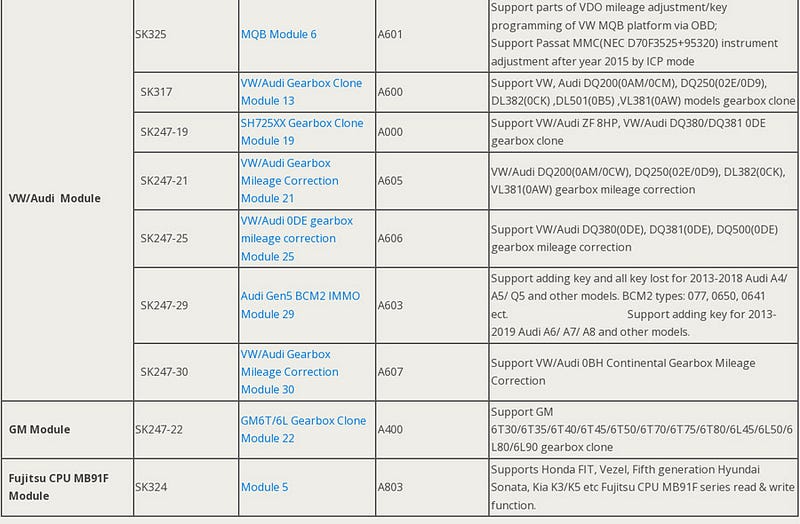
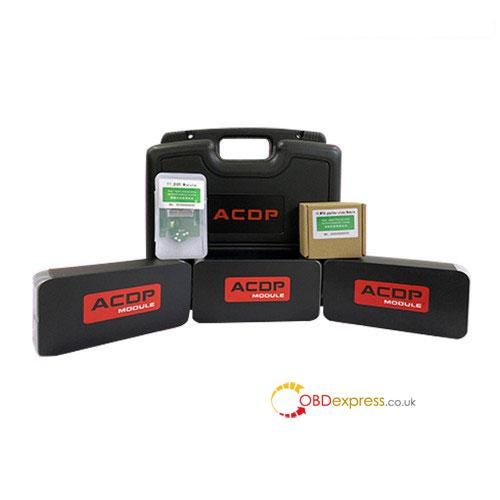
 Here we have collected a total of 30 Yanhua ACDP Modules info in this post. Different modules can be used with Mini ACDP for different car models covering BMW, Mercedes- Benz, Jaguar, Land Rover, Porsche, Volvo, VW/AUDI, GM to perform key programming, key refresh, mileage reset, gearbox clone, DME ISN read/write, and battery restore, etc.
How to Choose Yanhua Mini ACDP Module

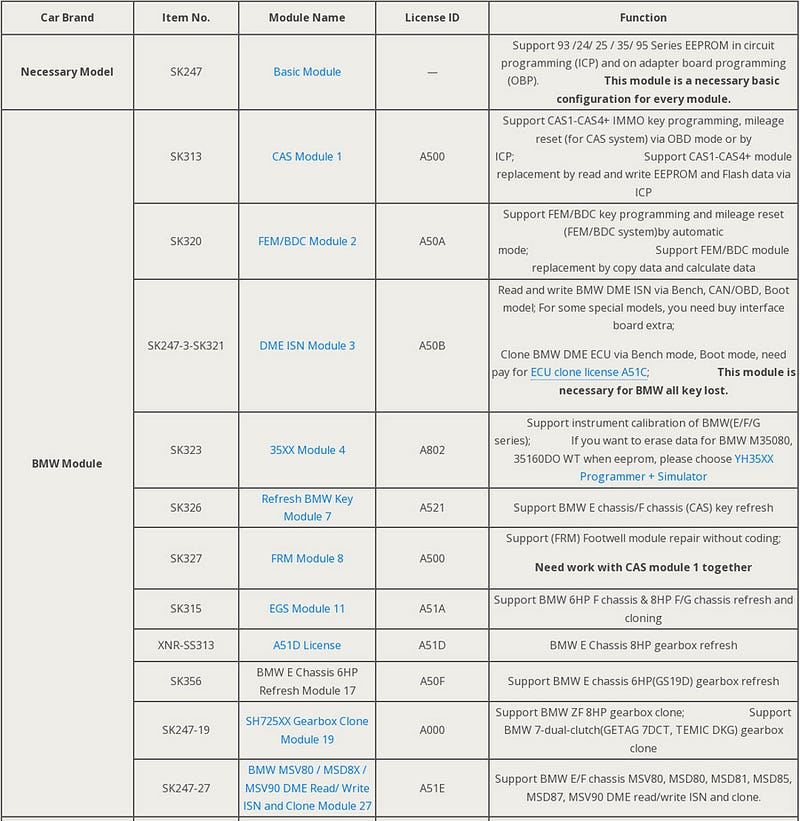
Yanhua Mini ACDP Module support list:
How to Choose Yanhua Mini ACDP Module

How to Choose Yanhua Mini ACDP Module

How to Choose Yanhua Mini ACDP Module

Note:

All above modules cannot work alone. They need to work with Yanhua Mini ACDP Master basic module.

If you have ACDP Master basic module already, you can choose the module you need alone, and then activate it on your ACDP Master. Check Two Methods to Get Yanhua ACDP Module Authorization Card Number Automatically.

How to use Yanhua Mini ACDP Module?

Most of the module usage guidelines are collected for reference below.

Continue to be updated…

Yanhua ACDP Module 1:

Yanhua Mini ACDP Adds BMW CAS4 Key OBD/ ICP Mode

Yanhua ACDP Module 1 and Module 27:

Yanhua Mini ACDP BMW Replace DME: Read & Write CAS ISN via ICP

Yanhua ACDP Module 2:

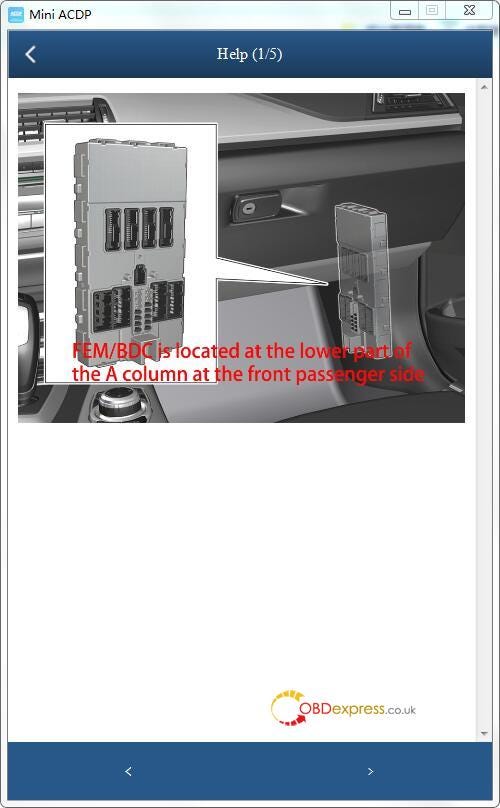
Yanhua ACDP Mileage Correction for BMW FEM BDC

Yanhua ACDP Module 3:

Yanhua Mini ACDP Program BMW FEM/ BDC All Keys Lost

Yanhua ACDP Mini Read Write MSD80 / MSD802 DME ISN

Yanhua ACDP Module 6:

How to use Yanhua ACDP to program MQB keys?

Yanhua ACDP Module 8:

Yanhua Mini ACDP Repair BMW FRM Module Without Coding

Yanhua ACDP Module 9:

Yanhua Mini ACDP + Module 9 Add 2011–2019 JLR Key via OBD

Yanhua ACDP Module 11:

Yanhua Mini ACDP Refresh BMW E/F Chassis 8HP EGS ISN

Yanhua ACDP Module 12:

Yanhua Mini ACDP Refresh BMW E/F Chassis 8HP EGS ISN

Yanhua Mini ACDP + Module 12 Program Volvo Add Key & AKL

Yanhua ACDP Module 13/Module 21:

Yanhua Mini ACDP Correct VW/Audi 0DE Gearbox Mileage

Yanhua Mini ACDP Module 21 VW Audi Gearbox Mileage Correction

Yanhua ACDP Module 16:

Yanhua Mini ACDP + Module 16 Refresh Benz VGS2-NAG2 Gearbox

Yanhua ACDP Module 19:

Yanhua Mini ACDP Clone VW DQ500 0DE/0BH Gearbox, Possible?

Mercedes-Benz VGS- NAG3 9GTronic Gearbox Clone by Mini ACDP with Module 19

Yanhua ACDP Module 22:

GM 6T/ 6L Gearbox Clone with Yanhua Mini ACDP + Module 22

Yanhua ACDP Module 23:

https://youtu.be/VnJ6u6Nv8CM?list=PLGrwsrmIA9GX-PEUbtb1cS30oZckrt52N

Yanhua ACDP Module 24:

https://youtu.be/g_cFLIiOzhw

Yanhua ACDP Module 27:

Yanhua Mini ACDP + Module 27 Clone BMW MSV90 DME

Yanhua Mini ACDP with Module 27 Read BMW MSV90 ISN on Bench

Yanhua ACDP Module 28:

Yanhua Mini ACDP Module 28 Clone JLR ZF-9HP Gearbox

Yanhua ACDP Module 29:

How to Add Key/ AKL on Audi Gen5 BCM2 IMMO with Yanhua ACDP No Soldering?

Yanhua ACDP Module 30:

Yanhua Mini ACDP Correct VW/AUDI DQ500 (0BH Continental) Gearbox Mileage No Soldering

All Yanhua ACDP products:

https://www.obdexpress.co.uk/producttags/yanhua-acdp.html

www.obdexpress.co.uk


Monday, May 29, 2023

Yanhua Mini ACDP Module 8: Unlocking BMW FRM Module Repair Without Coding

 This is a tutorial on how to use Yanhua Mini ACDP Module 8 to repair BMW FRM without coding. Make sure you've got the Module1 or Mini ACDP BMW full package before any operations.

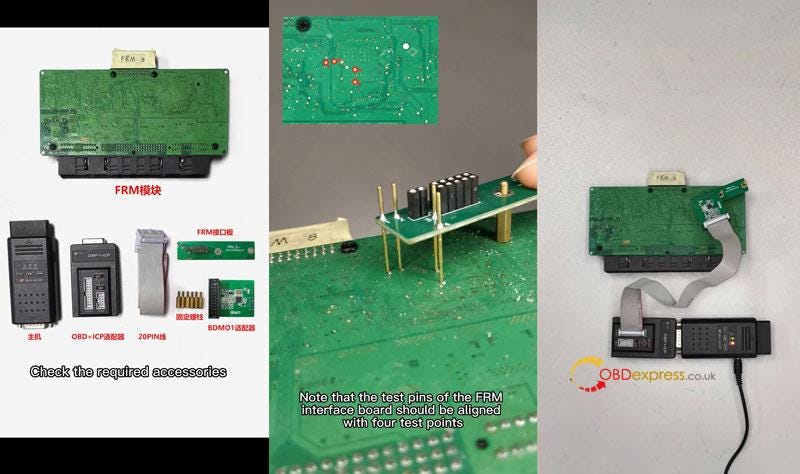
Required Accessories

FRM module

Yanhua Mini ACDP Basic Module

OBD + ICP adapter

20PIN cable

FRM interface adapter

Fixed screws

BDMO1 adapter

Connection

  • Install the fixed screws and FRM interface adapter. Note that the test pins on FRM interface adapter should be aligned with 4 test points. Lock 2 screws.
  • Connect the BDM01 adapter to the OBP+ICP adapter & FRM interface adapter.
  • Connect to ACDP and power up.
    1. Yanhua Mini ACDP Repair BMW FRM Module Without Coding

      Operation

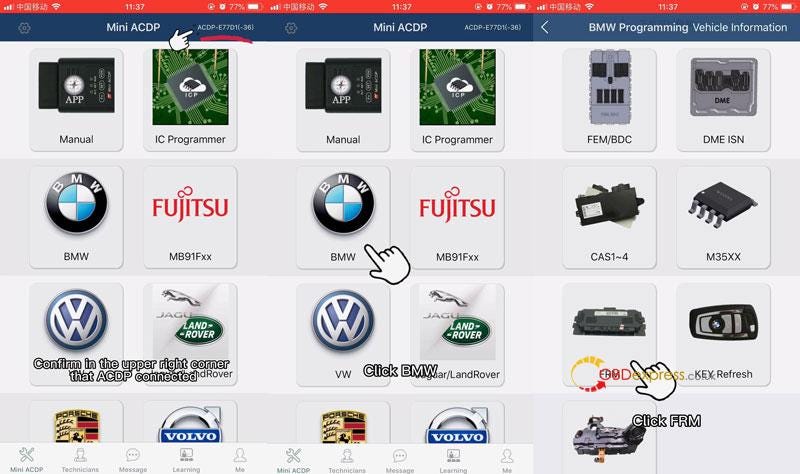
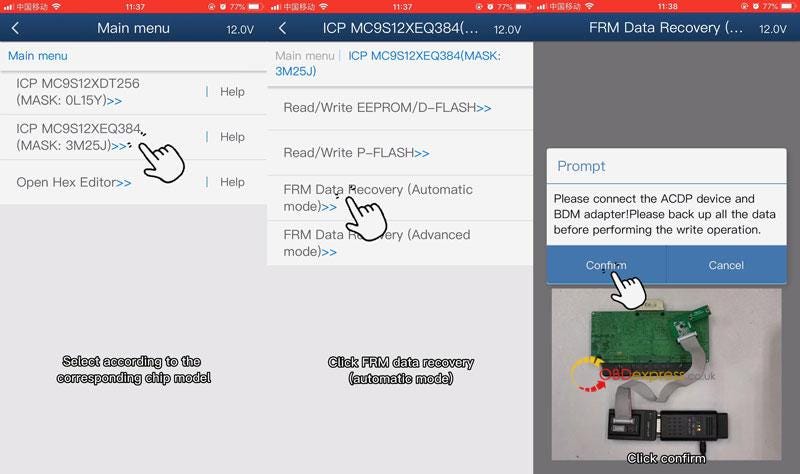
      Mini ACDP APP >> Confirm in the upper right corner that ACDP connected >> BMW >> FRM >> Select according to the corresponding chip model: ICP MC9S12XEQ384(MASK: 3M25J) >> FRM Data Recovery(Automatic mode)

      Confirm the ACDP device and the adapter are connected properly. Please back up all the data before performing the write operation.

      Press "Confirm".

      Yanhua Mini ACDP Repair BMW FRM Module Without Coding

      Yanhua Mini ACDP Repair BMW FRM Module Without Coding

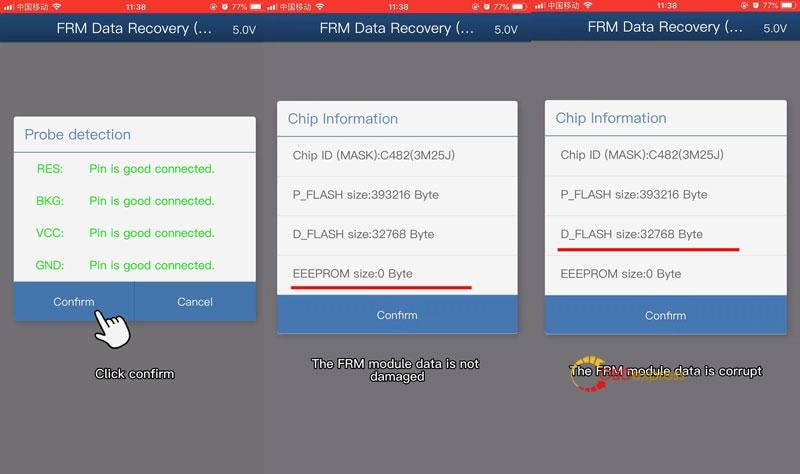
      Waiting for pin detection to pass…

      Press "Confirm".

      Check the chip info read out:

      If 4K EEPROM data is read, the FRM module data is not damaged. Please operate with caution.

      If 32K Dflash data is read, the FRM module data is corrupt.

      Press "Confirm".

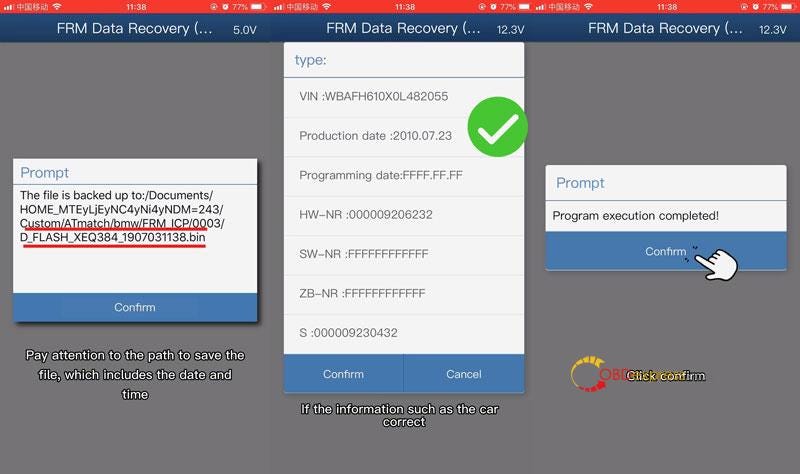
      Confirm the backup data path.

      Check the frame number and other info:

      If the parsed car info is incorrect, press "Cancel" to exit automatic repair.

      If the info such as the car correct, press "Confirm".

      Repairing chip data…

      Program execution completed!

      Yanhua Mini ACDP Repair BMW FRM Module Without Coding

      Yanhua Mini ACDP Repair BMW FRM Module Without Coding

      www.obdexpress.co.uk

      Wednesday, May 24, 2023

      Refresh BMW E/F Chassis 8HP ISN with Yanhua Mini ACDP + Module 11

       This is a tutorial on how to use Yanhua Mini ACDP + Module 11 to refresh BMW E/F chassis 8HP ISN. Besides, Module 11 can refresh F chassis 6HP data without welding as well.

      BMW E Chassis 8HP EGS ISN Refresh

      Accessories required:

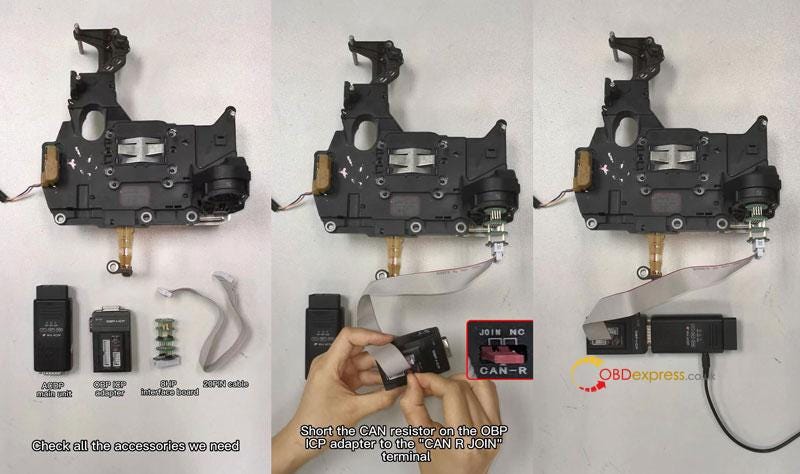
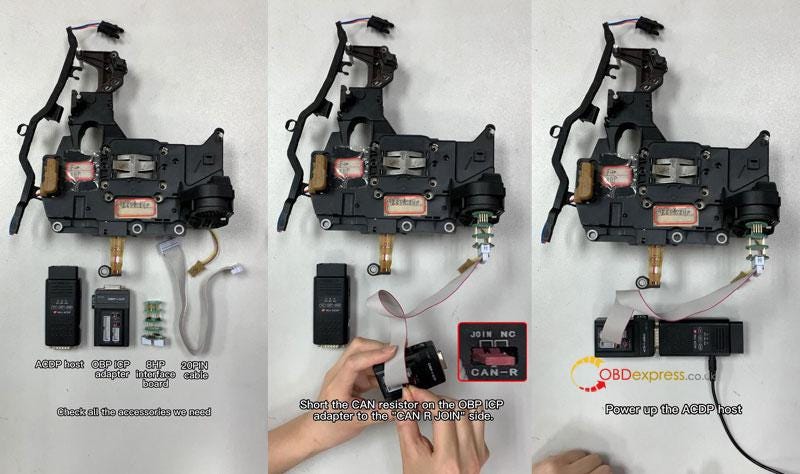
      BMW EGS module, ACDP main unit, OBP ICP adapter, 8HP interface board, 20 PIN cable.

      Connection:

    2. Install the 8HP interface board, connect the OBP ICP adapter.
    3. Short the CAN resistor on the OBP ICP adapter to the "CAN R JOIN" terminal.
    4. Connect and power up the ACDP host.
      1. Yanhua Mini ACDP Refresh BMW E/F Chassis 8HP EGS ISN

        Operation:

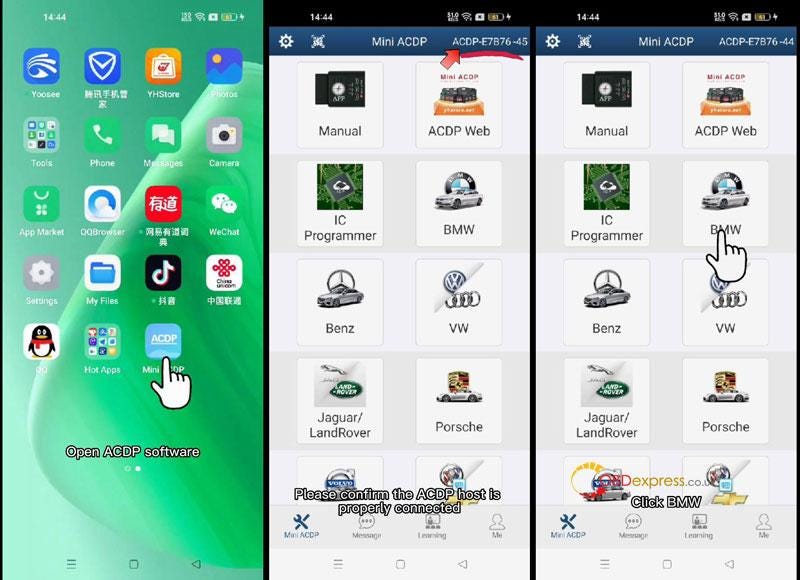
        * Please make sure the ACDP host is properly connected.

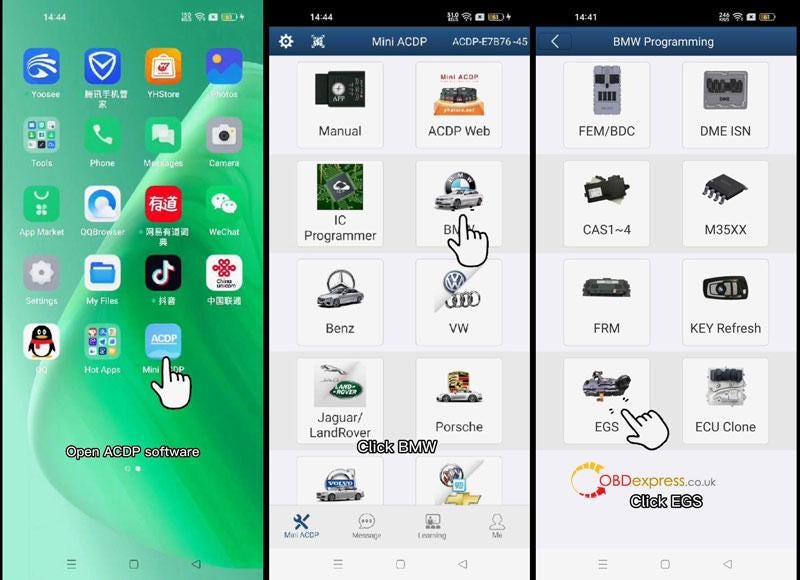
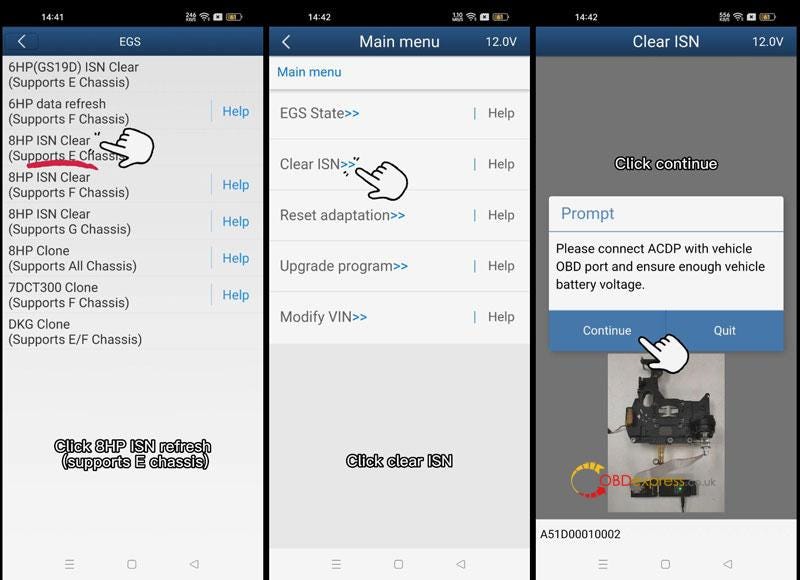
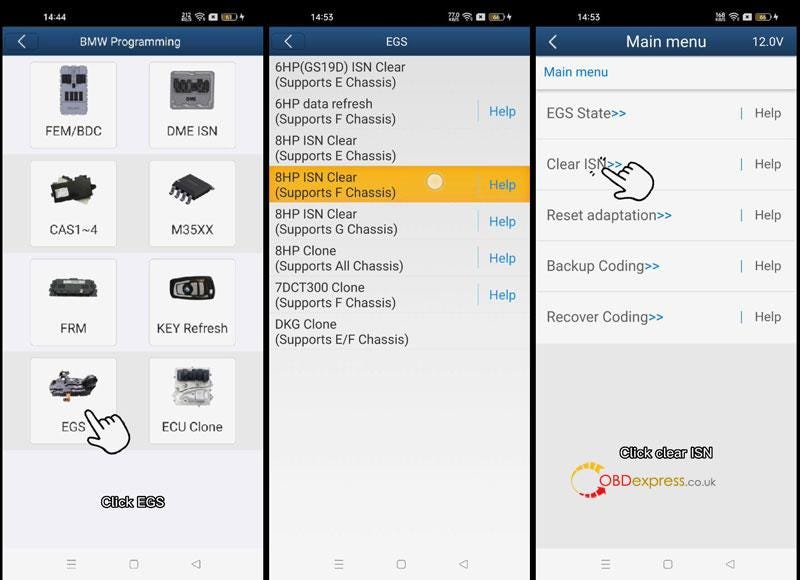
        Mini ACDP APP>> BMW >> EGS >> 8HP ISN Clear(Supports E Chassis) >> Clear ISN

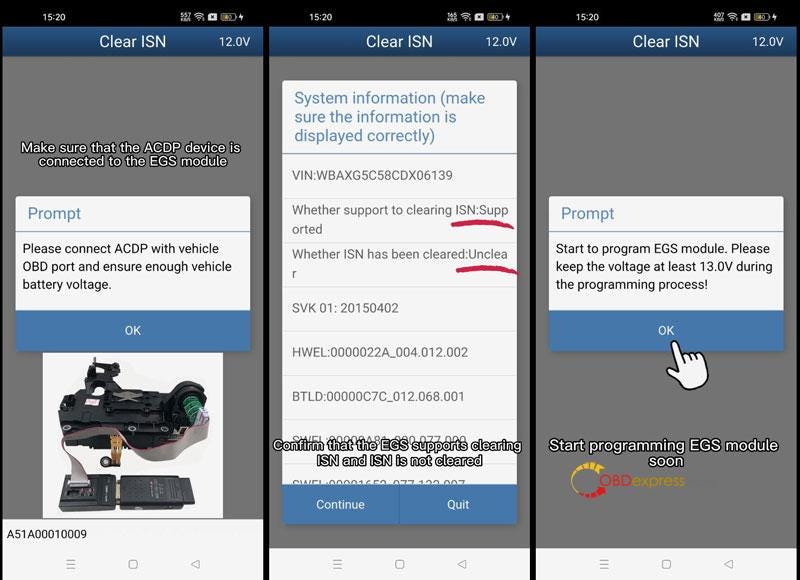
        Please connect ACDP with vehicle OBD port and ensure enough vehicle battery voltage. Click "Continue".

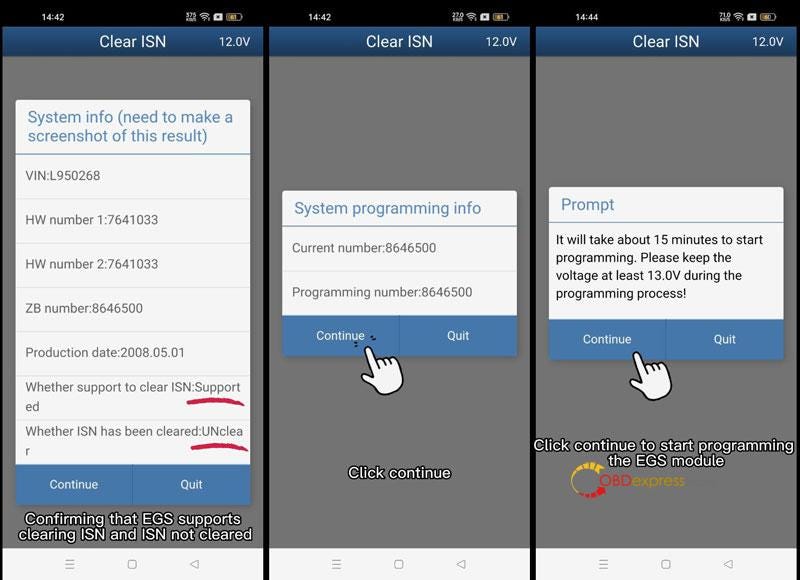
        Confirm the EGS supports clearing ISN and ISN not cleared, click "Continue".

        Confirm the system programming information, click "Continue".

        It will take about 15 minutes to start programming. Please keep the voltage at least 13.0V during the programming process! Click "Continue".

        EGS module is being programmed…

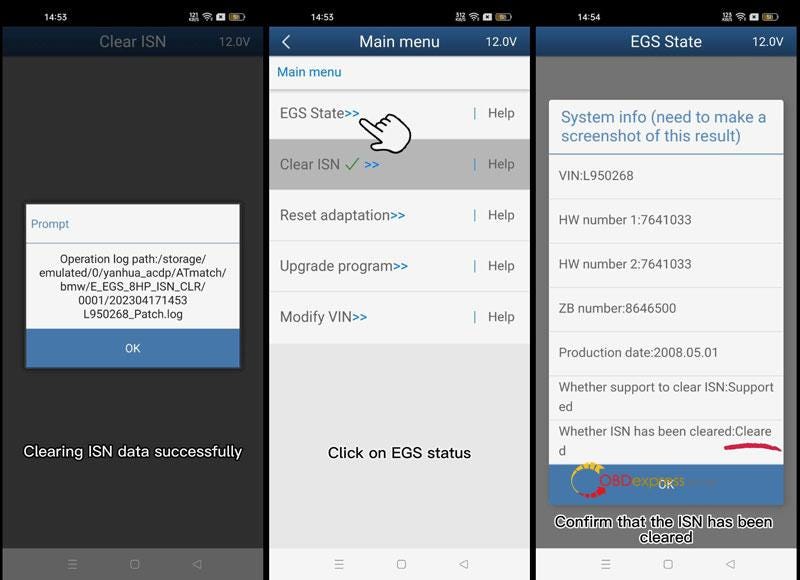
        ISN data has been cleared successfully.

        EGS State >> Continue

        As we can see, the ISN has changed to be cleared.

        Done.

        Yanhua Mini ACDP Refresh BMW E/F Chassis 8HP EGS ISN

        Yanhua Mini ACDP Refresh BMW E/F Chassis 8HP EGS ISN

        Yanhua Mini ACDP Refresh BMW E/F Chassis 8HP EGS ISN

        Yanhua Mini ACDP Refresh BMW E/F Chassis 8HP EGS ISN

        BMW F Chassis 8HP EGS ISN Refresh

        Accessories required:

        BMW EGS module, ACDP host, OBP ICP adapter, 8HP interface board, 20 PIN cable.

        Connection:

      2. Installing the 8HP interface board and connect OBP ICP adapter.
      3. Short the CAN resistor on the OBP ICP adapter to the "CAN R JOIN" side.
      4. Connect and power up the the ACDP host.
        1. Yanhua Mini ACDP Refresh BMW E/F Chassis 8HP EGS ISN

          Operation:

          * Ensure the ACDP host is properly connected.

          Mini ACDP Software >> BMW >> EGS >> 8HP ISN Clear(Supports F Chassis) >> Clear ISN >> OK

          Confirm the EGS supports clearing ISN and ISN is not cleared. Click "Continue".

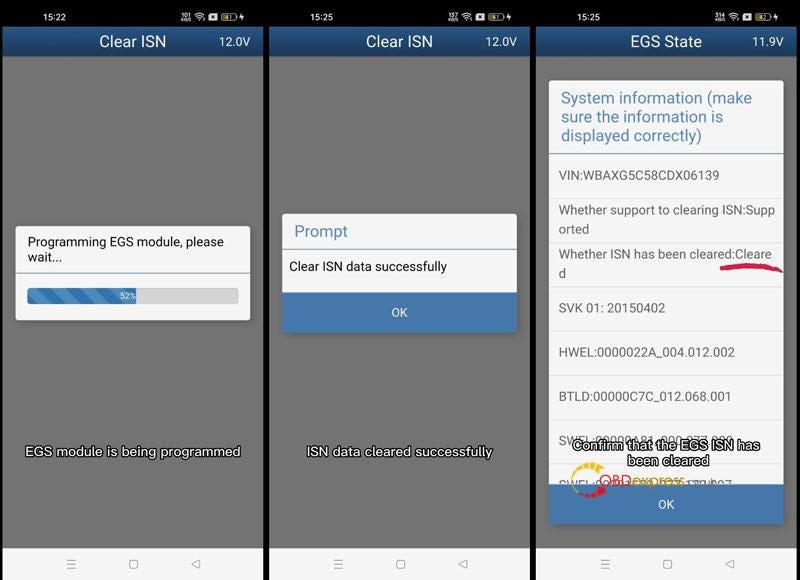
          Click "OK" to start programming EGS module.

          Programming EGS module, please wait…

          Clear ISN data successfully.

          EGS State >> OK

          The EGS ISN has been cleared.

          Done.

          Yanhua Mini ACDP Refresh BMW E/F Chassis 8HP EGS ISN

          Yanhua Mini ACDP Refresh BMW E/F Chassis 8HP EGS ISN

          Yanhua Mini ACDP Refresh BMW E/F Chassis 8HP EGS ISN

          Yanhua Mini ACDP Refresh BMW E/F Chassis 8HP EGS ISN

          www.obdexpress.co.uk

          Thursday, May 11, 2023

          Yanhua JLR KVM Soldering Toolkit: The Solution for MCU Repair

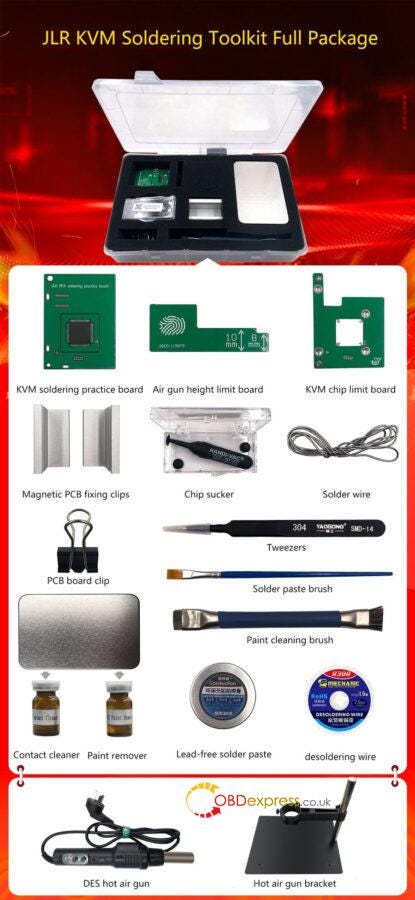
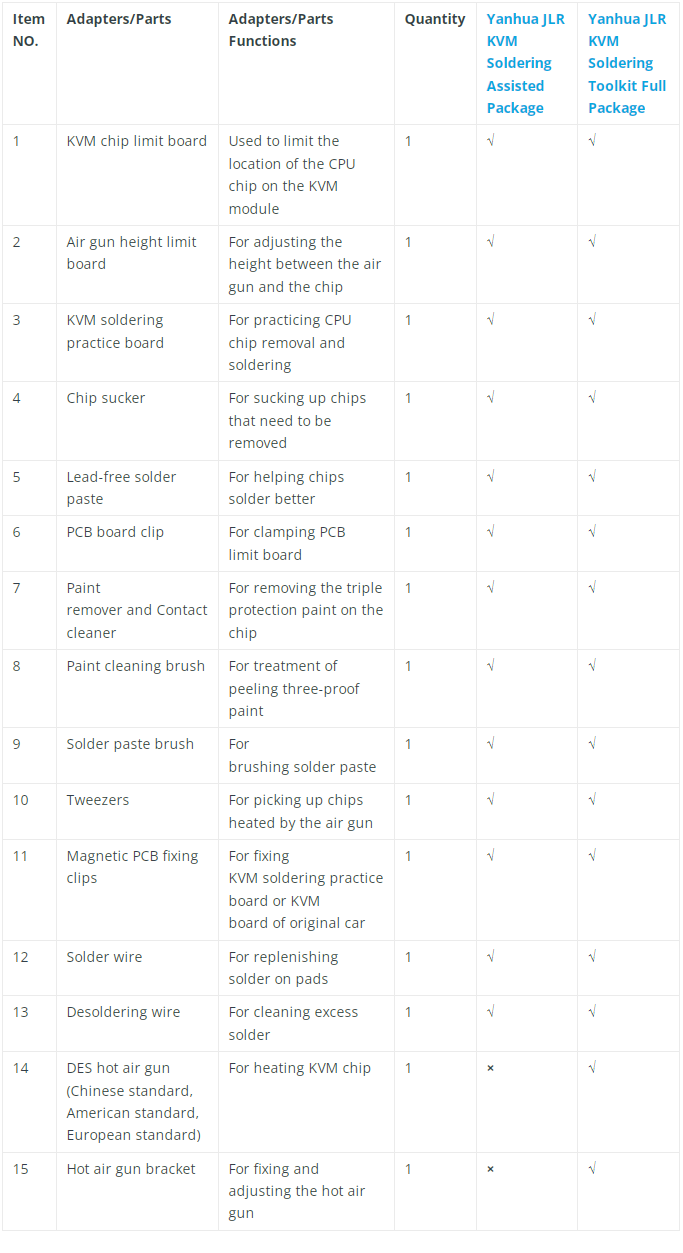
           Yanhua JLR KVM Soldering Toolkit is specially designed for customers to solder and desolder 2018+ Jaguar Land Rover KVM (RFA module) MCU processor chips easier and faster. There are two kinds of toolkits available at obdexpress.co.uk. The main difference is the full package has DES hot air gun and Hot air gun bracket. You can choose any one according to your own need.

          Solder or Desolder 2018+ JLR KVM with Yanhua JLR KVM Soldering Toolkit


          Yanhua JLR KVM Soldering Toolkit Comparison Table:


          Solder or Desolder 2018+ JLR KVM with Yanhua JLR KVM Soldering Toolkit


          As the JLR KVM Soldering Toolkit Full Package has more tools, the price is more expensive. It's 333 euro with 15 items, and another package is 210 euro with 13 items.

          How to use Yanhua JLR KVM Soldering Toolkit to desolder/solder 2018+ JLR KVM?

          Toolkits used: Yanhua JLR KVM Soldering Toolkit Full Package

          1.Remove 2018+ JLR KVM chip

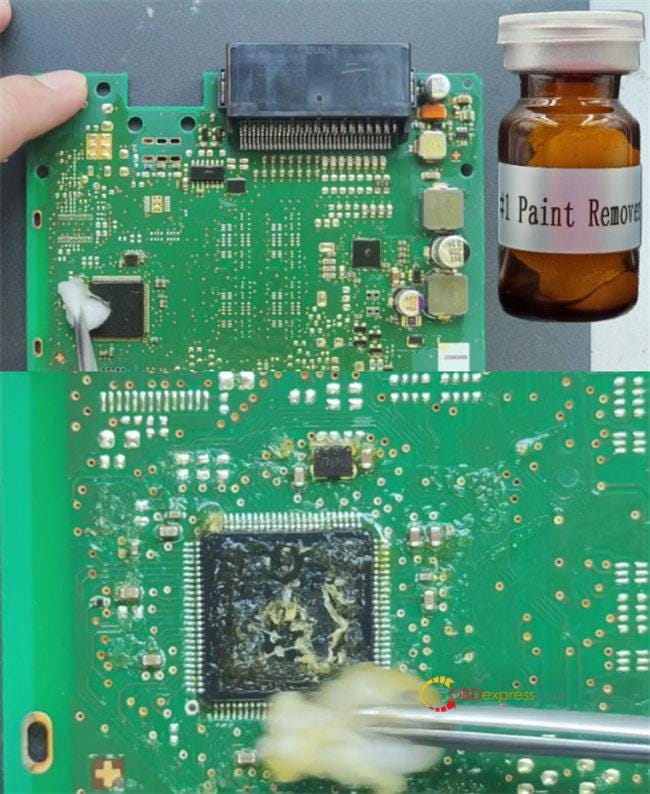
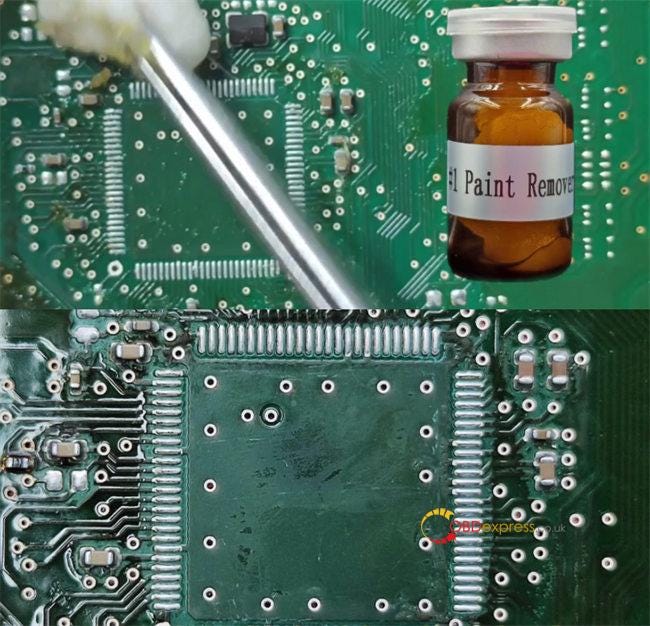
          Apply Yanhua paint remover to the top of the chip and the pins

          After 30 seconds, you will see the protective paint start to peel off

          Apply the paint remover to the pin area

          After about 90s, you can start cleaning the chip with cotton.


          Solder or Desolder 2018+ JLR KVM with Yanhua JLR KVM Soldering Toolkit


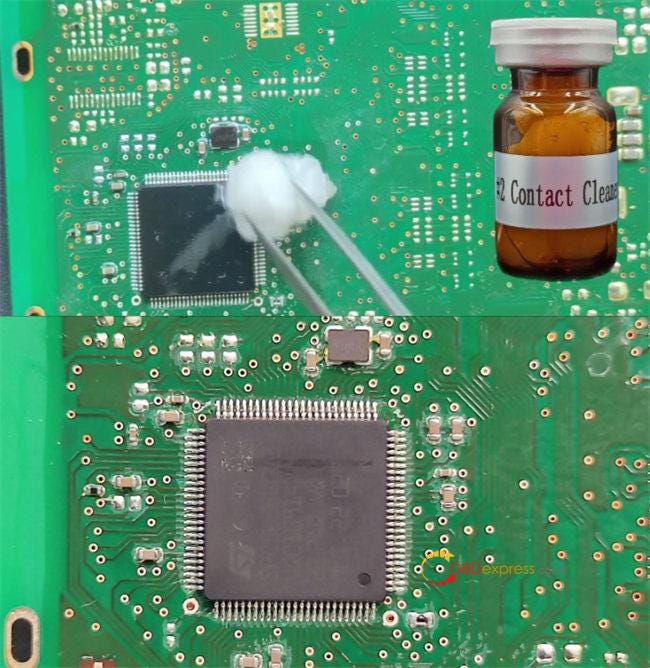
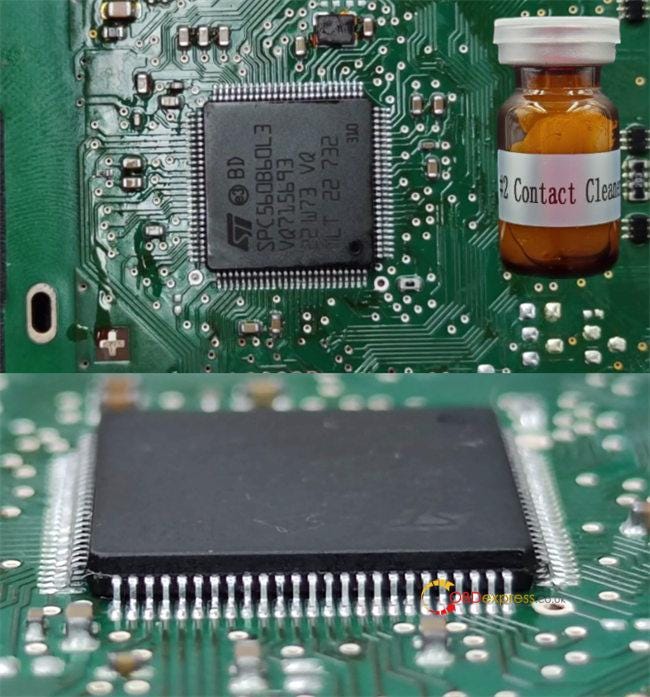
          Then clean the board with the Contact cleaner to avoid corrosion of the board by paint remover

          This is the effect after paint removal and cleaning.


          Solder or Desolder 2018+ JLR KVM with Yanhua JLR KVM Soldering Toolkit


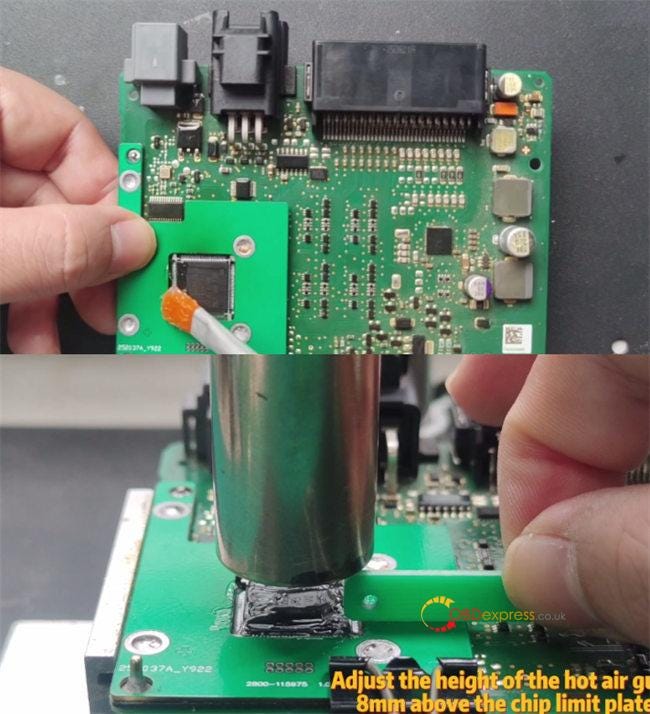
          Install the KVM chip limit board

          Apply Solder paste to the chip pins

          Use the temperature and the airflow adjustable Hot air gun to desolder chip

          Use PCB board clip to secure the chip limit plate

          Use the Air gun height limit board to adjust the of height of the hot air gun, 8m above the chip limit board


          Solder or Desolder 2018+ JLR KVM with Yanhua JLR KVM Soldering Toolkit


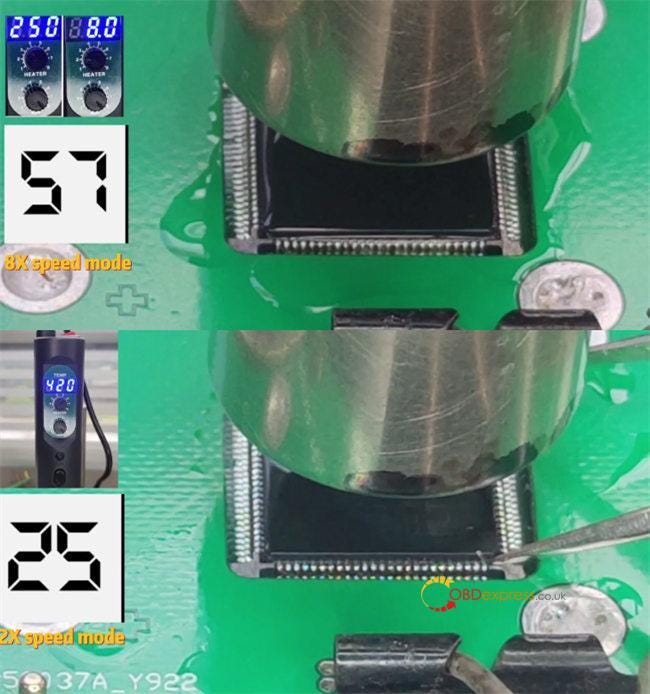
          Adjust the air volume to 8 gear

          Adjust the preheating temperature to 250℃

          Start the Hot air gun, keep the temperature at 250℃, preheat for 90 seconds

          After 90 seconds, raise the temperature to 420℃, and heat for 25 seconds


          Solder or Desolder 2018+ JLR KVM with Yanhua JLR KVM Soldering Toolkit


          At this point, use Tweezers to hold one corner of the chip. When the chip is loose, and clip up the chip.

          About 25 seconds, the chip is close, remove the Air gun and clip up the chip.

          Clean the bottom and pins of the chip with Yanhua paint remover

          Then clean the board with the Contact cleaner to avoid corrosion of the board by paint remover

          There is the original plate solder on the pad, please check whether there is short circuit between the board.


          Solder or Desolder 2018+ JLR KVM with Yanhua JLR KVM Soldering Toolkit


          Video guide:

          https://youtu.be/AjZyT21saWg

          2.Solder 2018+ JLR KVM chip

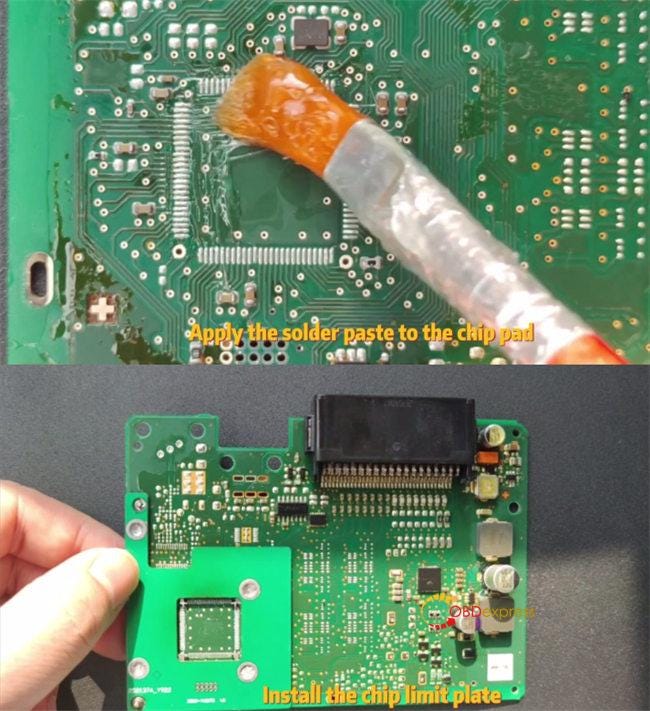
          Apply the Solder paste to the chip pad

          Install the KVM chip limit board


          Solder or Desolder 2018+ JLR KVM with Yanhua JLR KVM Soldering Toolkit


          Use Clamp to secure the chip limit plate

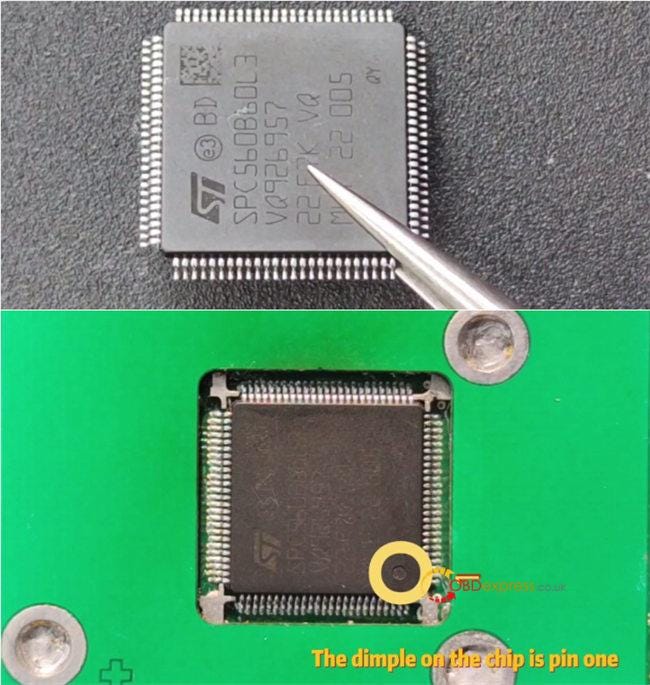
          Use Yanhua proprietary chips, Yanhua has added solder for the chip pin before delivery

          Gently place the chip into the Chip limit plate

          Please note the chip pin direction

          The dimple on the chip is pin1


          Solder or Desolder 2018+ JLR KVM with Yanhua JLR KVM Soldering Toolkit


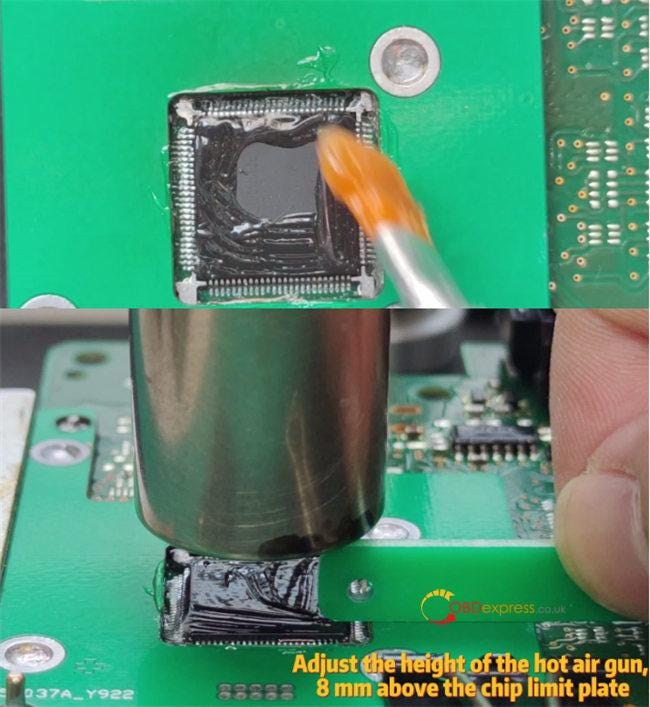
          Apply Solder paste to the chip pins and the top of the chip

          Check that the chips are placed correctly

          Use the temperature and the air volume adjustable Hot air gun to below and solder chip

          Use the Air gun height limit board to adjust the of height of the hot air gun, 8m above the chip limit plate


          Solder or Desolder 2018+ JLR KVM with Yanhua JLR KVM Soldering Toolkit


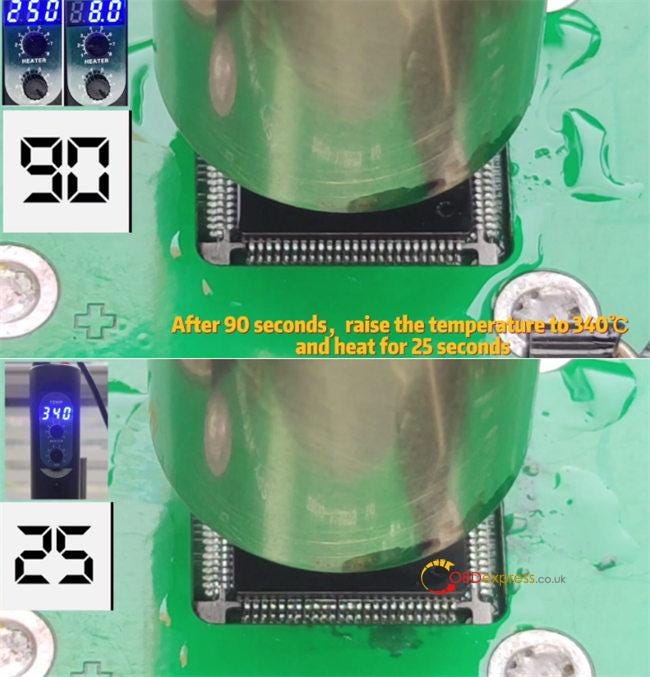
          Adjust the air volume to 8 gear

          Adjust the preheating temperature to 250℃°

          Start the hot air gun, keep the temperature at 250℃, preheat for 90 seconds

          After 90 seconds, raise the temperature to 340℃, and heat for 25 seconds


          Solder or Desolder 2018+ JLR KVM with Yanhua JLR KVM Soldering Toolkit


          About 25 seconds, please shut down and remove the air gun

          Use the Contact cleaner to clean the solder paste on the chip

          This is final result after welding and cleaning.


          Solder or Desolder 2018+ JLR KVM with Yanhua JLR KVM Soldering Toolkit


          Video guide:

          https://youtu.be/5_QH4CojmTQ

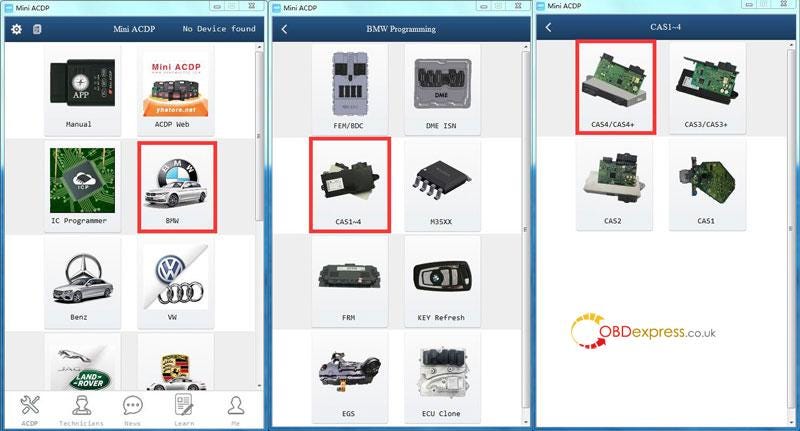
          Yanhua JLR KVM Soldering Assisted Package without DES hot air gun and bracket (€210 + free shipping):

          https://www.obdexpress.co.uk/wholesale/yanhua-jlr-kvm-soldering-assisted-package.html
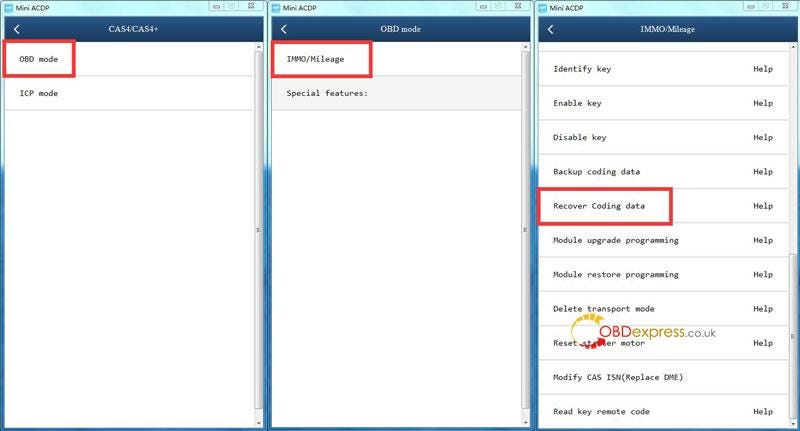
          Yanhua JLR KVM Soldering Toolkit Full Package with DES hot air gun and bracket (€333 + free shipping):

          https://www.obdexpress.co.uk/wholesale/yanhua-jlr-kvm-soldering-toolkit-full-package.html
          www.obdexpress.co.uk


          Faster and More Stable 35128WT Read and Write with YH35XX Chip Clip

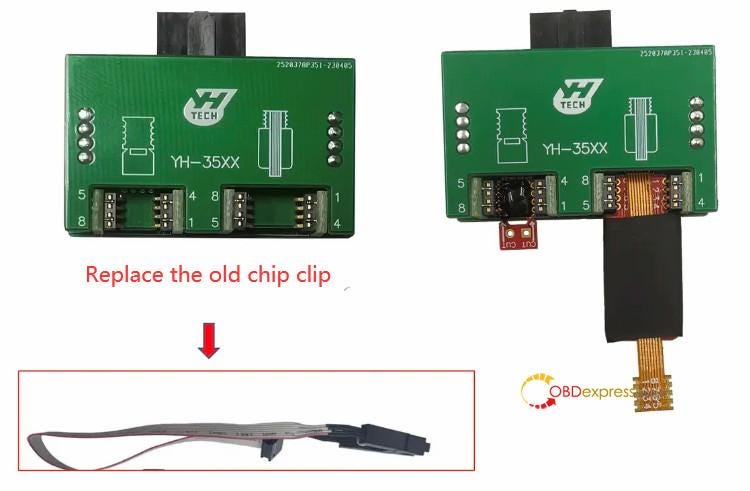
           Yanhua YH35XX Programmer & Simulator for 35128WT Read and Write has been upgraded. The programmer is the same, and the old chip clip is replaced by the new YH35XX chip clip. The prices are the same, but it's easier and more stable to install the chip, and faster to read the chip as well.

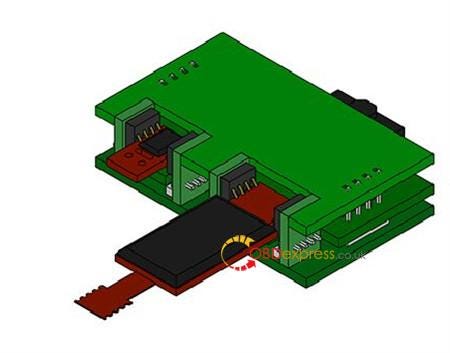
          Install YH35XX Chip Clip for 35128WT Read and Write

          Simple guide to install YH35XX Chip Clip:

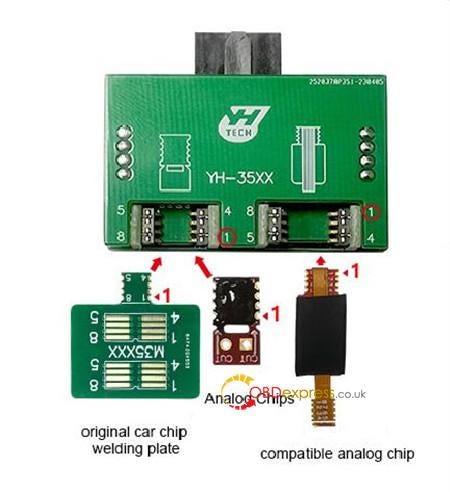
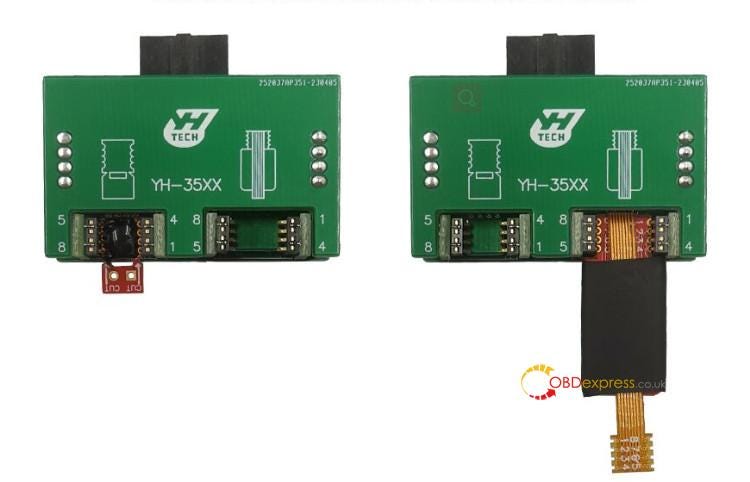
          Step 1: Confirm the position and pin definition of the original car chip welding plate, analog chip, compatible analog chip and YH35XX chip clip before installation

          Install YH35XX Chip Clip for 35128WT Read and Write

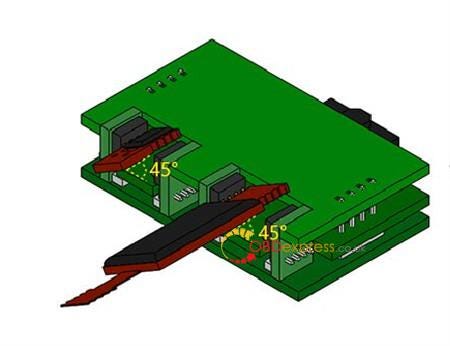
          Step 2: Title the original car chip welding plate, analog chip or compatible analog chip at an angle of 45°and install it into the corresponding YH35XX chip clip from top to bottom

          Install YH35XX Chip Clip for 35128WT Read and Write

          Step 3: Confirm that the original car chip welding plate, analog chip or compatible analog chip is firmly installed

          Install YH35XX Chip Clip for 35128WT Read and Write

          Here is the overall installation effect.

          Install YH35XX Chip Clip for 35128WT Read and Write

          How to read and write 35128WT with YH35XX Chip Clip?

          It covers F classis odometer with 35128WT EEPROM, and G classis VDO odometer.

          The operation guide is easy. No risk! No red dot on odometer.

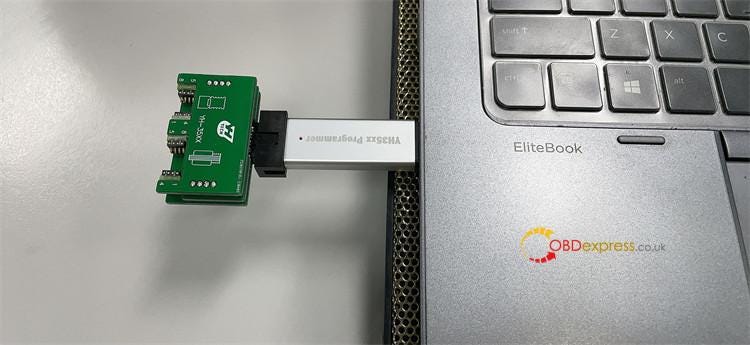
          Connect the YH35XX Chip Clip and YH35XX programmer, and connect into the computer

          Install YH35XX Chip Clip for 35128WT Read and Write

          Then the independent software inside can be run directly

          For more details, please refer to YH35XX programmer + Simulator User manual.

          If you are interested in new upgrade Yanhua YH35XX Programmer + Simulator, don't hesitate to order one.

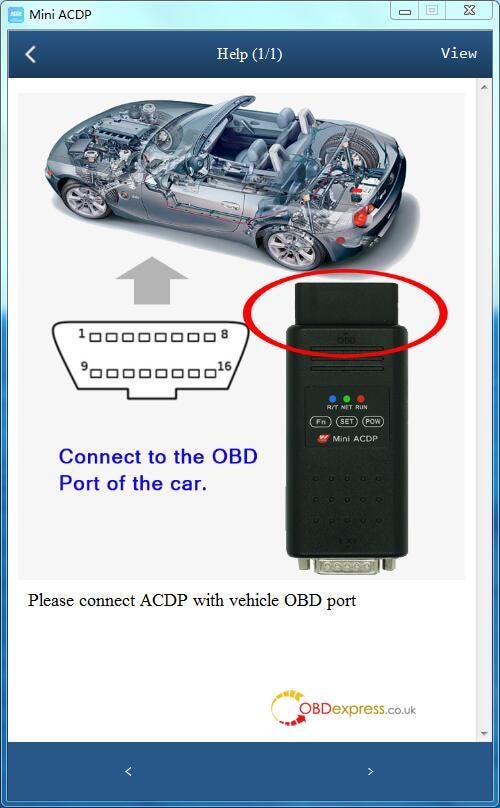
          https://www.obdexpress.co.uk/wholesale/yanhua-yh35xx-programmer-simulator-35128wt.html
          Monday, February 6, 2023

          How Yanhua Mini ACDP solves data loss problem of BMW CAS4

           Question: Hello, I recently experienced a data lost with Yanhua Mini ACDP BMW CAS3+. This CAS3+ is easy to fix. But I'm wondering what can I do if I had problem with CAS4+ or FEM/BDC module.

          We are asking if there is a solution to fix the problem…

          Solution

          • If CAS4/CAS4+ coding data loss due to transmission interruption, go to recover data in Mini ACDP, the vehicle can back to normal.

          Path: BMW >> CAS1~4 >> CAS4/CAS4+ >> OBD mode >> IMMO/Mileage >> Recover coding data

          Yanhua Mini ACDP restores BMW CAS4 data

          Yanhua Mini ACDP restores BMW CAS4 data

          Yanhua Mini ACDP restores BMW CAS4 data

          • If FEM/BDC transmission break, DO NOT exit and wait for 15 minutes. The ACDP back-end will run automatically.
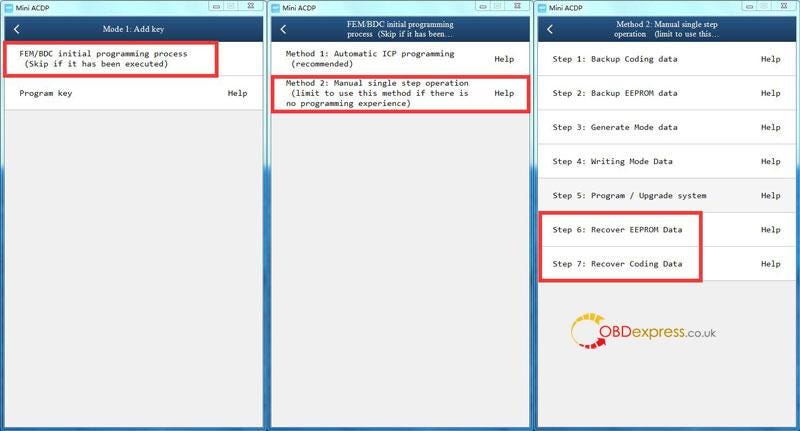
          • If FEM/BDC data loss, go to recover EEPROM & coding data in Mini ACDP with a smart phone. The vehicle will return to normal.

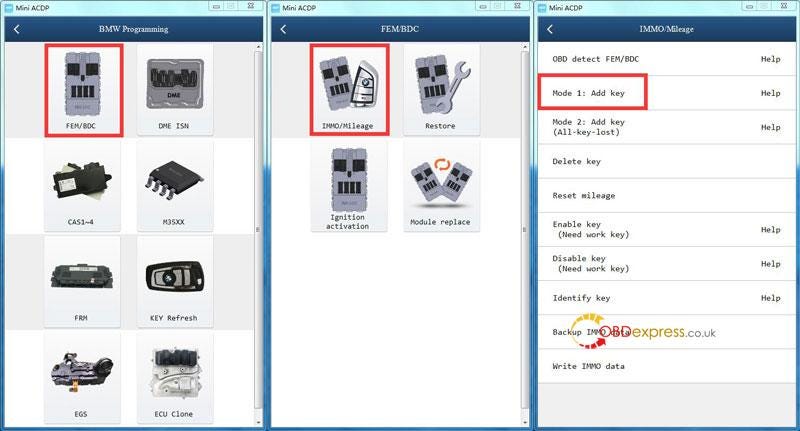
          Path: BMW >>FEM/BDC>>IMMO/Mileage >>Mode 1: add key >> FEM/BDC initial programming process >> Method 2: manual single step operation >> Recover EEPROM data/ Recover coding data

          Yanhua Mini ACDP restores BMW CAS4 data

          Yanhua Mini ACDP restores BMW CAS4 data

          Yanhua Mini ACDP restores BMW CAS4 data

          Technical Support

          www.obdexpress.co.uk

          Sunday, January 8, 2023

          How to solve Digimaster 3 mileage adjustment (1E10) error

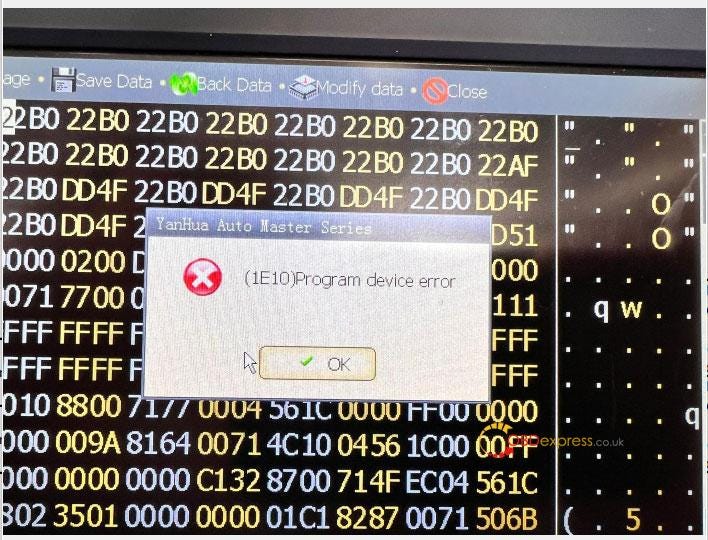
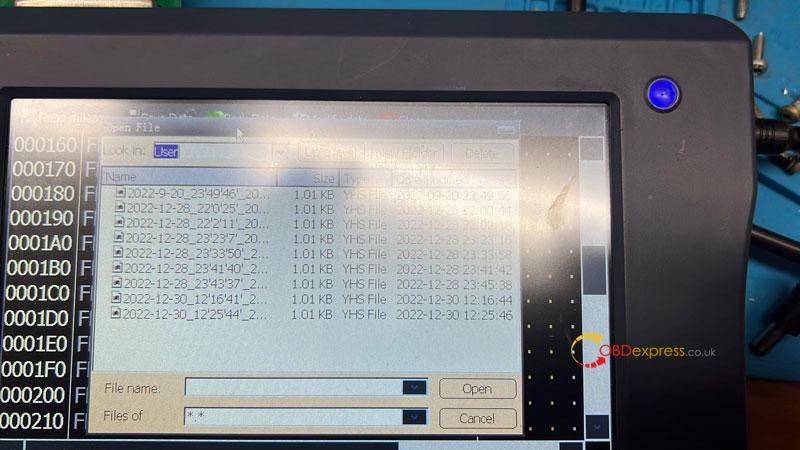
           Problem: Can you please help me with this YANHUA Digimaster 3 error code? This is for a 2006 Range Rover V8, it reads the EPROM file. However, it gives me this error when I try to change the mileage.

          I've changed the miles before on the same vehicle. It worked fine for a day and started giving an error code in the mileage screen: "(1E10)Program device error".

          What's the problem? Any suggestions?

          Yanhua Digimaster 3 error message (1E10) Solution

          Yanhua Digimaster 3 error message (1E10) Solution

          Solution

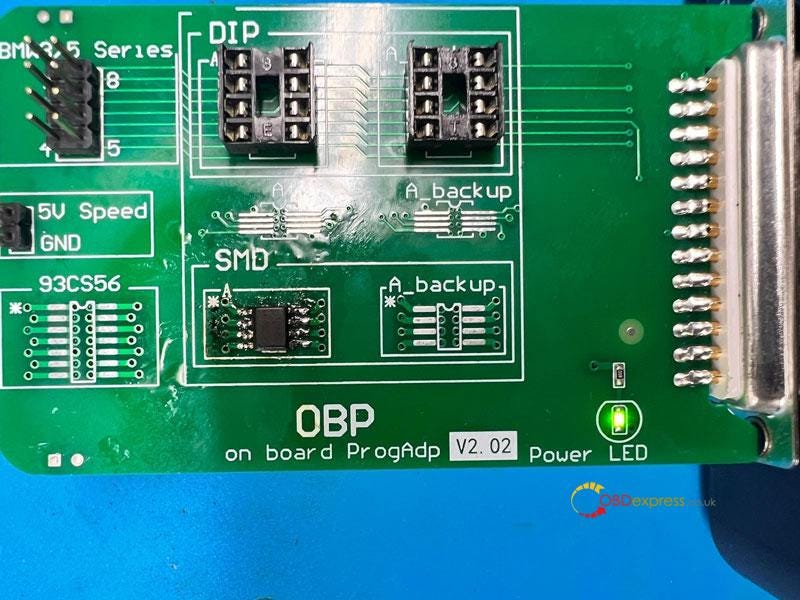
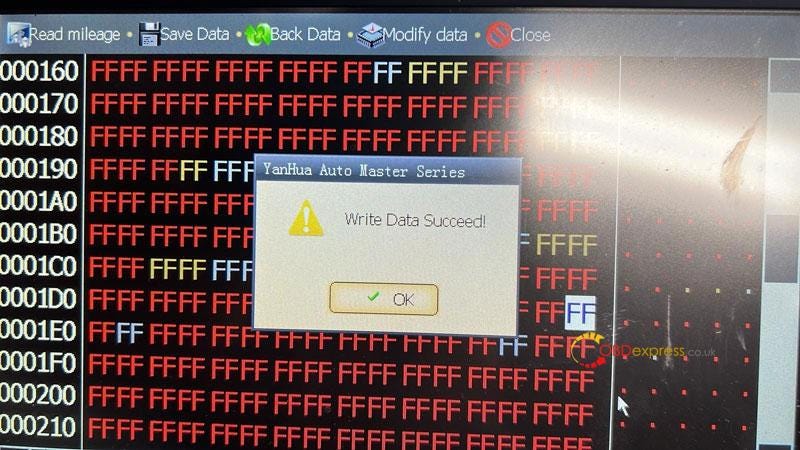
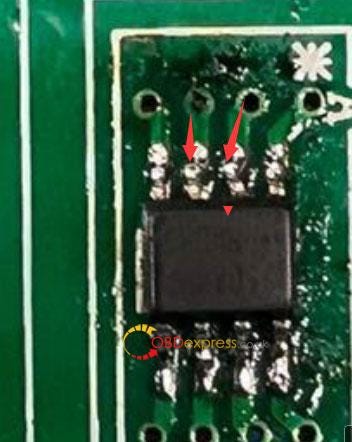
          The reason for Digimaster III can read but unable to write is because of not welding properly. The unwelded pins won't allow to write any data. Or it may display "Write Data Succeed!" while the actual file is an empty data with all FFF.

          To solve the problem, just re-weld the 2 pins.

          Noted do not solder too much tin around the pin, as it's easy to cause short circuit.

          Yanhua Digimaster 3 error message (1E10) Solution

          Yanhua Digimaster 3 error message (1E10) Solution

          Yanhua Digimaster 3 error message (1E10) Solution

          Hope this can help.

          More questions, please contact us.

          www.obdexpress.co.uk