Monday, August 1, 2022

Can Yanhua module 9 support copy keys for after 2019 JLR?

 Can Yanhua module 9 copy all 2011–2019 JLR keys by obd?

Yanhua engineer replied:

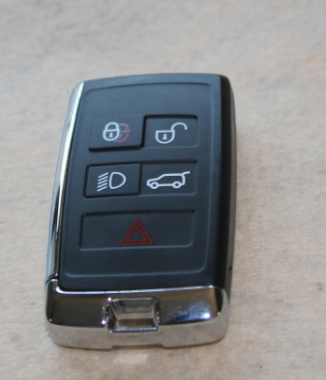
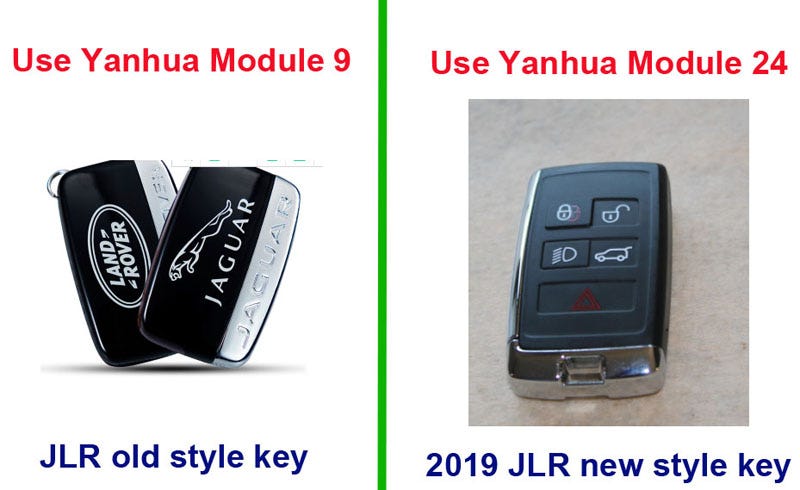
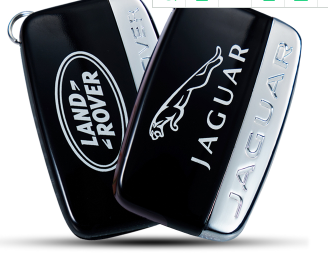
Generally supported, but there is one thing to note: The 2019 JRL series keys have undergone a style change, and the original keys are similar to the picture below.

old JRL series keys

And the new style key is like this:

2019 JRL series keys

As long as it is a JLR key whose style has not changed (old JLR key), it can be copied by using Yanhua module 9 + Double CAN Adapter.

Yanhua products also support JLR keys after the style change, but not module 9, but module 24.

JRL series keys

The expansion module of Yanhua Mini ACDP supports more functions. If you don’t know which module is suitable for your car, you can contact us for support:

Email: sales@OBDexpress.co.uk

WhatsApp: +86 18750906257

Skype: obd2express.co.uk

Tuesday, July 12, 2022

Mercedes-Benz VGS-NAG3 9GTronic Gearbox Clone by Yanhua Mini ACDP Module 19

 Yanhua Mini ACDP with Module 19 can clone gearbox for all ZF 8HP, VW/ Audi DQ380/ DQ381 0DE, Mercedes-Benz 9GT (VGS-NAG3), BMW 7-dual-clutch (GETAG 7DCT) and BMW 7-dual-cluthch (TEMIC DKG). Here share the guide to clone gearbox on Mercedes-Benz 9G Tronic VGS NAG3 using the Yanhua ACDP interface board without soldering.

Prepare all devices:

ACDP host, DB15-LAN adapter, SH725XX interface board, PTCU cable and VGS-NAG3 (9 Tronic) gearbox
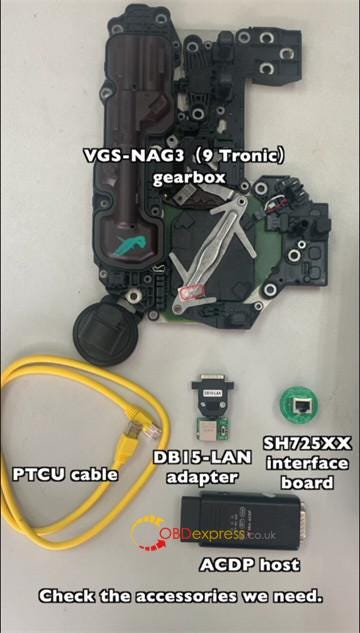
Yanhua Mini ACDP Module 19 Clone Mercedes VGS-NAG3 Gearbox

Correct connection diagram:

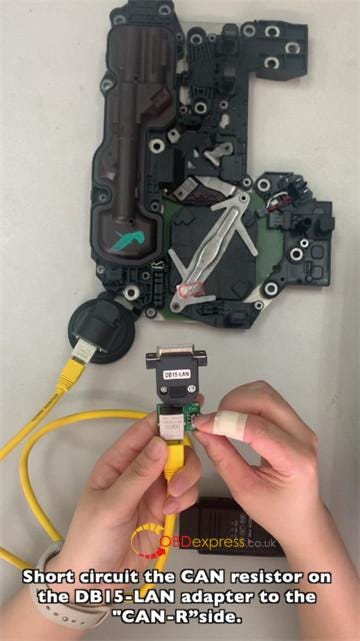
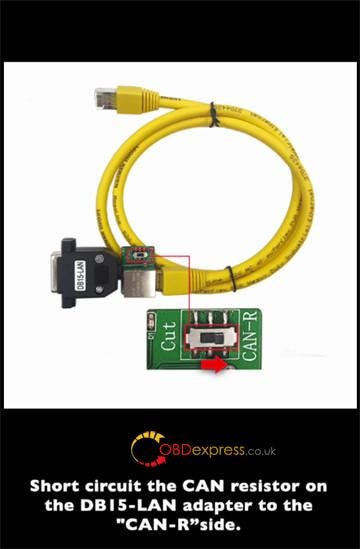
Connect the interface board correctly to the gearbox interface

Short circuit the CAN resistor on the DB15-LAN adapter to the CAN-R side

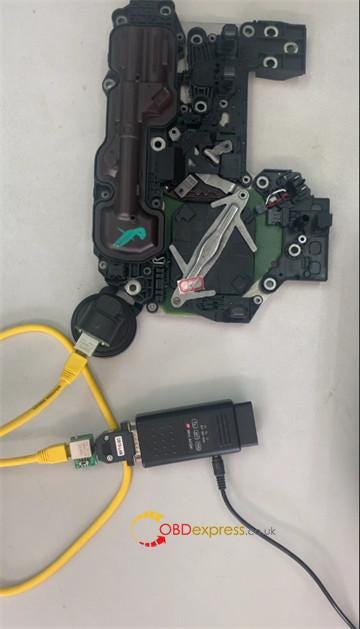
Connect ACDP, DB15-LAN adapter, interface board and gearbox

Supply power with the power adapter
Yanhua Mini ACDP Module 19 Clone Mercedes VGS-NAG3 Gearbox

Yanhua Mini ACDP Module 19 Clone Mercedes VGS-NAG3 Gearbox

Yanhua Mini ACDP Module 19 Clone Mercedes VGS-NAG3 Gearbox

Note: the connection diagram can be found in the VGS_ NAG3 9G Tronic function help document in Mini ACDP APP.
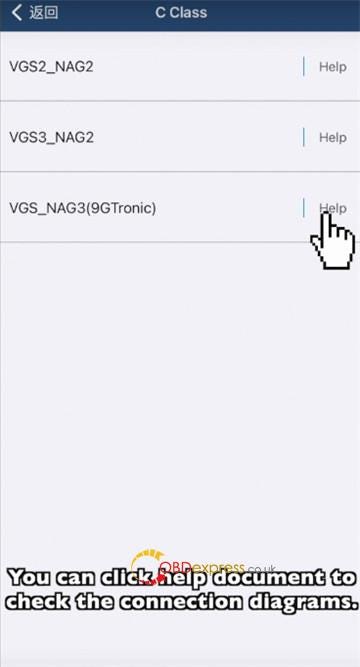
Yanhua Mini ACDP Module 19 Clone Mercedes VGS-NAG3 Gearbox

First step, go to read and save original gearbox data.

Run Mini ACDP app

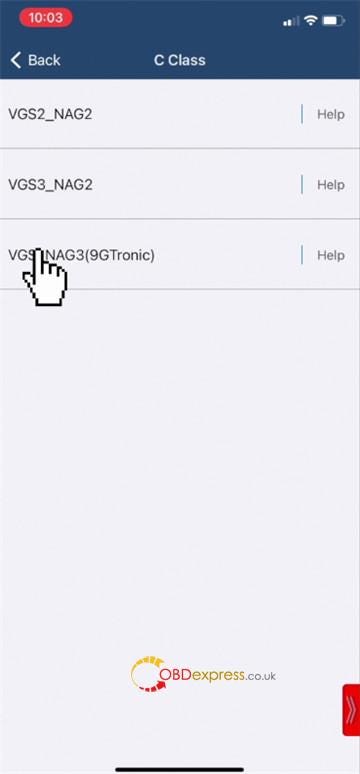
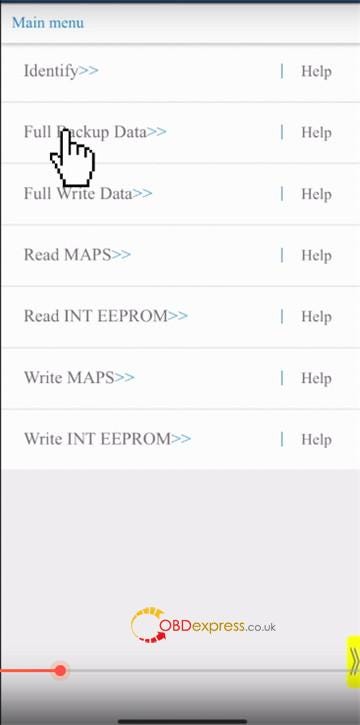
Tap Benz>>Gearbox clone/refresh>> C Class>> VGS_NAG3 (9GTronic)>> Full Backup Data
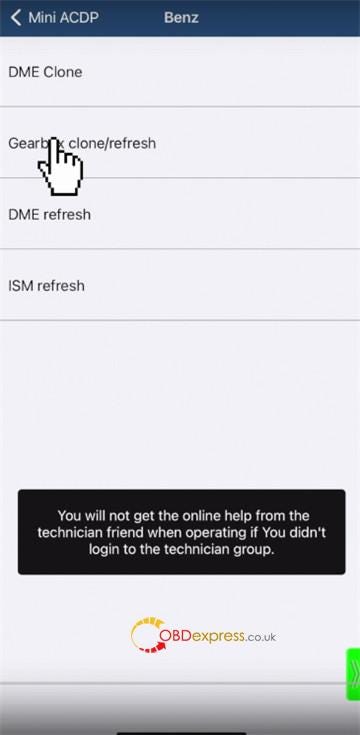
Yanhua Mini ACDP Module 19 Clone Mercedes VGS-NAG3 Gearbox

Yanhua Mini ACDP Module 19 Clone Mercedes VGS-NAG3 Gearbox

Yanhua Mini ACDP Module 19 Clone Mercedes VGS-NAG3 Gearbox

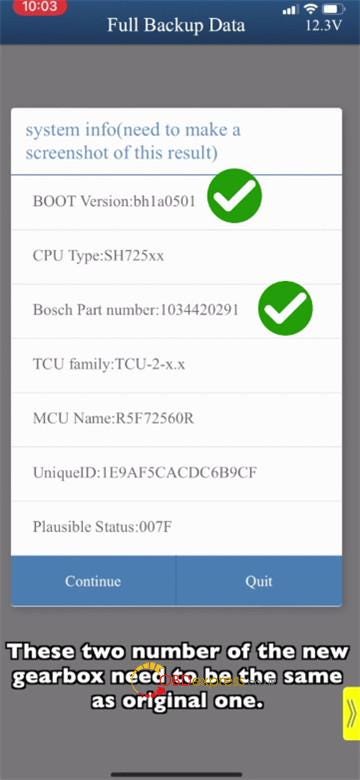
Make sure that the ACDP device is connected to the gearbox

Record the Boot version and Bosch part number

These two numbers of the new gearbox need to be the same as the original one
Yanhua Mini ACDP Module 19 Clone Mercedes VGS-NAG3 Gearbox

Make a screenshot to save the system information as well

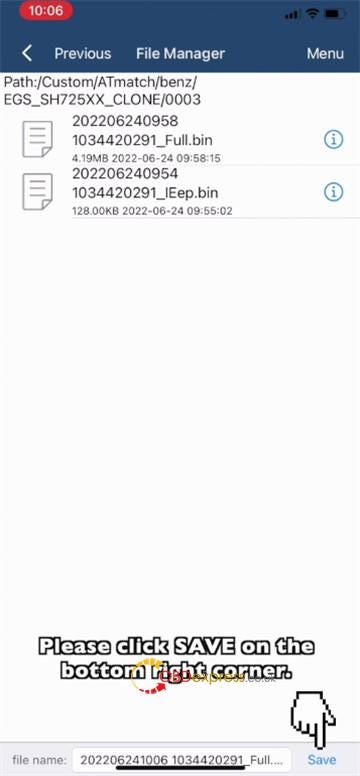
Continue to read chip data

Save the data read out
Yanhua Mini ACDP Module 19 Clone Mercedes VGS-NAG3 Gearbox

Second step, go to write data with a new gearbox

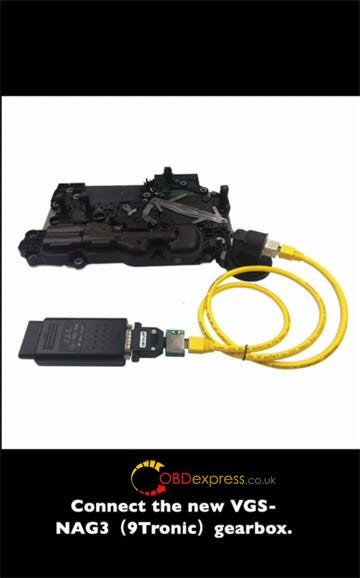
Connect a new VGA NAG3 9G Tronic gearbox with ACDP interface board
Yanhua Mini ACDP Module 19 Clone Mercedes VGS-NAG3 Gearbox

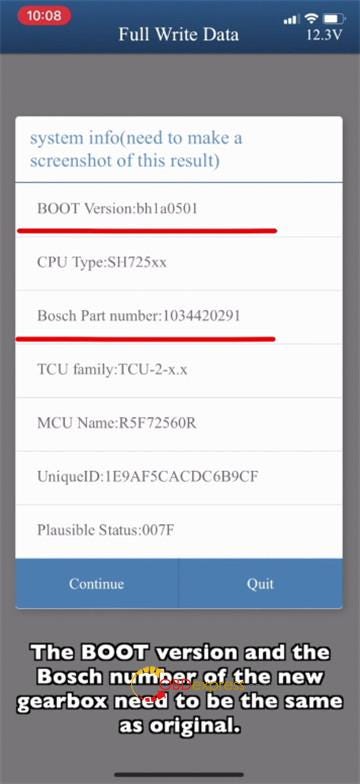
Tap Full Write Data

Check if the two numbers of the new gearbox need to be the same as the original one
Yanhua Mini ACDP Module 19 Clone Mercedes VGS-NAG3 Gearbox

Make a screenshot to save the system information

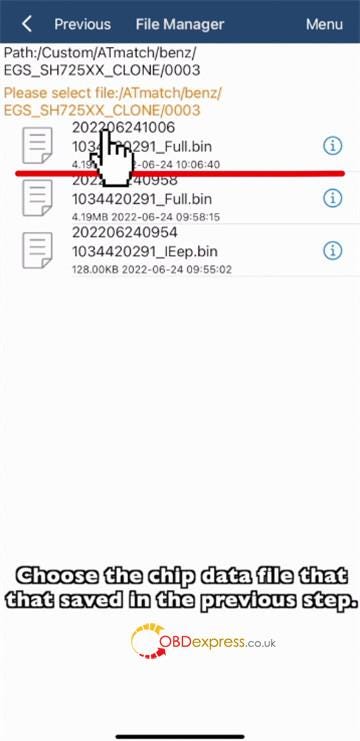
Select chip data file

Choose the chip data file that saved in the previous step
Yanhua Mini ACDP Module 19 Clone Mercedes VGS-NAG3 Gearbox

Write data finished.

Finally, install the new gearbox cloned by Mini ACDP with module 19 back to the vehicle and test.

www.obdexpress.co.uk
Tuesday, July 5, 2022

Digimaster3 Corrected 2005 Nissan Altima odometer

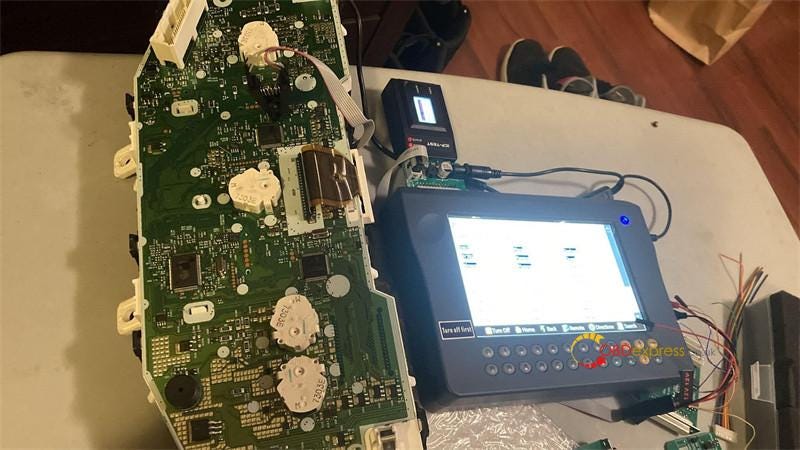
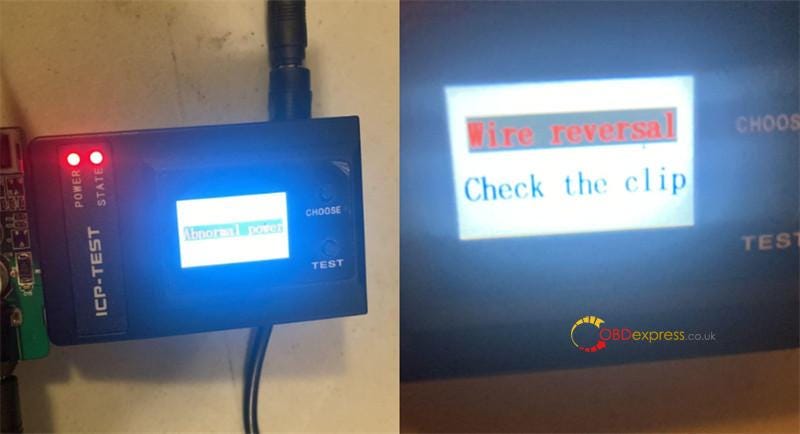
 I have received yanhua digimaster 3 and used it to correct odometer on my 2005 nissan altima. But it failed and prompted 'Wire reversal' and 'Abnormal power'. How to fix the problem?

Digimaster3 Corrected 2005 Nissan Altima odometer

Digimaster3 Corrected 2005 Nissan Altima odometer

obdexpress.co.uk engineer replied:

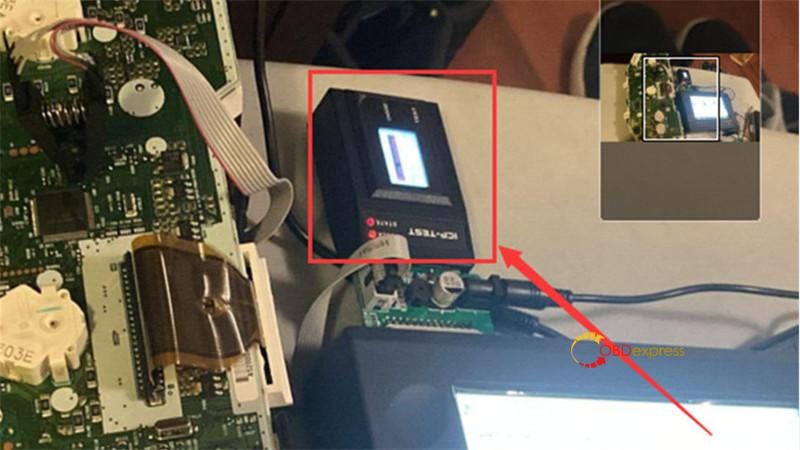
The chip clip is not clamped properly, so the pin detection fails.

Digimaster3 Corrected 2005 Nissan Altima odometer

Please adjust chip clip and press test again.

Follow the video to connect Yanhua solderless adapter, Digimaster iii and instrument correctly.

https://youtu.be/q-7T__Yn9z0

Use power cables to connect Digimaster 3 and solderless adapter

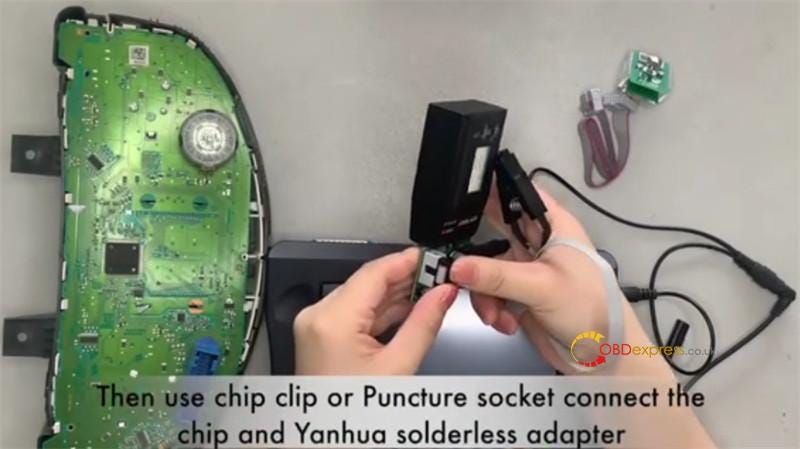
Then use chip clip or Yanhua Puncture Socket connect the chip and Yanhua solderless adapter

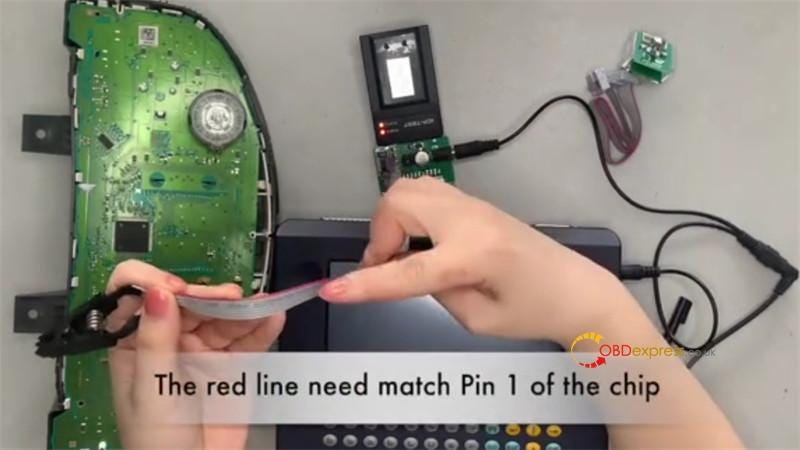
The red line needs to match Pin 1 of the chip

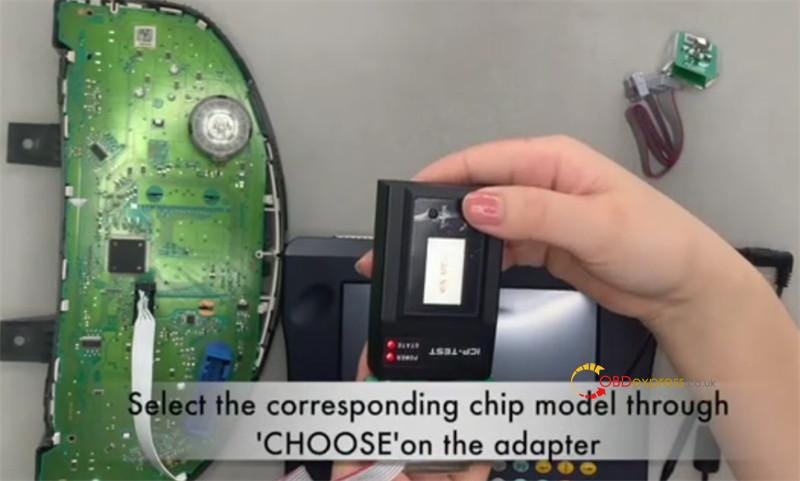
Select the corresponding chip model through 'CHOOSE' on the adapter

When pass the pin detection, connect the adapter and digimaster 3.

Then choose meter system, car brand, car model to change the mileage.

Digimaster3 Corrected 2005 Nissan Altima odometer

Digimaster3 Corrected 2005 Nissan Altima odometer

Digimaster3 Corrected 2005 Nissan Altima odometer 

Yanhua Mini ACDP Puncture Socket correct connection diagram:

Digimaster3 Corrected 2005 Nissan Altima odometer

Tech support: www.obdexpress.co.uk

How to refresh Benz VGS2-NAG2 gearbox with Yanhua Mini ACDP

 Yanhua Mini ACDP + Module 16 can support to refresh Mercedes Benz 722.9 VGS2-NAG2 & VGS3-NAG2 gearbox. This is to show the procedure by refreshing VGS2-NAG2 gearbox as example.

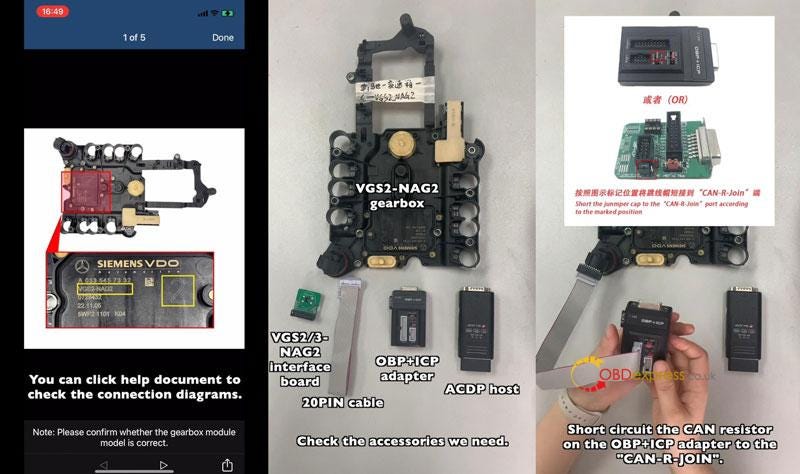
Tips: Users can click "Help" to check connection diagram before operation.

Note: Make sure gearbox model is correct.

Tools Required

VGS2-NAG2 gearbox

VGS2/3-NAG2 interface board

OBP+ICP adapter

ACDP host

20PIN cable

Connection

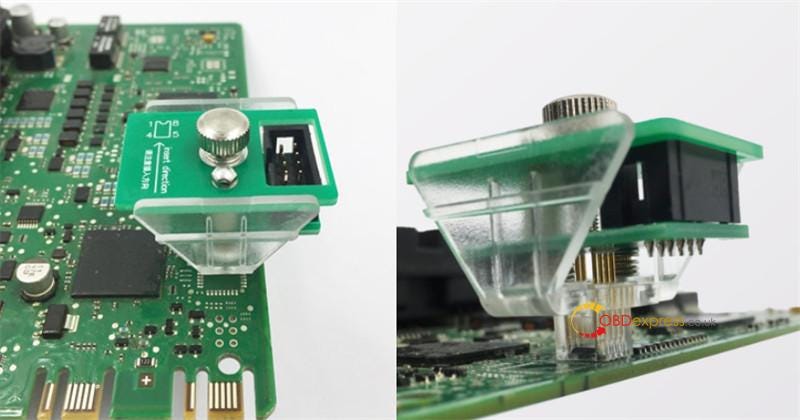
  • Install the interface board.
  • Short circuit the CAN resistor on the OBP+ICP adapter to the "CAN-R Join".
  • Connect all together correctly.
    1. Procedure

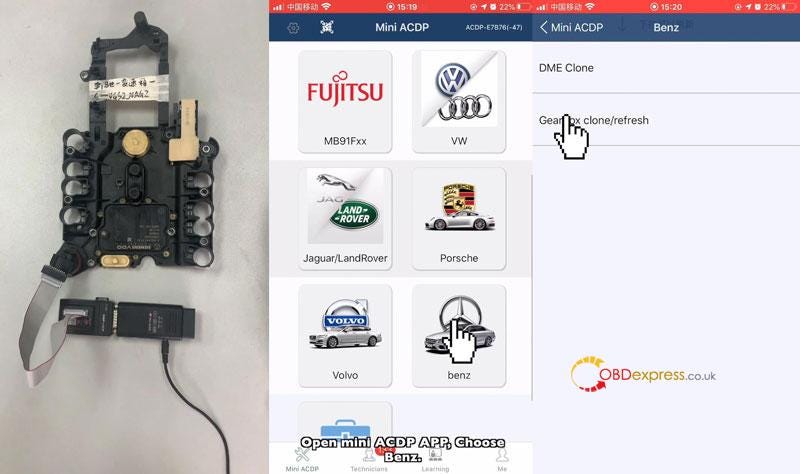
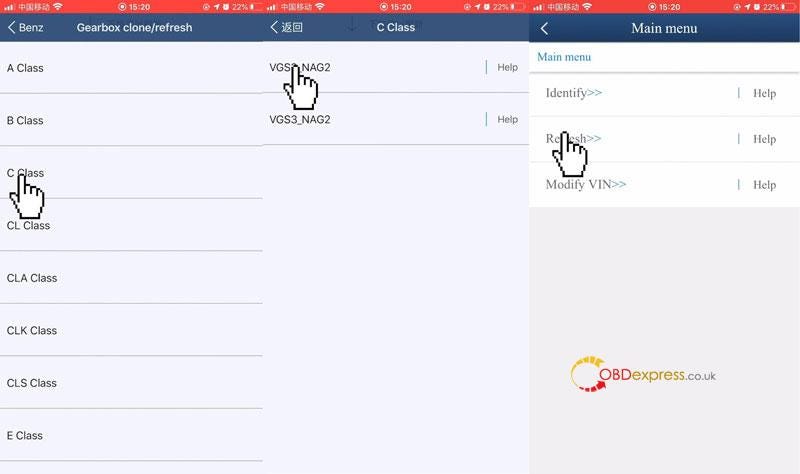
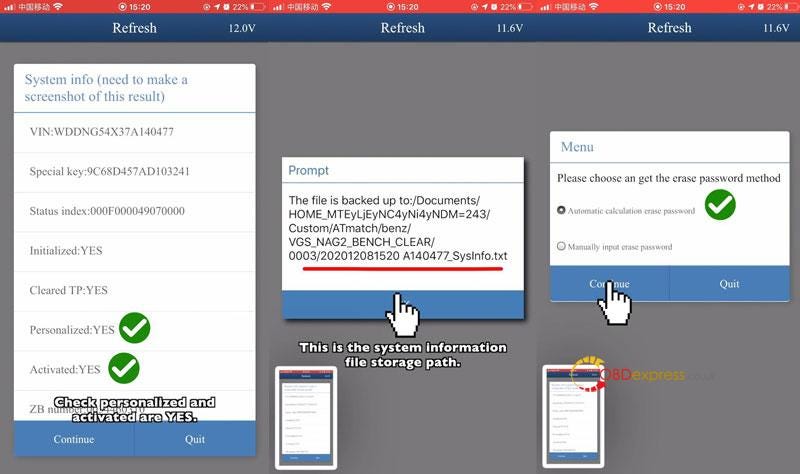
      Mini ACDP >> Benz >> Gearbox clone/refresh >> C class >> VGS2_NAG2 >> Refresh

      Connect ACDP with the gearbox, click "Continue".

      Check "Personalized"&"Activated" are YES. That means the gearbox has not been refreshed.

      Confirm the system info, click "Continue".

      Record the system info file storage path.

      Choose a method to get password:

      automatic calculation erase password/ manually input erase password.

      Click "Continue".

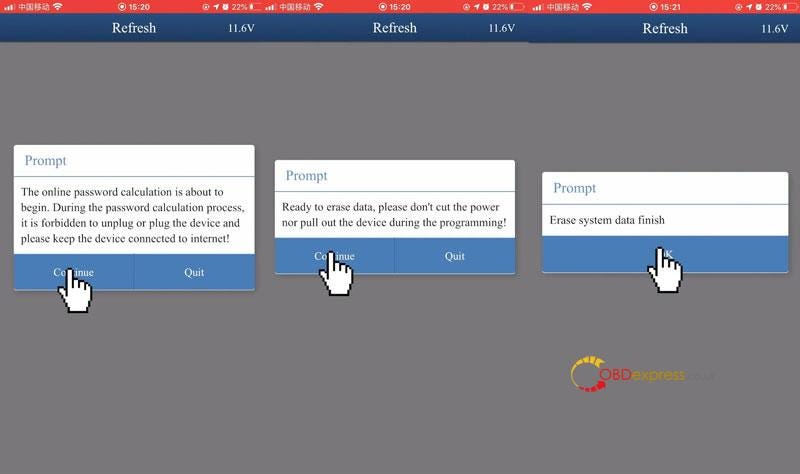
      The online password calculation is about to begin. During the password calculation process, it is forbidden to unplug or plug the device and please keep the device connected to internet!

      Ready to erase data, please don't cut the power nor pull out the device during the programming!

      Erasing system data, please wait…

      Erase system data finish.

      Back up log file.

      refresh Benz VGS2-NAG2 gearbox with Yanhua Mini ACDP

      refresh Benz VGS2-NAG2 gearbox with Yanhua Mini ACDP

      refresh Benz VGS2-NAG2 gearbox with Yanhua Mini ACDP

      refresh Benz VGS2-NAG2 gearbox with Yanhua Mini ACDP

      refresh Benz VGS2-NAG2 gearbox with Yanhua Mini ACDP

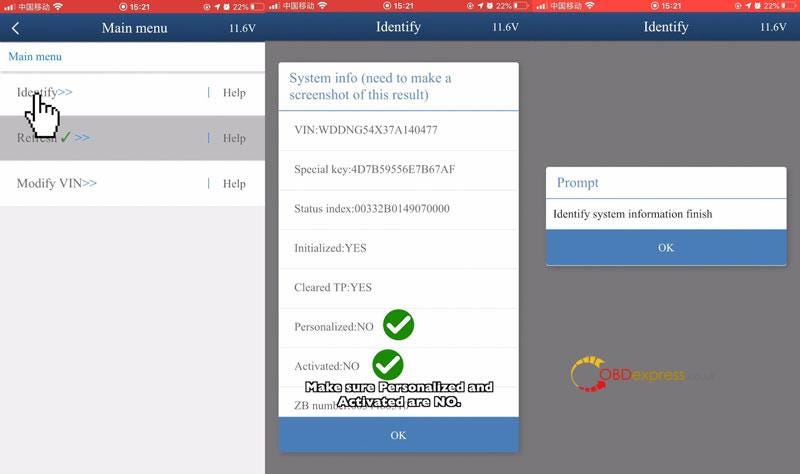
      Identify >> Continue

      Make sure "Personalized"&"Activated" are NO. That means the gearbox data has been erased.

      Identify system info finish.

      Done.

      refresh Benz VGS2-NAG2 gearbox with Yanhua Mini ACDP

      This is how to refresh Mercedes VGS2-NAG2 gearbox with Mini ACDP Master.

      www.obdexpress.co.uk
      Friday, June 17, 2022

      How does Yanhua ACDP do VW & Audi mileage correction?

      Can Yanhua Mini ACDP supports to do VW/Audi gearbox mileage correction? The answer is yes. Only to have A605 License, by working with ACDP Module 13 or Module 21 to easily realize. Supports VW/Audi DQ200(0AM/0CM), DQ250(02E/0D9), DL382(0CK), VL381(0AW) mileage adjustment.

      How to correct VW/Audi gearbox mileage?

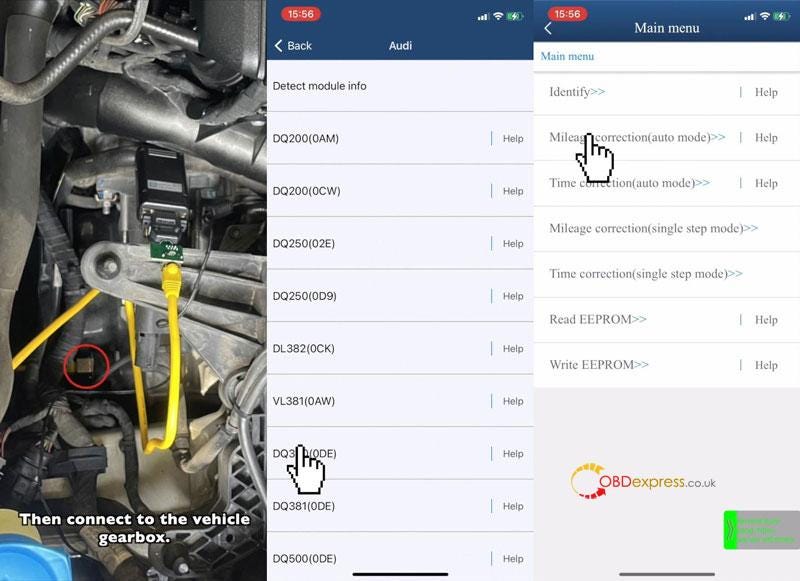
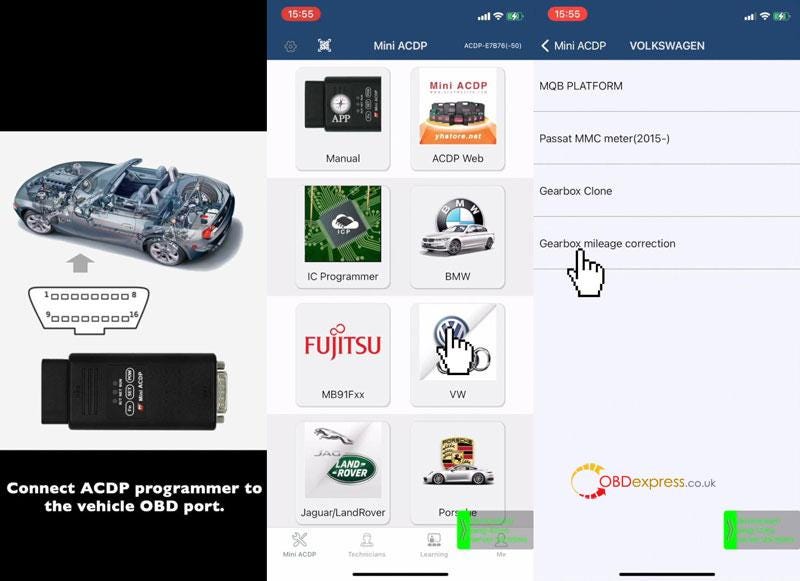
      Connect ACDP programmer to vehicle OBD port.

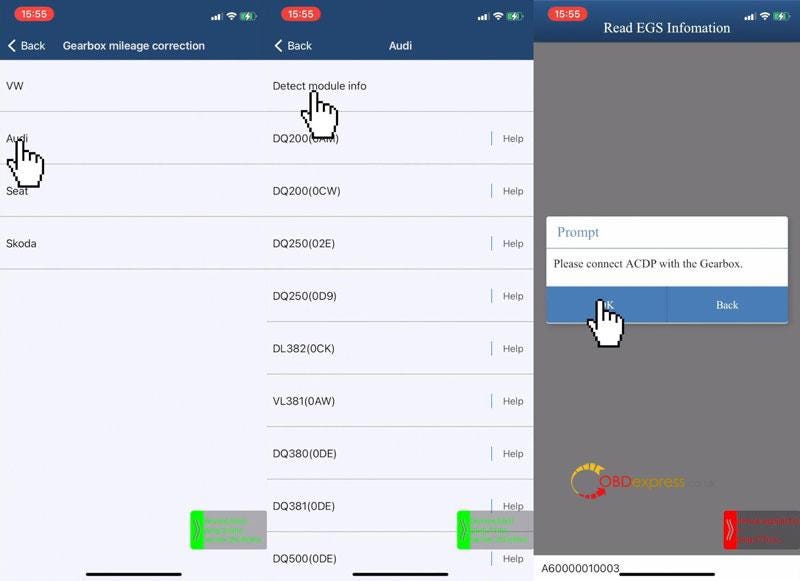
      Mini ACDP>> VW >> Gearbox mileage correction >> Audi >> Detect module info

      Connect ACDP with gearbox, click "OK".

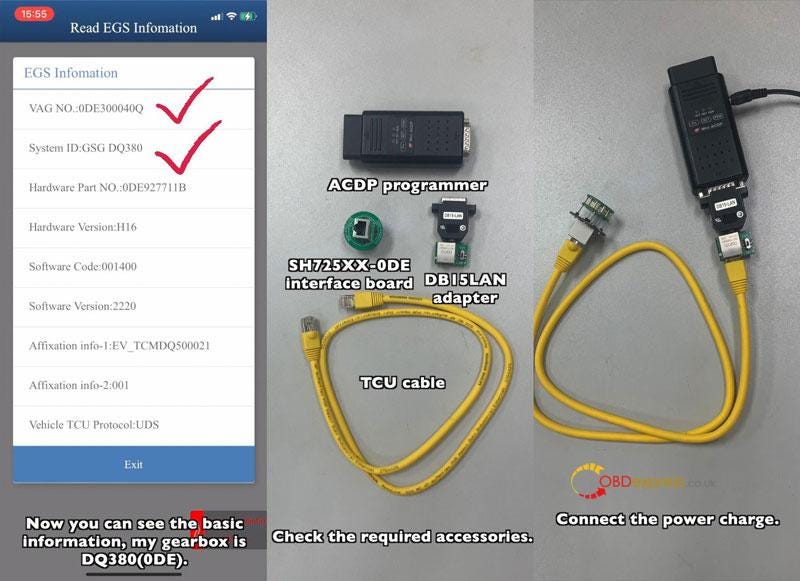
      Check gearbox info, it's DQ380(0DE).

      Required Tools:

      ACDP Programmer

      SH725XX-0DE interface board

      DB15LAN adapter

      TCU cable

    2. Connect the interface board.
    3. Pull DB15LAN adapter's button to the CAN-R side.
    4. Connect the power charge & vehicle gearbox.
      1. Yanhua Mini ACDP Correct VW Audi 0DE Gearbox Mileage

        Yanhua Mini ACDP Correct VW Audi 0DE Gearbox Mileage

        Yanhua Mini ACDP Correct VW Audi 0DE Gearbox Mileage

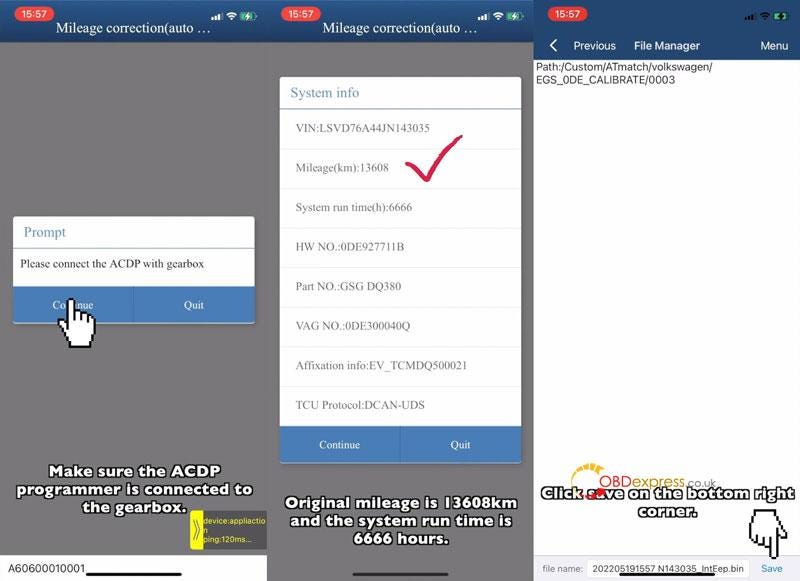
        DQ380(0DE) >> Mileage correction(auto mode) >> Continue

        Check system info, original mileage:13608km

        Click "Continue".

        Save EEPROM data.

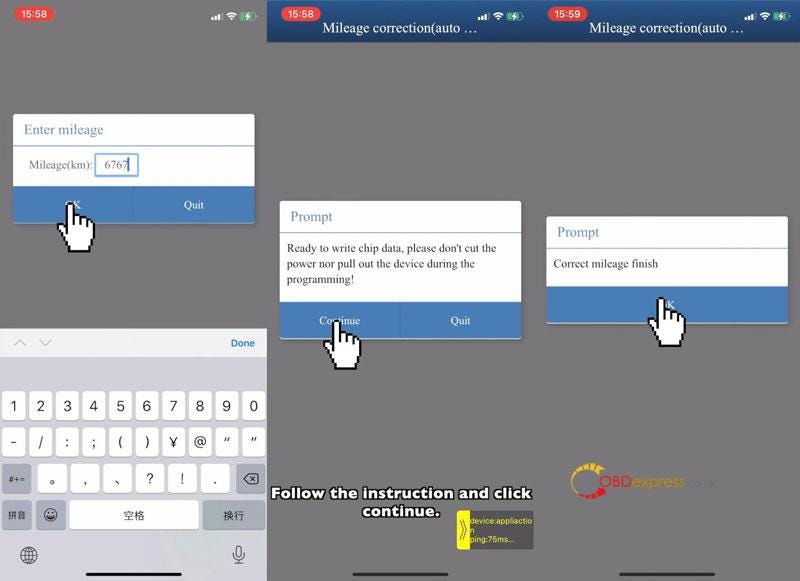
        Enter new mileage: 6767km

        Click "OK".

        Ready to write chip data, please don't cut the power nor pull out the device during the programming!

        Click "Continue".

        Correct mileage finish.

        Yanhua Mini ACDP Correct VW Audi 0DE Gearbox Mileage

        Yanhua Mini ACDP Correct VW Audi 0DE Gearbox Mileage

        Yanhua Mini ACDP Correct VW Audi 0DE Gearbox Mileage

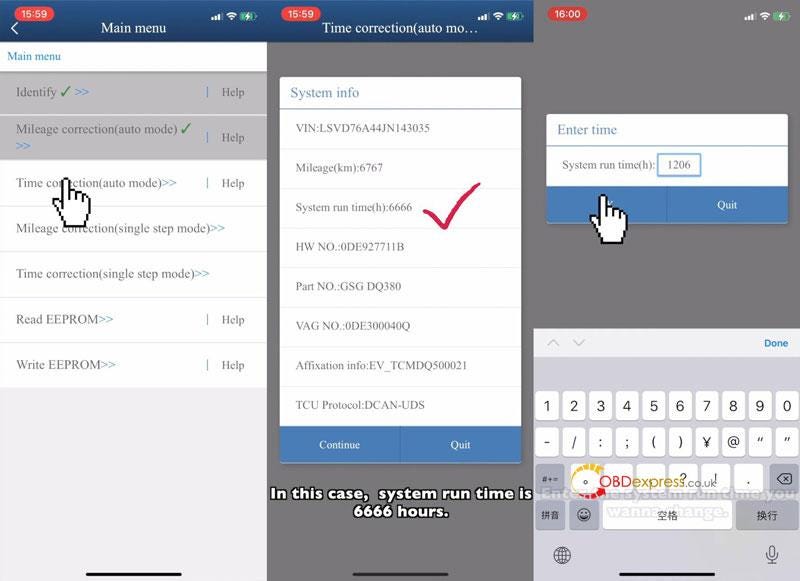
        How to correct system run time?

        Time correction(auto mode) >> Continue

        Check system info, system run time: 6666 hours.

        Click "Continue".

        Save EEPROM data.

        Enter new run time: 1206hours

        OK >> Continue

        Correct time finish.

        Yanhua Mini ACDP Correct VW Audi 0DE Gearbox Mileage

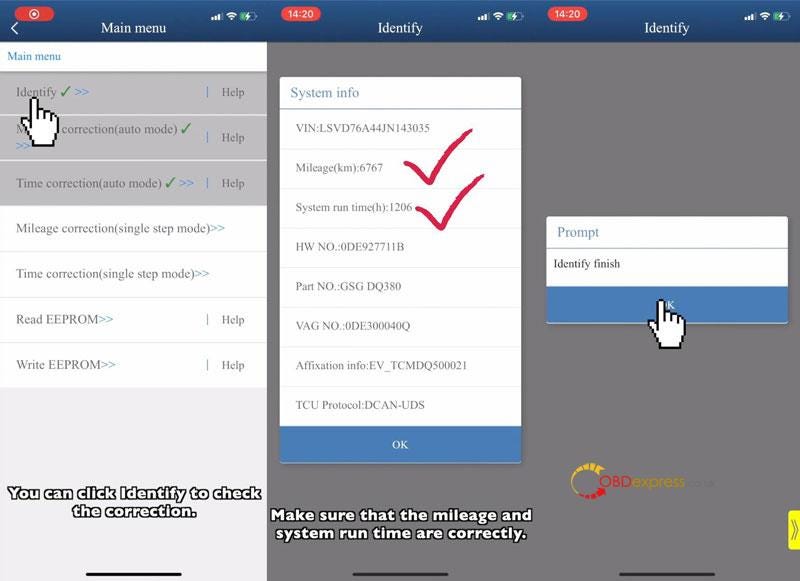
        Check the correction info.

        Identify >> Continue

        System info have been changed:

        Mileage: 6767km, system run time: 1206hours.

        Done.

        Yanhua Mini ACDP Correct VW Audi 0DE Gearbox Mileage

        This is how to do VW/Audi gearbox odometer correction with Yanhua ACDP.

        www.obdexpress.co.uk
        Monday, June 13, 2022

        Can Yanhua tools support 35128 chip?

         Hello everyone, I used Yanhua module 4 to erase the 35128 chip. Will red dots appear when erasing the chip data under normal circumstances?

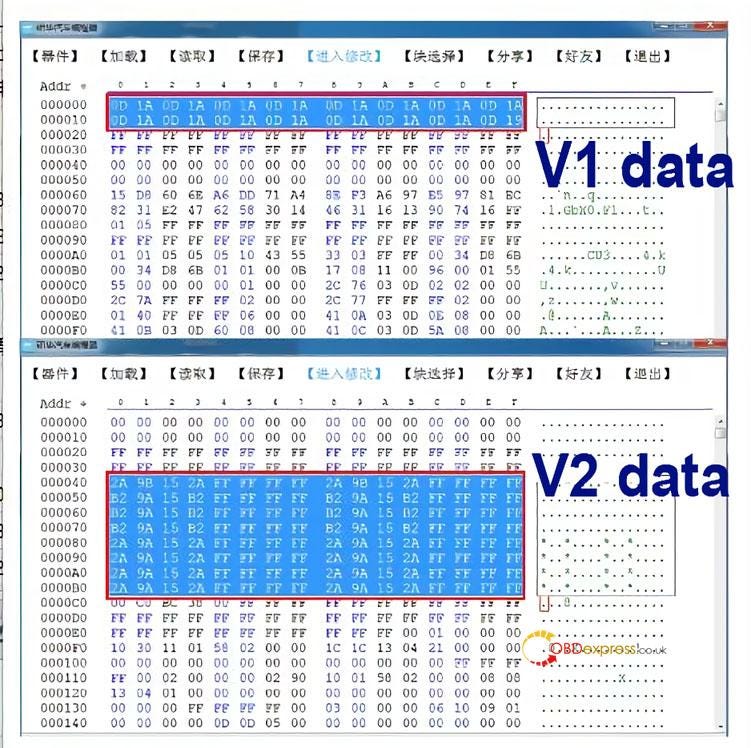
        Yanhua engineer replies: 35128 chip has two kinds of data (V1 and V2)

        Precautions for Yanhua ACDP erasing 35128 chip data

        V2 can directly wipe data without red dots.

        V1 cannot directly erase data, and the analog chip needs to be replaced. Users can use Yanhua 35XX programmer + Simulator to read and modify data with Yanhua Mini ACDP or Digimaster 3.

        Thanks for the reply from the engineer, one more question: I put can file wrong, it jumped back mileage. Then i try make again, but cannot read or write. Can the simulator only change the mileage once?

        Yanhua engineer replied:

        The simulator can modify the mileage many times, but chip soldering is not an easy task. If the chip is soldered many times, the chip is easy to break.

        It is recommended that you check whether there is a problem with the soldering of the chip. If there is no problem, you should consider whether the chip is damaged.

        Technical support: obdexpress.co.uk
        Thursday, May 12, 2022

        How to export data of Yanhua Mini ACDP from IOS?

         This is a guide to explain how to export IOS system Yanhua Mini ACDP data and bind device to PC software.

        How to export ACDP data in IOS system?

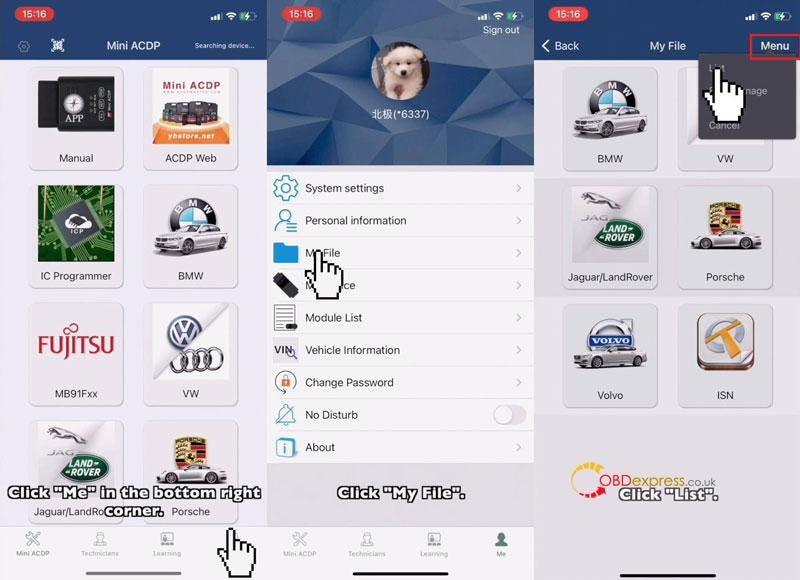
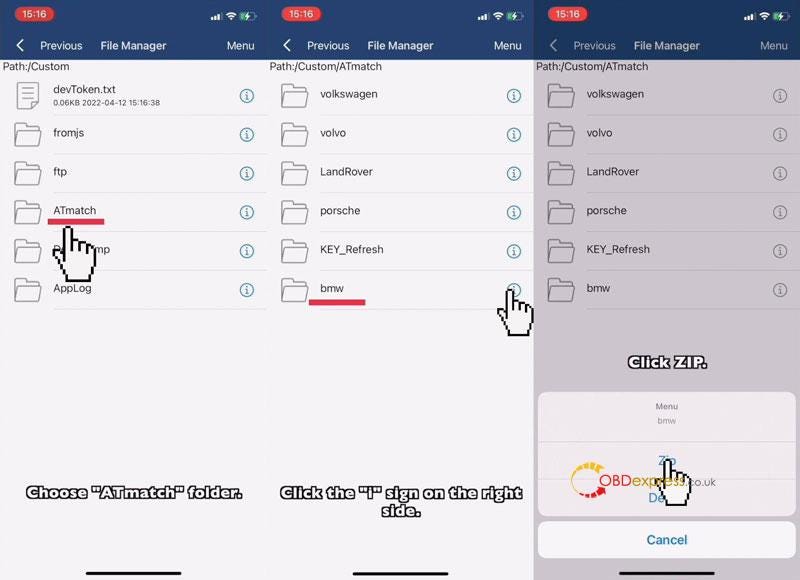
        Mini ACDP >> Me >> My file >> Menu >> List >> ATmatch

        Note: folders need to be compressed before exporting.

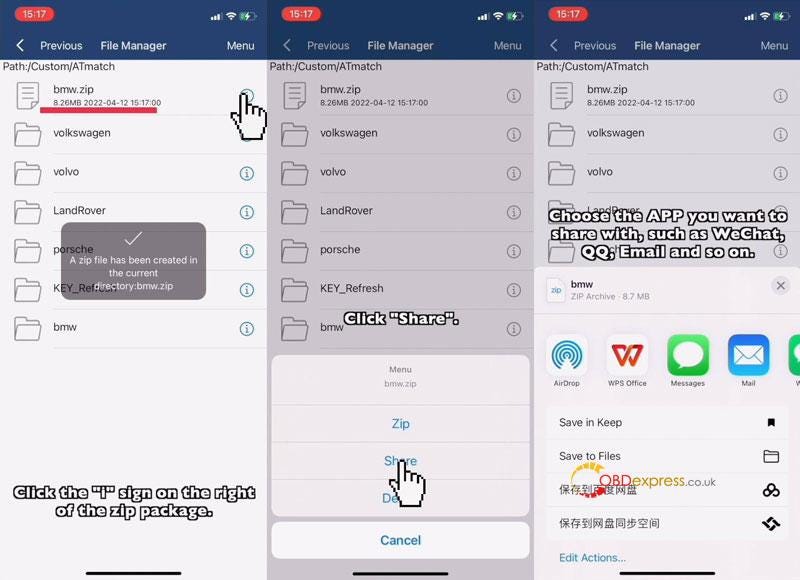
        Select a data file, click "i">> Zip >> Click zip file "i">> Share

        Select the APP you want to share with, such as WhatsApp, Email and so on.

        Now you can export data to anywhere as wanted.

        Yanhua Mini ACDP IOS System Data Export & PC Bind

        Yanhua Mini ACDP IOS System Data Export & PC Bind

        Yanhua Mini ACDP IOS System Data Export & PC Bind

        How to bind Mini ACDP to PC software?

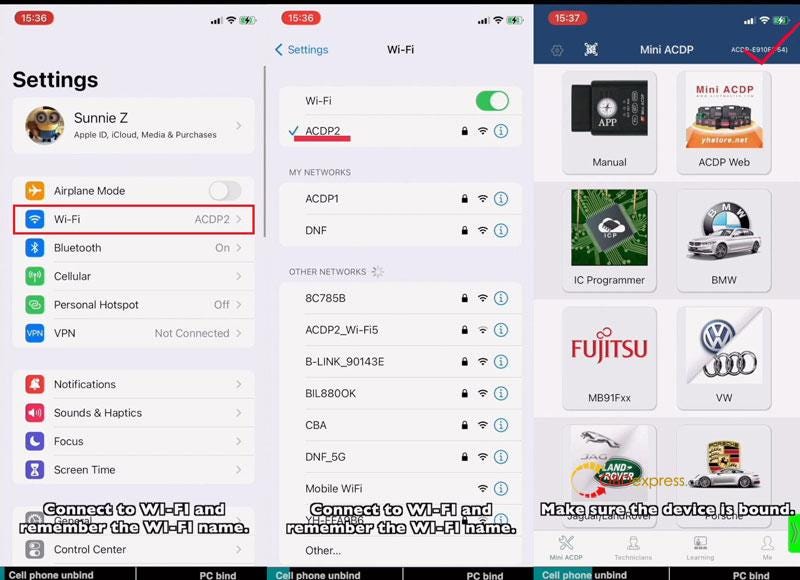
        iPhone Setting:

        Settings >> Wi-Fi

        *Connect to Wi-Fi and remember its name.

        APP Setting

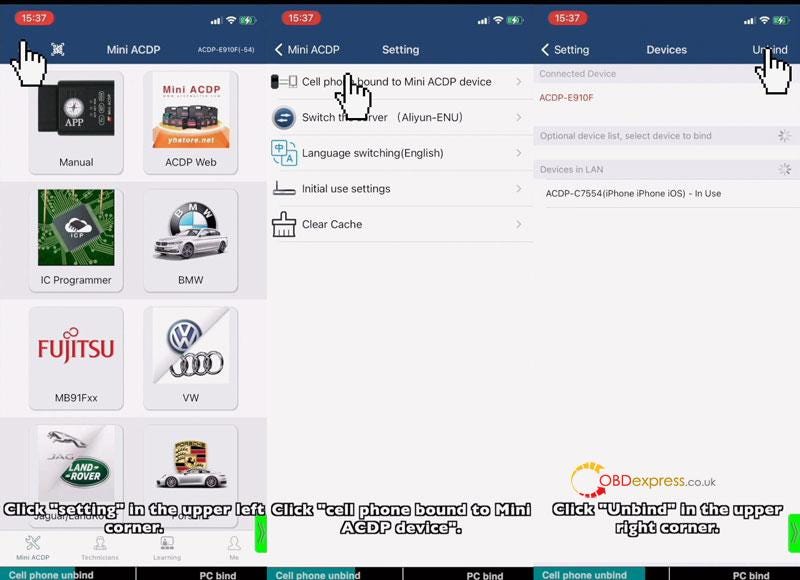
        Step1. Cell Phone Unbind

        Mini ACDP >>Make sure the device is bound(check top right corner)

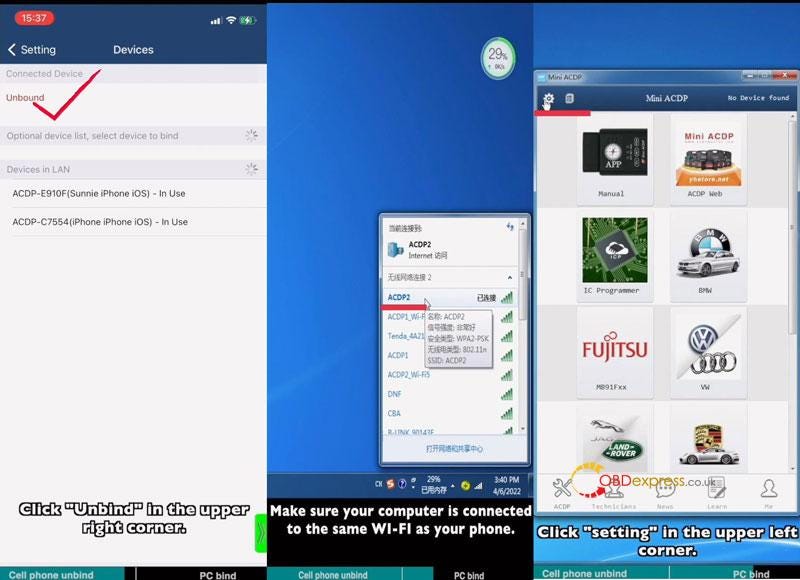
        Setting >> Cell phone bound to Mini ACDP device >> Unbind

        Step2. PC Bind

        Note: make sure your computer is connected to the same Wi-Fi as your phone.

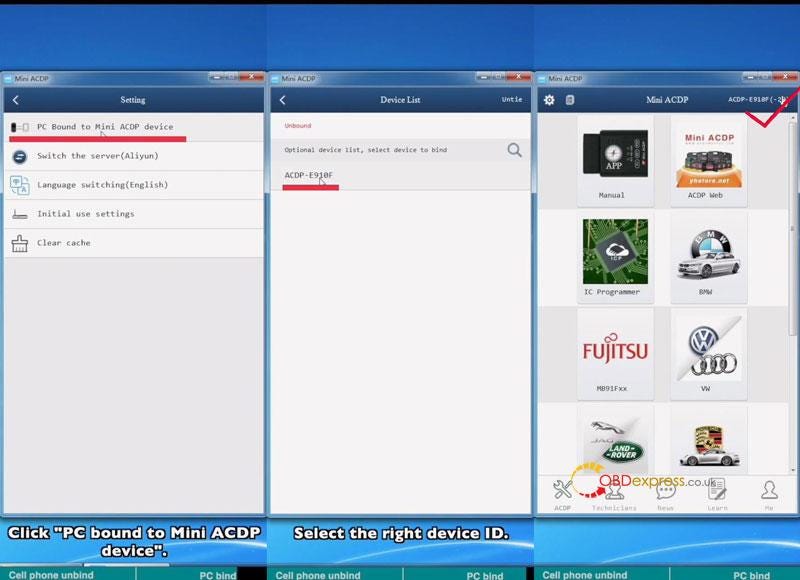
        Start ACDP PC software >> Setting >> PC bound to Mini ACDP device >> Select ACDP ID

        Go back to home page, once device ID was displaying on the top right corner, which means binding success.

        Yanhua Mini ACDP IOS System Data Export & PC Bind

        Yanhua Mini ACDP IOS System Data Export & PC Bind

        Yanhua Mini ACDP IOS System Data Export & PC Bind

        Yanhua Mini ACDP IOS System Data Export & PC Bind

        Read also

        How to connect Yanhua Mini ACDP to IOS iPhone Hotspot?