Thursday, June 11, 2020

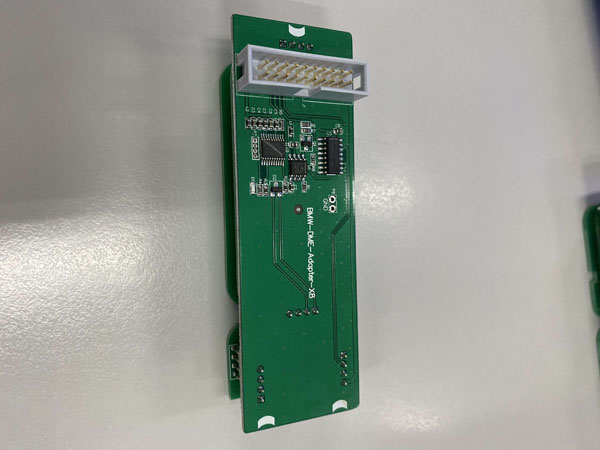
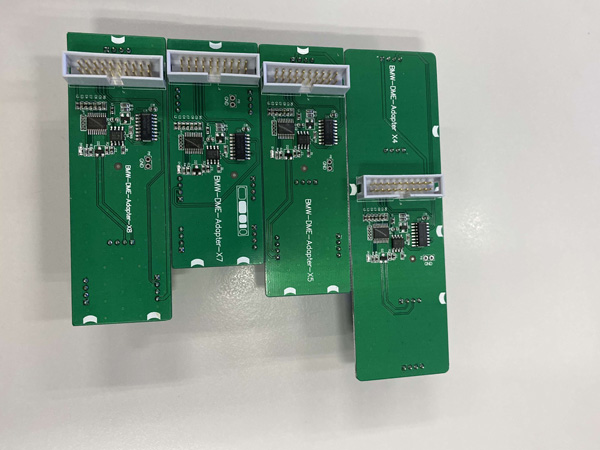
Yanhua Mini #ACDP BMW DME Adapter X5 X7 X4 X8 Interface Board

๐Ÿ“ฃ๐Ÿ“ฃ๐Ÿ“ฃYanhua Mini #ACDP BMW DME Adapter X5 X7 X4 X8 Interface Board is coming
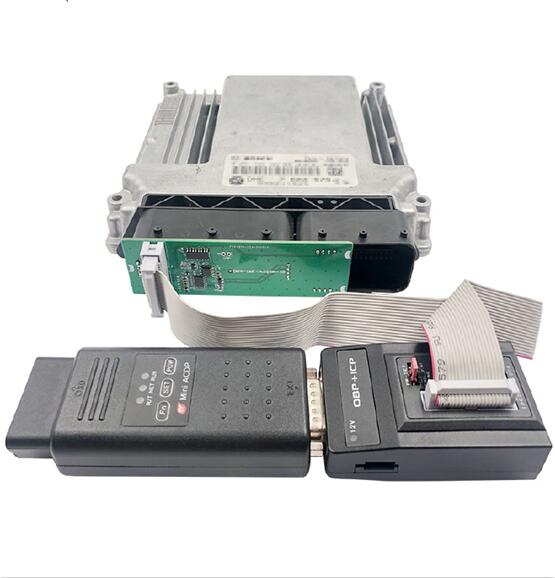
No need to open DME shell, no need to drill hole on DME, no need to plug wire.

๐Ÿ”บX5 X7
https://www.obdexpress.co.uk/wholesale/yanhua-mini-acdp-bmw-x5-x7-dme-interface-board.html

1: Support #BMW E chassis N47 (EDC17C06 ) diesel DME ISN read, write and clone.๐Ÿ‘Œ
2: Support BMW E chassis N57 (EDC17CP09), F chassis N57 (EDC17CP09) diesel DME ISN read, write and clone.๐Ÿ‘Œ

๐Ÿ”บX4 X8
https://www.obdexpress.co.uk/wholesale/yanhua-mini-acdp-x4-x8-interface-board.html
Support BMW #MINI R chassis N12 (MEV172) / N14 (MED172) DME ISN read, write and clone.๐Ÿ‘Œ
Support BMW E chassis N45 (MEV1721) / N46 (MEV1721) DME ISN read, write and clone.๐Ÿ‘Œ 


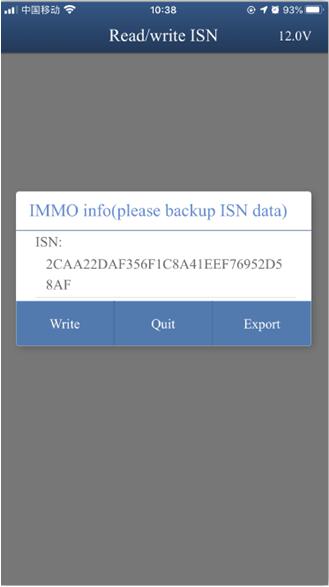
BMW X4 DME ISN Read / Write 
ACDP BMW X4 DME ISN Read / Write

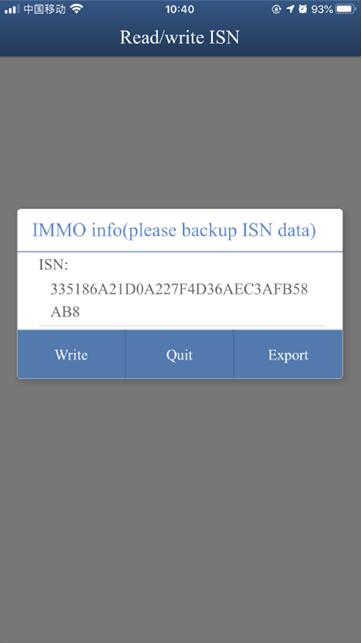
BMW X8 DME ISN Read / Write 
ACDP BMW X8 DME ISN Read / Write


Yanhua Mini ACDP BMW DME X8 Display
ACDP BMW X8

Yanhua Mini ACDP BMW DME X4 X5 X7 X8 Display
Yanhua Mini ACDP BMW DME X4 X5 X7 X8 Display

Tuesday, June 9, 2020

YANHUA New Arrival!BMW F/G chassis odometer wiring harness

YANHUA TECH BMW F/G chassis odometer wiring harness

Good helper of resetting odometer

YANHUA BMW F/G  odometer wiring harness  Function:
Use BMW F/G chassis odometer wiring harness connects the odometer  and power the wiring harness. Press the wake-up button which is locat­ed in the lower left corner of the odometer to light up the instrument and check the mileage.

Operation skills:
If resetting odometer needs to replace simulate chips and install filter, reset the simulate chips first, and then use BMW F/G chassis odometer wiring harness light up the odometer, to ensure odometer resetting is success, and then install filter. Use BMW F/G chassis odometer wiring harness light up odometer after the filter is installed, and then install odometer back to the car after confirm it shows normal. After the odometer which needs to replaced simulator chip or installed filter been reset and installed back to the car, this operation method can avoid problems such as odometer screen go blank or could not lighted up or shows red dot.

you can get Best price  here:
https://www.obdexpress.co.uk/wholesale/yanhua-bmw-f-g-odometer-wiring-harness.html

Tuesday, May 19, 2020

Yanhua ACDP BMW Full Reviews

Please read these Yanhua ACDP Full Auth reviews, after that you will have idea if it is worth to have.


@ droidwayne65 review

It's worked fine for me so far but I use it only for EGS stuff.


@ PixelsFixed

Well I've used it for:-
CAS3+ reading and writing flash and eeprom. Excellent
FEM/BDC spare keys. Spot on.
Cas4 AKL and spare keys. Spot on.
Locked JLR KVM. Spot on.
FRM Repairs. Again, spot on.

It's becoming one of my favorite tools.


@ Jimmy07

Done a few CAS3+ and 16 Jag XF with no issues
I never buy Chinese tools direct from China. Yes you will pay more buying from a local supplier but you have some support and can return the tool if it breaks.


also CAS4/4+ no issues


@DayvG

I bought one purely as it was cheap, I needed something for my Comfort Access retrofit that could make keys and read the CAS. This was £300ish and does everything I need. It makes keys flawlessly on CAS4 over OBD. I know it's not the most expensive but keys over OBD is a great option!


Update:

I bought an ACDP mini purely to create new CAS4 keys for my F10 and to clone my CAS4 for a comfort access retrofit. CAS clone worked great and was successful in adding new keys to donor CAS after cloning as well as original keys working ok. Reading CAS4 via ICP working first time every time and I have had no failures or errors. The issue with my method was that cloning the original CAS4 also copied the HWAP which rendered the Comfort Access aspects of the donor CAS inoperable. The solution was given by a friend who decrypted the CAS using a different tool, I think Autohex. I still had to provide the DME ISN for him from ACDP in order to decrypt the CAS data.

ACDP has some usable functions but its certainly not a professional tool. I don't use the mobile interface, I use the PC software.


@willisodhiambo

True, ACDP is one of the best tools. No soldering and does what it needs to for key making and icp reading of cas.
Explorer is the most cumbersome (you need keytag tool, Ecu explorer needs that you open dme's e.t.c) but one of the best all round tool, Autohex makes things as easy as can be and also one of the best all round.


@MarioIL

I have the newest one my ACDP is only 2 months old. bought FULL BMW ACDP PACKAGE.

CAS3-4 keys no problem with ACDP icp mode of course
FRM repair also works good


Update:

I used ACDP  for few keys and coping f series ecus had no issues with that,
tried bdc for key programming wouldn't connect to bdc via adapter
need more testing but so far for keys on cas4/3 it works good.


Update:

Just did CAS4  KR55WK49663 key yesterday worked like a charm, I need to test it on fem and bdc but CAS never had any issues. I also use it from iPhone


To be upgrading...


http://blog.obdexpress.co.uk/2020/05/19/yanhua-acdp-bmw-full-reviews/
Thursday, April 16, 2020

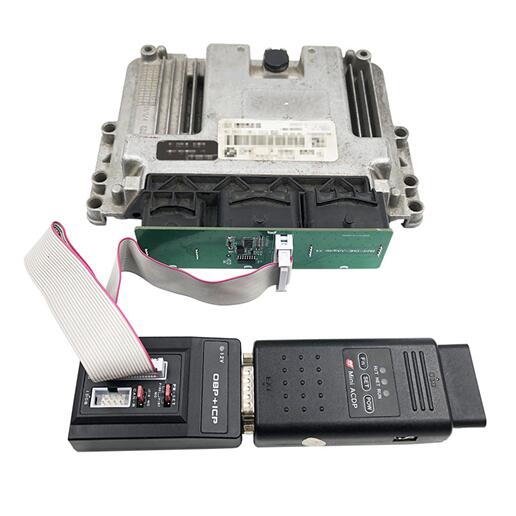
How to use Yanhua ACDP to renew BMW CAS2?

Question: Hey on BMW cas 2 to write data can I solder directly to the board since I don’t have adapter?
My purpose is to renew cas.
Look the image 1 of ACDP option and the pinout:
Yanhua Acdp Renew Bmw Cas2 01
Yanhua Acdp Renew Bmw Cas2 02

Yanhua ACDP chief engineer replied:
You can read the CAS2 data by inserting ACDP MINI to the car’s OBD2 port.
If the CAS2 is dismantled, please buy one extra ACDP module 1 inside there is one BDM-ICP adapter, use it to read out the CAS2 data and to renew.

Image 3: yanhua mini acdp module 1
Yanhua Acdp Renew Bmw Cas2 03

Image 4: BDM-ICP adapter
Yanhua Acdp Renew Bmw Cas2 04

Source:http://blog.obdexpress.co.uk/2020/04/16/how-to-use-yanhua-acdp-to-renew-bmw-cas2/

Wednesday, March 25, 2020

How to use YANHUA Single Probe Solderless Connector ?

Yanhua New arrival! Single Probe Solderless Connector.
No soldering, No risk!
How connect Single Probe Solderless Connector with the ECU?
1.video demo:

2.Step-by-step:
Step 1. Fix the chip.
How To Connect Singe Probe Soldering With ECU 1

Step 2. Fix and straighten the flexible arm.
Yanhua Single Probe Solderless Connector 04
Step 3. Align and prick the probe at the test point.
Use the PCB probe board to align the through -hole test point or solder pad test point.
How To Connect Singe Probe Soldering With ECU 3
Step 4. Press the PCB probe board with flexible arm.
Note that the angle between the flexible arm and the PCB probe board should be kept at 90°.
Yanhua Single Probe Solderless Connector 06
Step 5. Check the contact point and the probe compression.
Adjust the inclination of flexible arm according to the length of the probe compression.
Yanhua Single Probe Solderless Connector 07
Yanhua Single Probe Solderless Connector 01

What it can do:
  1. Provide solderless connecting during in-circuit programming (ICP) testing.
  2. Connect the Boot point when opening DME shell to read ISN code.

Compatible devices:
The other devices: Yes
Yanhua Single Probe Solderless Connector 02
(Image: How connecting with manhua ACDP)

3 Pros of single probe solderless connector:
  1. Excellent versatility: compared with the traditional ECU worktable, it is compact in size, easy to carry, has multiple fixing modes, more suitable for outdoor or indoor work.

  1. Simple and high efficiency operation: the connection can be simply completed by pulling and pressing.

  1. Modular design: free switch among single point connection, multi-point connection and combination connection.


Yanhua Single Probe Solderless Connector  best price offers here:

Thursday, December 26, 2019

BMW CAS4 mileage reset via OBD with MINI ACDP

Purpose: BMW CAS4 mileage reset via OBD.
Need:
Yanhua ACDP basic unit + CAS4 module 1
M35xx eeprom adapter
Bmw Cas4 Mileage Reset With Yanhua Acdp 00
CAS4 mileage reset method: via OBD
Bmw Cas4 Mileage Reset With Yanhua Acdp 01

Procedure:
Part 1: mileage reset in CAS4.
Part 2: modify mileage in dashboard (required)
If only reset mileage in CAS4, not the dashboard, when you start the car, the mileage will restore to the old value.

Part 1: mileage reset in CAS4
Mini ACDP software selection
On the home menu, select "BMW".
Bmw Cas4 Mileage Reset With Yanhua Acdp 02

CAS1-4
Bmw Cas4 Mileage Reset With Yanhua Acdp 03

CAS4 /CAS4+
Bmw Cas4 Mileage Reset With Yanhua Acdp 04

OBD mode.
Bmw Cas4 Mileage Reset With Yanhua Acdp 05

IMMO / Mileage.
Bmw Cas4 Mileage Reset With Yanhua Acdp 06
Reset Mileage.
Bmw Cas4 Mileage Reset With Yanhua Acdp 07

The left job is easy, just follow the Mini ACDP on-screen instruction to complete.

Part 2: modify mileage in dashboard.
How to: Dismantle the BMW dashboard, remove the M35XX chip to read the old mileage value, then write new value.

Click on "M35XX".
Bmw Cas4 Mileage Reset With Yanhua Acdp 08

The following list are dashboard chip types:
M35080
M35080 V6 / VP
080DOWQ
080DOWT
160DOWQ
160DOWT
M35128
Bmw Cas4 Mileage Reset With Yanhua Acdp 09

Here are function menu:
Backup data
Recover data
Modify mileage
Open HEX Editor
Bmw Cas4 Mileage Reset With Yanhua Acdp 10

For the newest BMW with 35160WT dashboard, it requires Simulator to reset the mileage.
Bmw Cas4 Mileage Reset With Yanhua Acdp 11
Source of Yanhua YH35XX Programmer+ Simulator:
http://www.obdexpress.co.uk/wholesale/yanhua-yh35xx-programmer-simulator-35128wt.html

Enjoy
 Source:http://blog.obdexpress.co.uk/2019/12/26/bmw-cas4-mileage-reset-via-obd-with-yanhua-acdp/

BMW FEM BDC mileage reset on Bench with Yanhua MINI acdp


Confirmed: BMW FEM BDC mileage reset can be done on Bench with Yanhua acdp.

Need:
Yanhua mini acdp
FEM/BDC Module Adapter + authorization (module2)
M35xx eeprom adapter
Bmw Fem Bdc Mileage Reset With Yanhua Acdp 00

Mileage reset method: via Bench

Procedure:
Part 1: Mileage reset in FEM BDC
Part 2: modify mileage in dashboard (required)
*** If only reset mileage in FEM BDC, not the dashboard, when you start the car, the mileage will restore to the old value.

Part 1: Mileage reset in FEM BDC
1). Hardware connection
FEM/BDC is located at the lower part of the A column at the front passenger side.
Bmw Fem Bdc Mileage Reset With Yanhua Acdp 01

FEM diagram
Bmw Fem Bdc Mileage Reset With Yanhua Acdp 02 Bmw Fem Bdc Mileage Reset With Yanhua Acdp 03

BDC diagram.
Bmw Fem Bdc Mileage Reset With Yanhua Acdp 04
Bmw Fem Bdc Mileage Reset With Yanhua Acdp 05

2). Software menu selection
Click on "BMW".

Bmw Fem Bdc Mileage Reset With Yanhua Acdp 06
Click on "FEM /BDC".
Bmw Fem Bdc Mileage Reset With Yanhua Acdp 07

IMMO / Mileage.
Bmw Fem Bdc Mileage Reset With Yanhua Acdp 08

Reset mileage.
Bmw Fem Bdc Mileage Reset With Yanhua Acdp 09 Bmw Fem Bdc Mileage Reset With Yanhua Acdp 10


Part 2: modify mileage in dashboard.
How to: Dismantle the BMW dashboard, remove the M35XX chip to read the old mileage value, then write new value.

Click on "M35XX".
Bmw Fem Bdc Mileage Reset With Yanhua Acdp 11

The following list are dashboard chip types:
M35080
M35080 V6 / VP
080DOWQ
080DOWT
160DOWQ
160DOWT
M35128
Bmw Fem Bdc Mileage Reset With Yanhua Acdp 12

Here are function menu:
Backup data
Recover data
Modify mileage
Open HEX Editor
Bmw Fem Bdc Mileage Reset With Yanhua Acdp 13

For the newest BMW with 35160WT dashboard, it requires Simulator to reset the mileage.
Bmw Fem Bdc Mileage Reset With Yanhua Acdp 14
Source of Yanhua YH35XX Programmer+ Simulator:
http://www.obdexpress.co.uk/wholesale/yanhua-yh35xx-programmer-simulator-35128wt.html

Enjoy


Source:http://www.mileageprogrammer.com/bmw-fem-bdc-mileage-reset-on-bench-with-yanhua-acdp/